Conditional Policy
This document isBased on the items actually set in the admin pageto each setting iswhat meaning it has and how it is reflected in policieswill be explained together.
1. Conditional Policy List Page
Page Overview
- Path:SHIELD DRM Admin Page > Conditional Policies > DS for Mobile
- Main screen for managing registered conditional policies
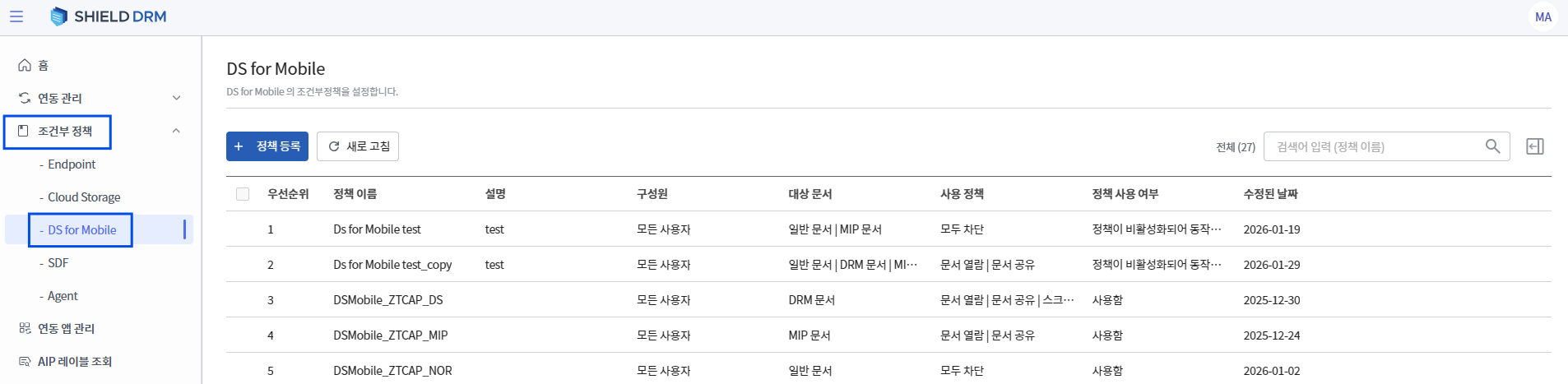
Information available in the policy list
- Policy Name
- Members
- Target Document Type
- Applicable Enforcement Policy
- Policy Description
- Modification Date
- Policy Usage Status
Each policy in the list isPolicy units applicable in actual mobile appsand, when multiple policies existPriorityIt is applied according to.
2. Conditional Policy Registration – Basic Information
Policy Name / Description
- Name and description for identifying policies
- It is recommended to clearly write operational scenarios (e.g., for internal viewing, for external blocking, etc.).
Members
-
Define the user scope to which the policy will apply
-
Selection Options
- All users
- Specific user or group
-
Exclusion settings for specific users/groups are possible.
3. Target Document Settings
The target document isSet independently by document typeand conditional policies are evaluated only for the selected document type.
3.1 General Document
- General documents refer to files that are not protected by DRM or MIP.
Selection Options
- Not applicable
- All General Documents
- File Extension Specification
- When specifying the extension,Only for the selected extensionThe policy will be applied.
- Unsupported extensions are not subject to policy.
3.2 DRM Document
- DRM document isDS policy is applied in advanceIt is possible.
Selection Options
- Not applicable
- All DRM Documents
- Designated DRM Document
3.3 MIP Document
- MIP document is a document that has Microsoft Information Protection labels applied.
Selection Options
- Not applicable
- All MIP documents
- Designated MIP Document
-
When selecting the designated MIP document:
-
Document extension
-
MIP Label\
is used as a condition together with.
-
4. Setting Conditions
Setting Conditions isConditions under which the policy is actually implementedSets.
4.1 Time Conditions
- No time limit
→ Apply policy at all times - Specify Application Time
→ Apply policy only during the specified time interval - Specify Exclusion Time
→ Policy not applied at specific times
time condition isUser Action Timing 기준is evaluated as.
5. Execution Policy Settings (Usage Policy)
5.1 Document Viewing
- Document Viewing Allow/Deny Settings
- When blocked:
- The document list is visible, but
- Display Block Message on Viewing
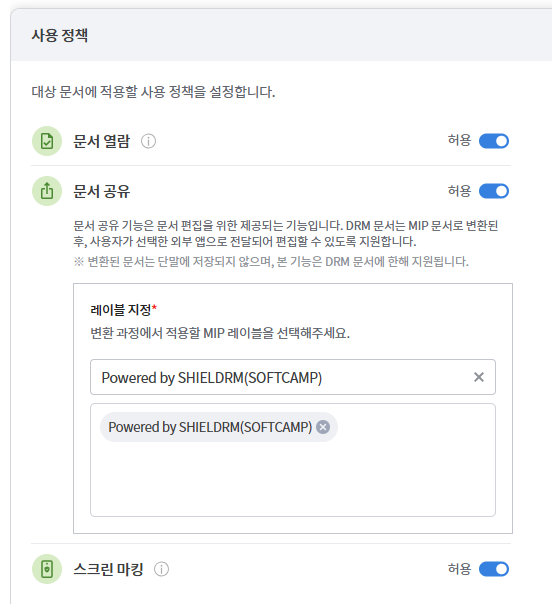
5.2 Document Sharing
- The document sharing feature is a function provided for document editing. DRM documents are converted to MIP documents and then delivered to the external app selected by the user for editing.
- Settings for DRM
- Download option disabled when only general documents or MIP documents are selected.
- When sharing DRM or regular documents:
- The document is not stored on the device.
- For external editing app integrationConvert to MIP document
- In this case, apply during conversionMIP label assignment is requiredis.
5.3 Screen Marking
-
Setting Watermark Application When Viewing Documents
-
Marking based on user identification information
6. Policy Settings
- Policy Usage Setting
- Disabled policies are excluded from the evaluation.
- When setting the policy validity period:
- Automatic deactivation possible after the specified period