SKMS Service
SKMS (SOFTCAMP Key Management System) is a backend service that processes identification information of SDF security documents and manages security policies. In this screen, you specify the server to be linked when building the Edge environment and set the MIP label assignment method.
Left Menu설정 > SKMS 서비스Entering from.
1. Screen Configuration
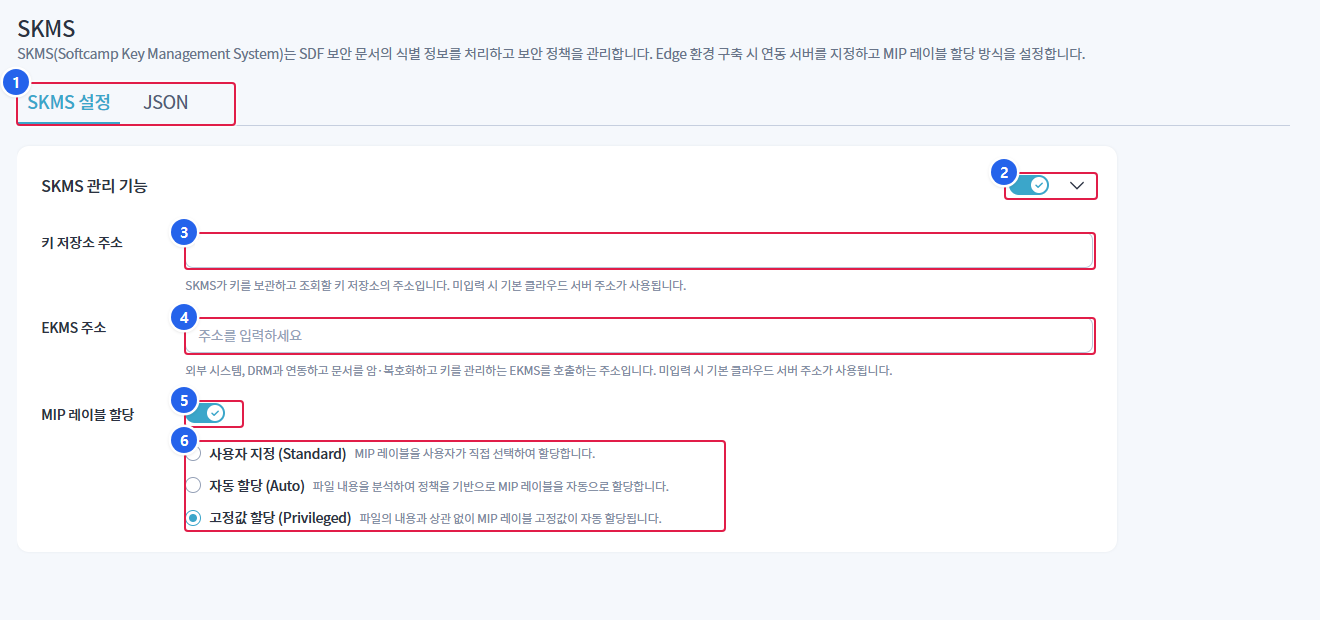
1. Tab
SKMS 설정is in itemized form,JSONedits the entire policy directly in JSON.
2. SKMS Management Features
- Toggle the usage of all management features. Use the right arrow to collapse or expand the settings area.
3. Key Store Address
- SKMS is the address of the key store that stores and retrieves the keys.
4. EKMS Address
- This is the address that calls the EKMS, which encrypts and decrypts documents and manages keys.
5. MIP Label Assignment
- Toggle the use of the MIP label assignment feature.
6. Allocation Method
- Choose one of the three ways to assign MIP labels.
2. Settings Items
| item | Explanation | if not entered |
|---|---|---|
| Key repository address | The address of the key storage where SKMS stores and retrieves keys. | Using the default cloud server address |
| EKMS Address | EKMS call address for encrypting and decrypting documents and managing keys in conjunction with external systems and DRM | Using the default cloud server address |
| MIP Label Assignment | Setting MIP Label Assignment Method | - |
The key storage address and EKMS address are entered when directly specifying the integration server in the Edge environment (where the server is located within the customer's premises).
3. MIP Label Assignment Method
| method | Explanation |
|---|---|
| Custom (Standard) | The user selects and assigns the MIP label. |
| Auto Assignment (Auto) | Analyzes the file content and automatically assigns MIP labels based on policies. |
| Fixed Value Assignment (Privileged) | Regardless of the content of the file, the MIP label fixed value is automatically assigned. |
Disabling the MIP label assignment toggle will not apply the assignment method selection options.
4. Save
| method | Procedure |
|---|---|
| form | After entering the item, at the bottom저장 |
| JSON | Save after modifying JSON text (validate JSON format upon saving) |
- If there are no changed values
저장The button is displayed in a disabled state. - storage
SkmsBuiltinPermission is required. - If there is a JSON format error, it will not be saved and an error message will be displayed.