8) Azure App 등록 가이드
SDF 앱 등록
1. 개요
Security365 공통 앱을 사용하지 않는 회사의 경우, SDF 서비스에서 사용할 Azure 앱을 별도로 등록합니다.
2. 앱 등록
2.1 Azure Portal 로그인
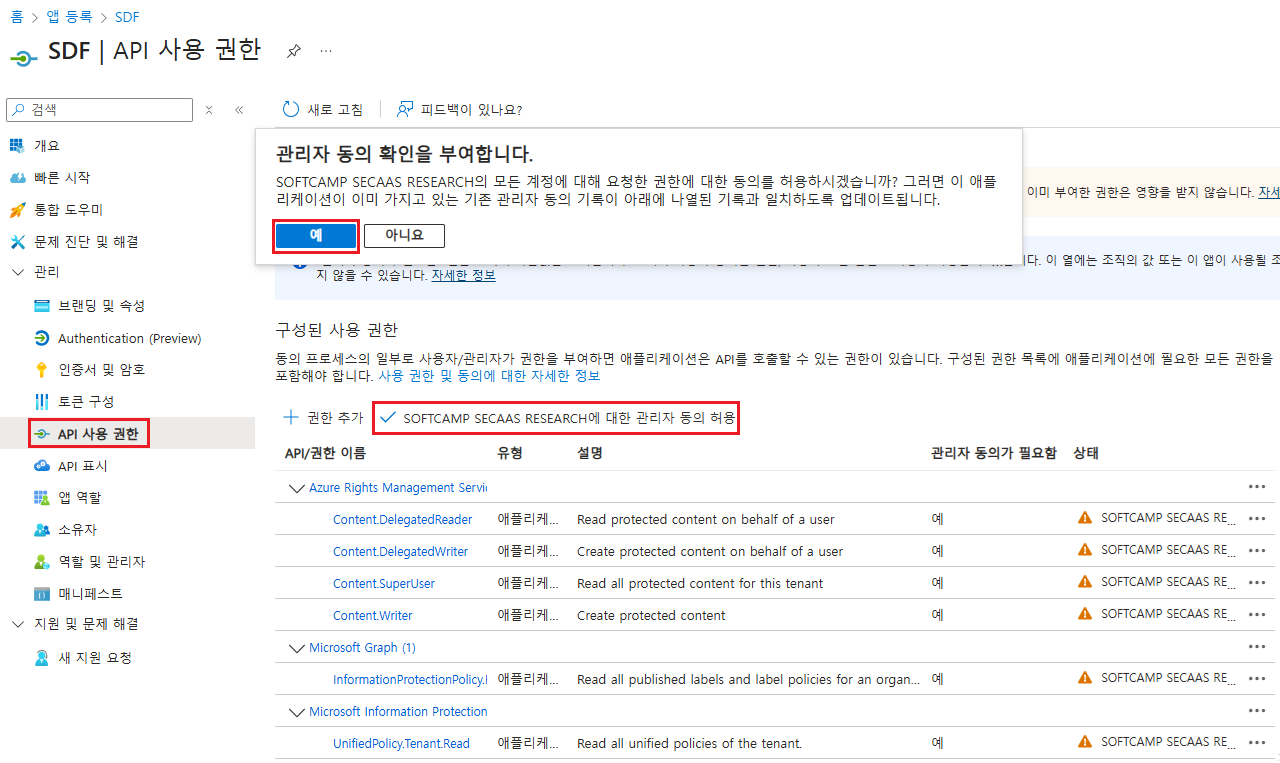
- Azure Portal에 관리자 계정으로 로그인합니다.
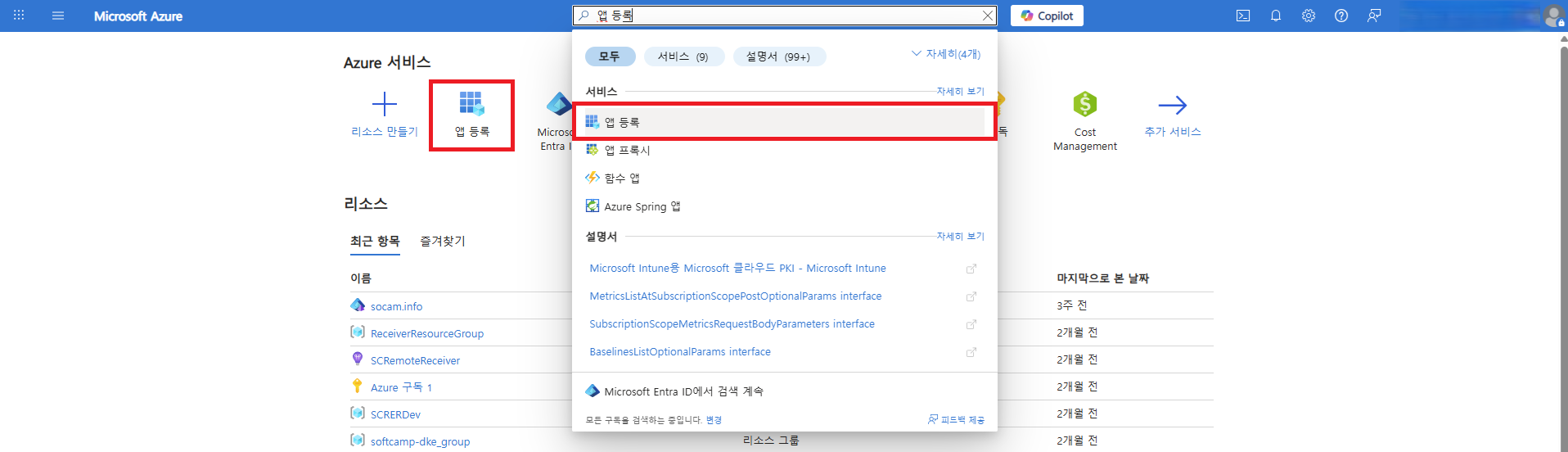
- 앱 등록 메뉴를 선택하고, 새 등록 버튼을 통해 애플리케이션 등록 페이지로 이동합니다.
2.2 앱 등록 정보
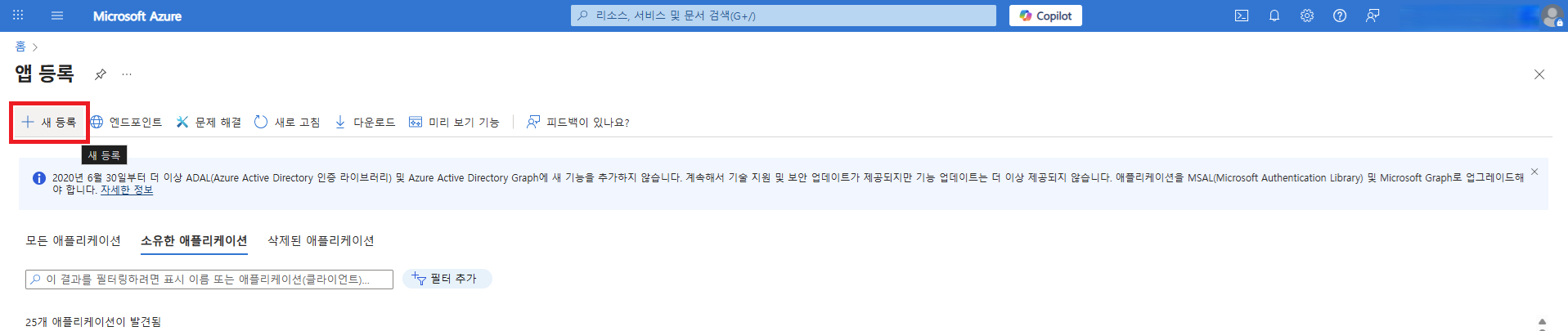
- 이름 : SDF
- 계정 유형 : 다중 테넌트
- 등록 버튼을 클릭하여 애플리케이션을 등록합니다.
2.3 앱 ID 정보 확인
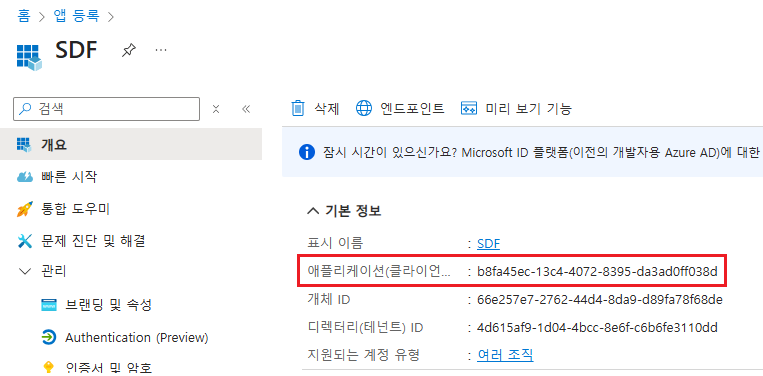
3. 클라이언트 암호 설정
3.1 Azure CLI 설치
- 서비스 인증 시 사용하는 암호를 설정하기 위해 Azure CLI를 설치합니다.
- Windows에 Azure CLI 설치
3.2 Azure CLI 로그인 (Powershell)
- Powershell을 관리자 권한으로 실행한 후, Azure 관리자 계정으로 로그인합니다.
- 해당 테넌트의 구독이 여러 개일 경우, 구독을 적절히 선택합니다.
az login
3.3 새 클라이언트 암호 생성
- 새로운 클라이언트 암호를 만료 기간과 함께 설정합니다.
- 만료 기간 미설정 시, 생성 시간 기준 1년으로 설정됩니다.
az ad app credential reset --id {appId} --append --end-date {end-date}- 파라미터
appId: 앱 아이디append: 기존 암호를 유지하면서 신규 암호를 생성합니다. 이 파라미터를 제거하면 기존 암호가 삭제됩니다.end-date: 암호 만료 시간 (형식: 'YYYY-MM-DD')- 예시: '2126-01-22'
3.4 암호 값 저장
- 클라이언트 암호 생성 후 출력되는 password 값을 확인하고 별도로 저장합니다.
{
  "appId": "b8fa45ec-13c4-4072-8395-da3ad0ff038d",
  "password": "moh8Q~yeUQVK.aptj-sbjwFup9jS.v81_D-CwaQ-",  //appSecret
  "tenant": "4d615af9-1d04-4bcc-8e6f-c6b6fe3110dd"
}
3.5 암호 생성 확인
- 암호가 정상적으로 생성되었는지 확인합니다.
az ad app credential list --id {appId}
PS C:\Users\Security365> az ad app credential list --id b8fa45ec-13c4-4072-8395-da3ad0ff038d
[
  {
    "customKeyIdentifier": null,
    "displayName": null,
    "endDateTime": "2126-01-22T00:00:00Z",
    "hint": "moh",
    "keyId": "3b27e547-a7fe-4ad3-800f-2167c162b13d",
    "secretText": null,
    "startDateTime": "2026-01-22T05:52:37Z"
  }
]
3.6 클라이언트 암호 생성 전체 실행 과정 예시
PS C:\Users\Security365> az login
Select the account you want to log in with. For more information on login with Azure CLI, see https://go.microsoft.com/fwlink/?linkid=2271136

Retrieving tenants and subscriptions for the selection...

[Tenant and subscription selection]

No     Subscription name    Subscription ID                       Tenant
-----  -------------------  ------------------------------------  ------------------------
[1] *  Azure 구독 1         581f6af6-8dc0-4ec4-b42c-fe3b732fdd8e  SOFTCAMP SECAAS RESEARCH
[2]    종량제               763f6b12-8cd0-4592-9751-93ddb39fb970  SOFTCAMP SECAAS RESEARCH

The default is marked with an *; the default tenant is 'SOFTCAMP SECAAS RESEARCH' and subscription is 'Azure 구독 1' (581f6af6-8dc0-4ec4-b42c-fe3b732fdd8e).

Select a subscription and tenant (Type a number or Enter for no changes): 1

PS C:\Users\Security365> az ad app credential reset --id b8fa45ec-13c4-4072-8395-da3ad0ff038d --append --end-date '2126-01-22'
The output includes credentials that you must protect. Be sure that you do not include these credentials in your code or check the credentials into your source control. For more information, see https://aka.ms/azadsp-cli
{
  "appId": "b8fa45ec-13c4-4072-8395-da3ad0ff038d",
  "password": "moh8Q~yeUQVK.aptj-sbjwFup9jS.v81_D-CwaQ-",
  "tenant": "4d615af9-1d04-4bcc-8e6f-c6b6fe3110dd"
}

PS C:\Users\Security365> az ad app credential list --id b8fa45ec-13c4-4072-8395-da3ad0ff038d
[
  {
    "customKeyIdentifier": null,
    "displayName": null,
    "endDateTime": "2126-01-22T00:00:00Z",
    "hint": "moh",
    "keyId": "3b27e547-a7fe-4ad3-800f-2167c162b13d",
    "secretText": null,
    "startDateTime": "2026-01-22T05:52:37Z"
  }
]
3.7 클라이언트 암호 생성 확인
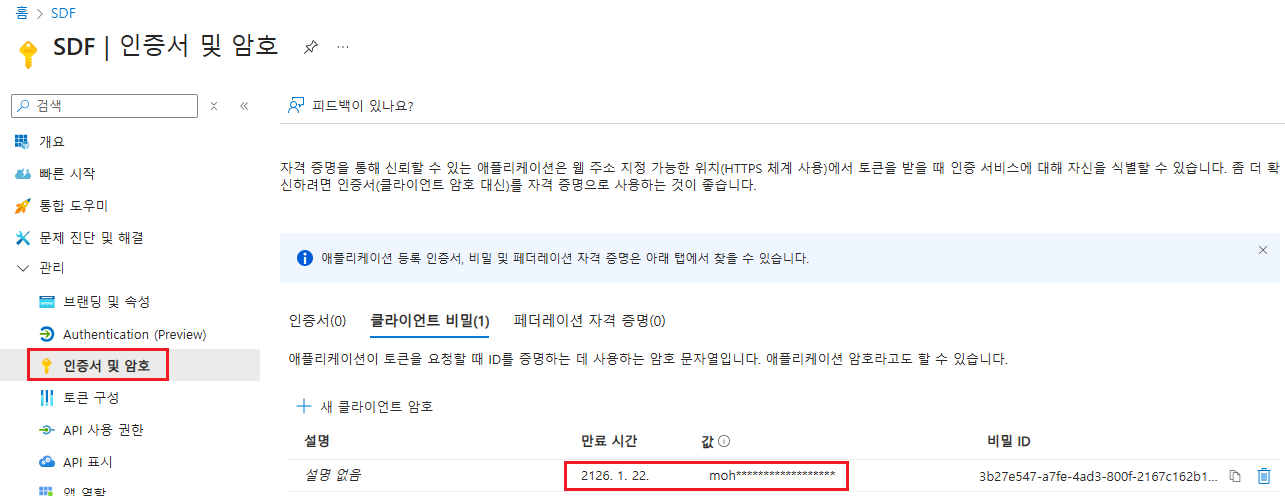
4. API 사용 권한 추가
4.1 추가해야 하는 권한 리스트
Microsoft Graph
| API/권한 이름 | 유형 | 관리자 동의가 필요함 | 권한 설명 |
|---|---|---|---|
| InformationProtectionPolicy.Read.All | 애플리케이션 | 예 | AIP label의 보호 템플릿 ID를 얻어옴 |
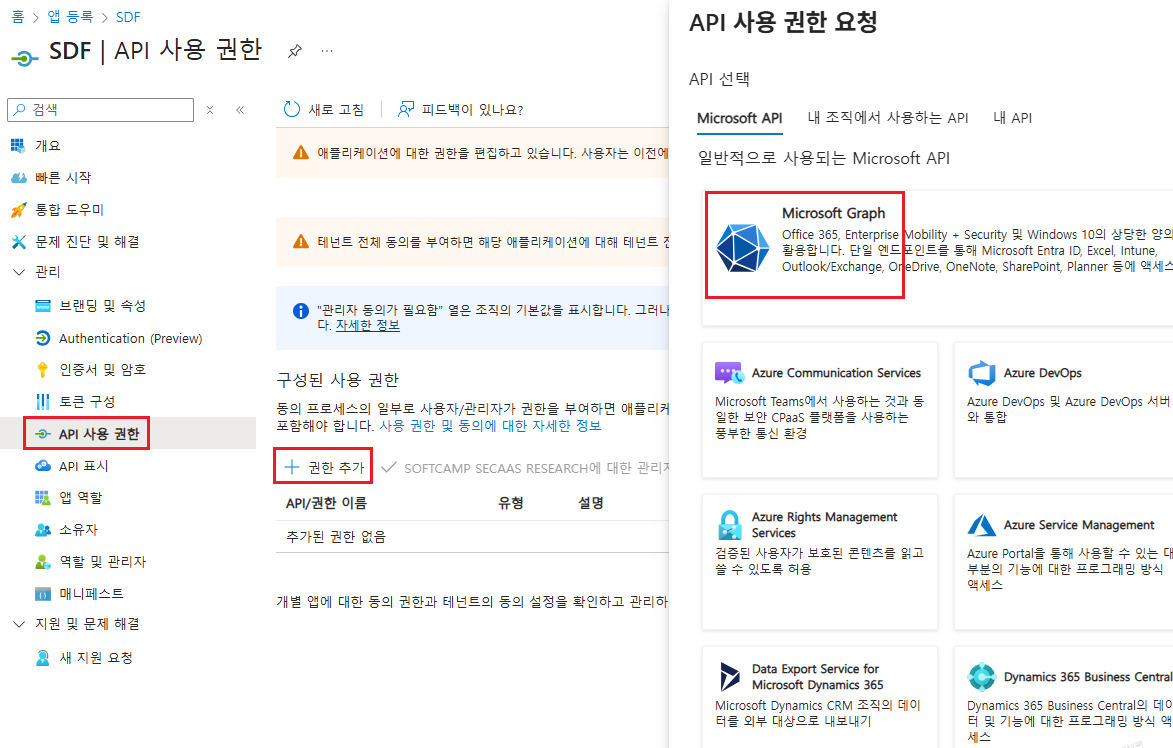
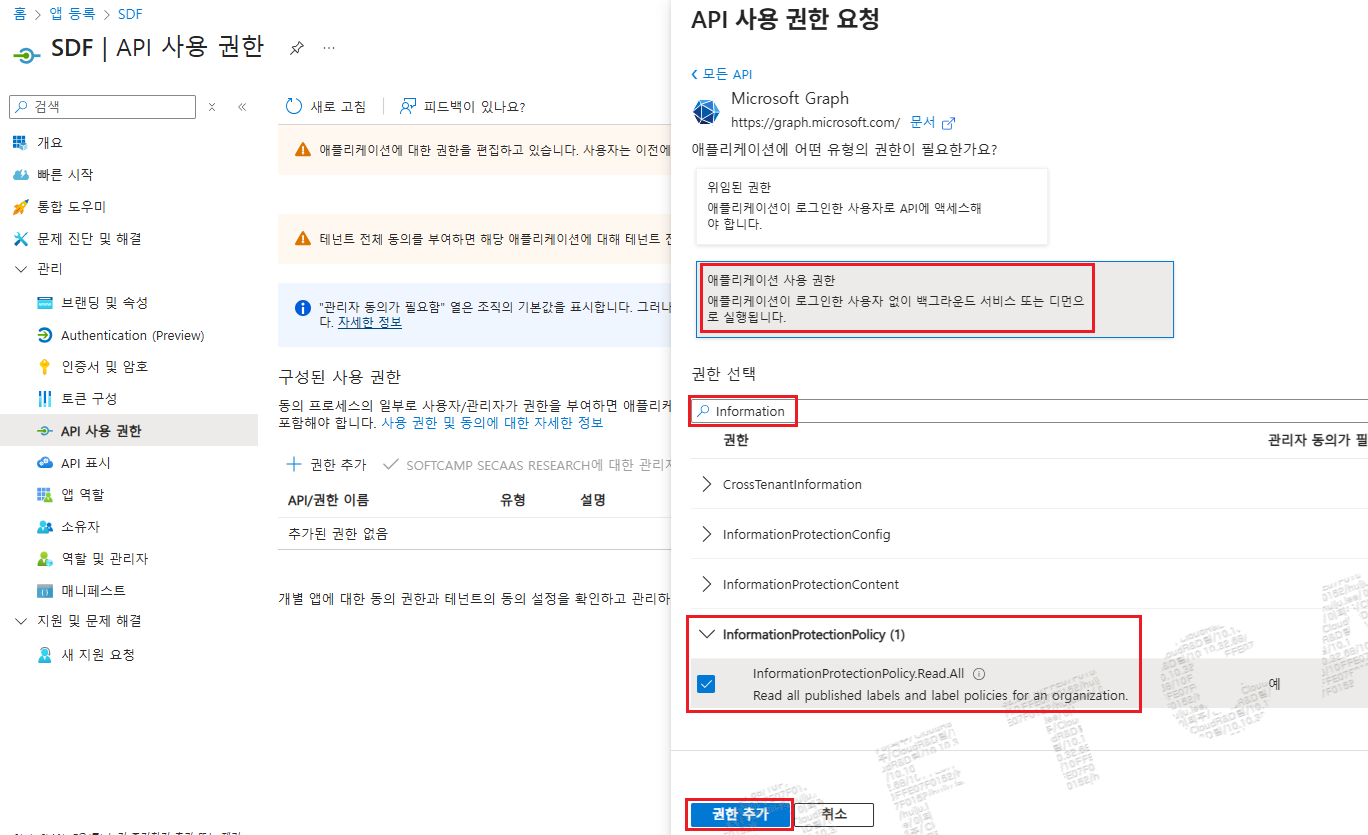
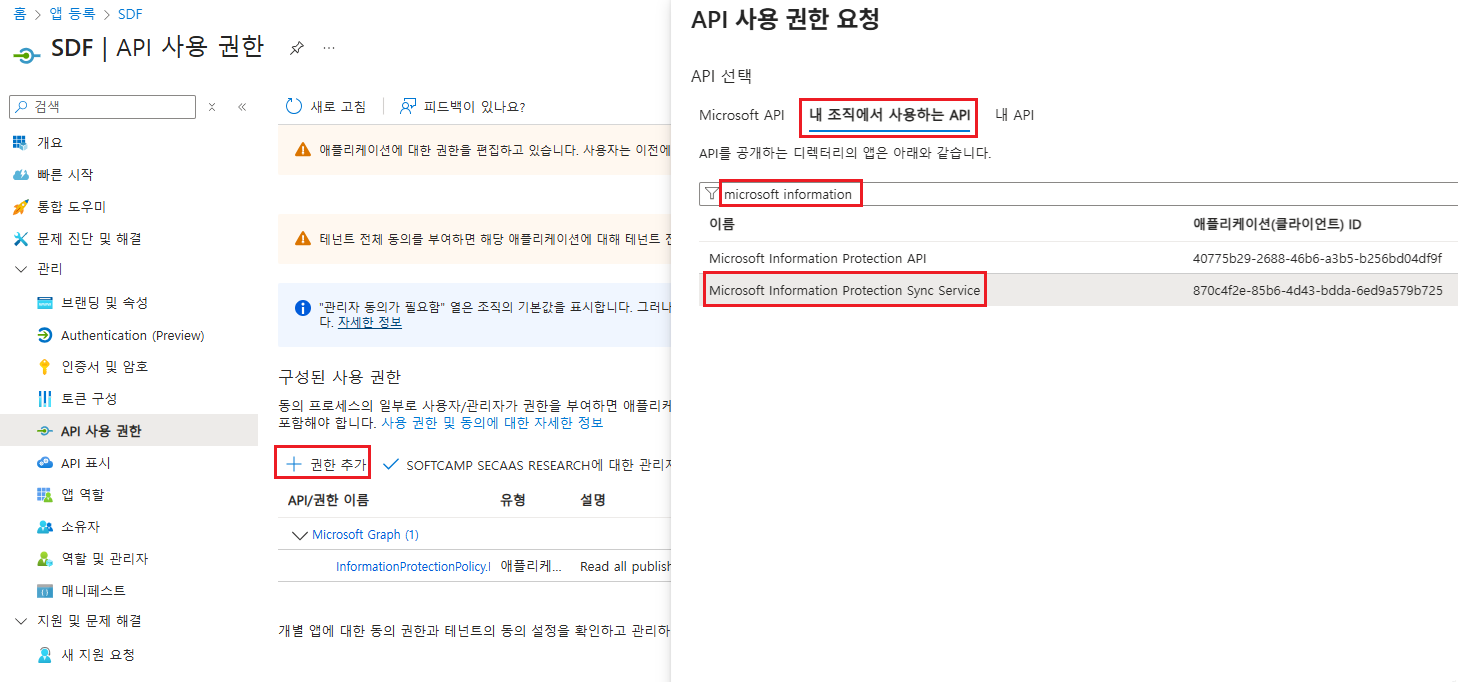
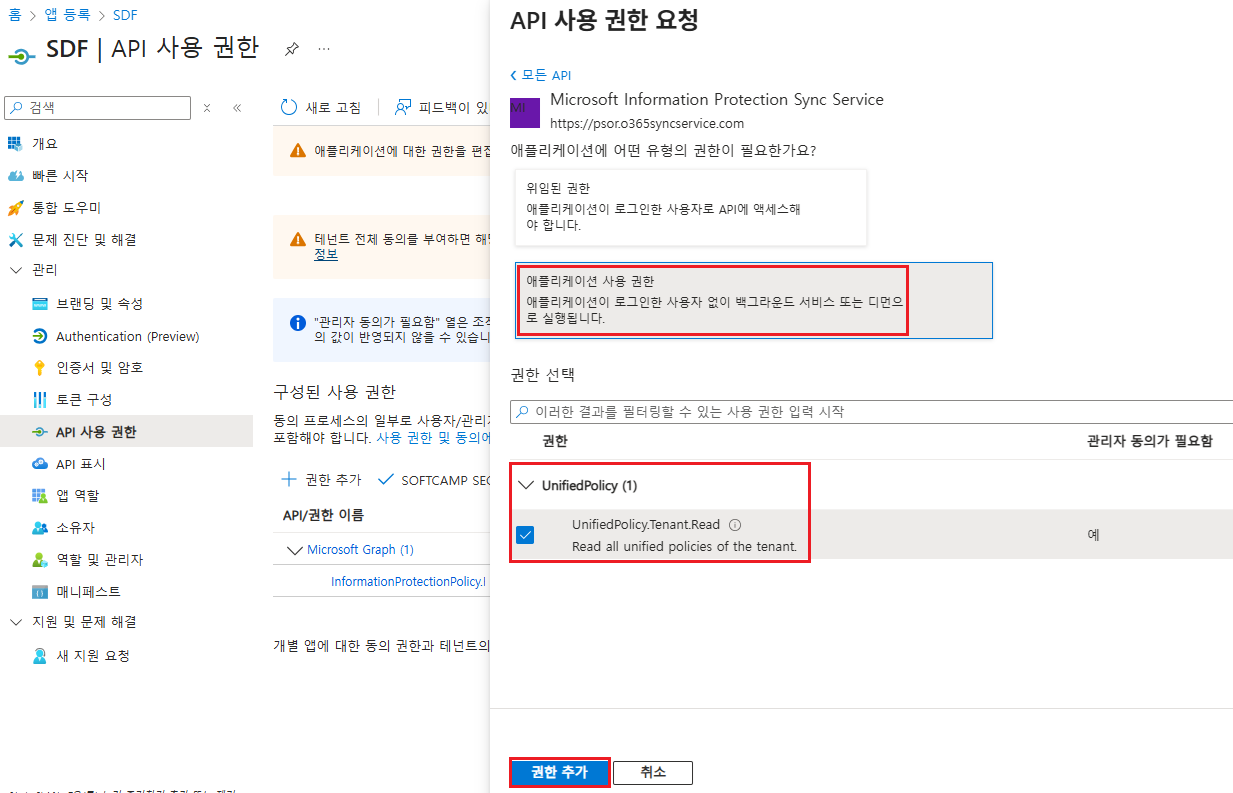
Microsoft Information Protection Sync Service
| API/권한 이름 | 유형 | 관리자 동의가 필요함 | 권한 설명 |
|---|---|---|---|
| UnifiedPolicy.Tenant.Read | 애플리케이션 | 예 | 사용자가 접근 권한을 가진 모든 통합 정책을 읽음 |
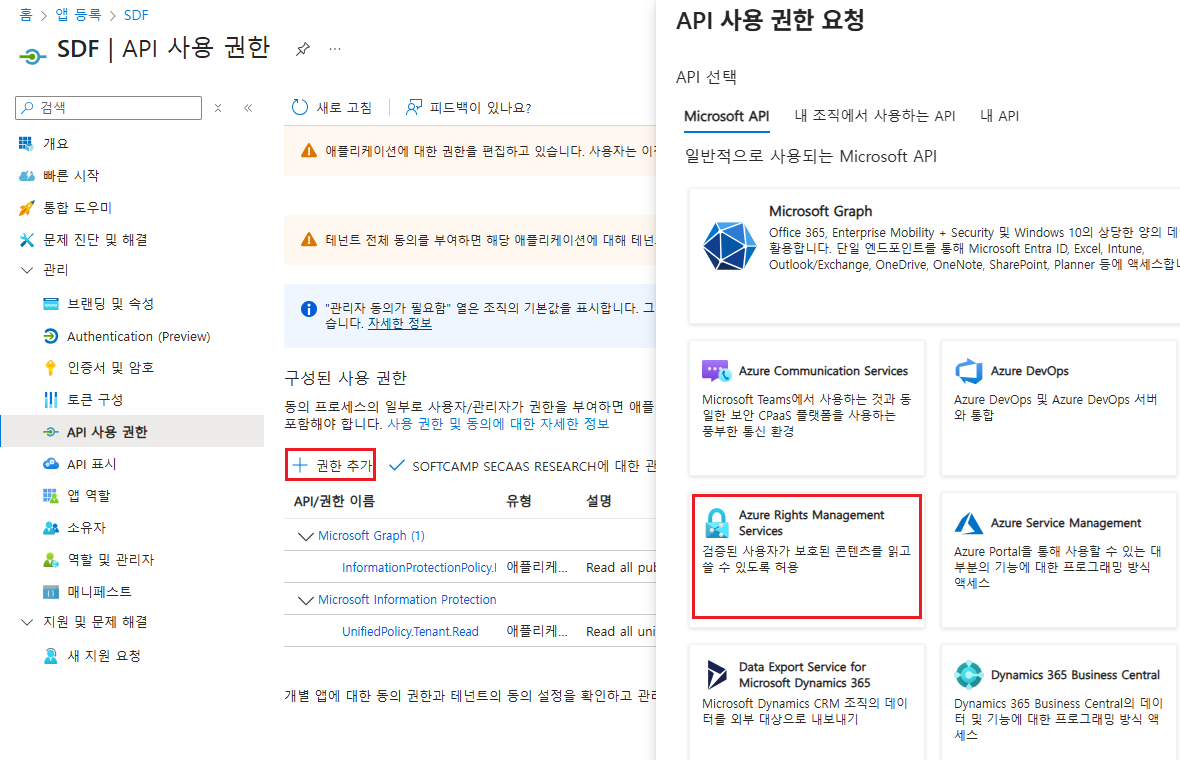
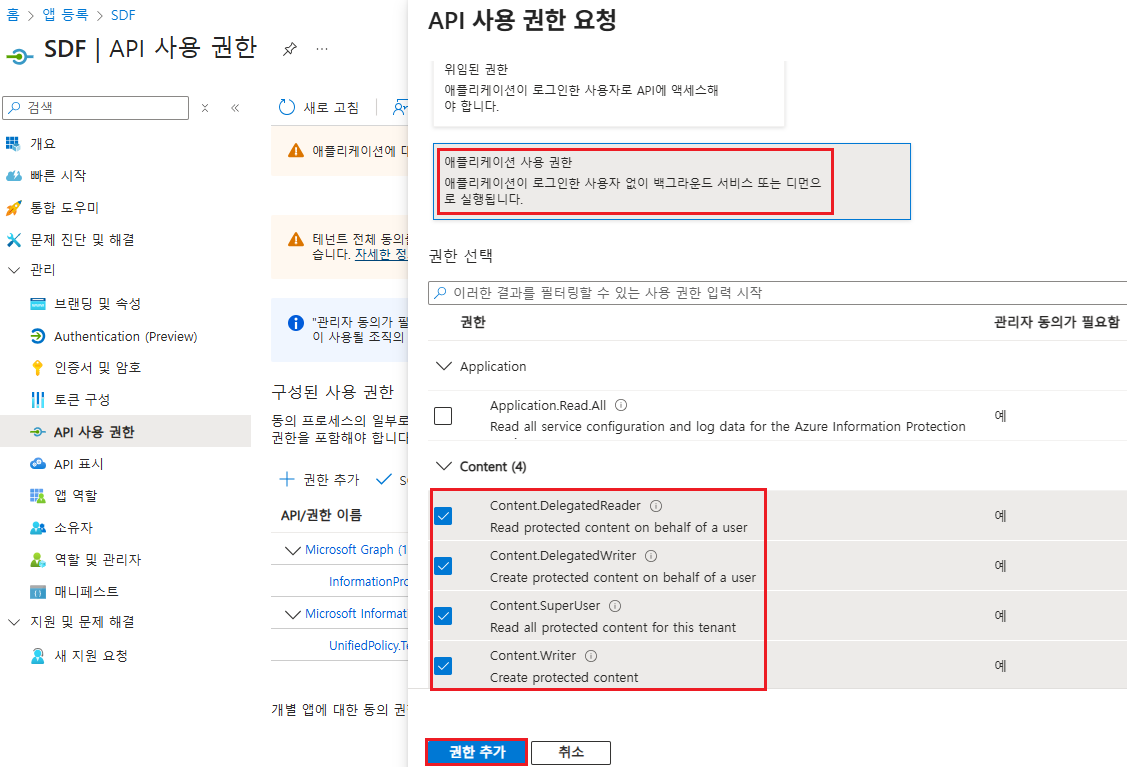
Azure Rights Management Services
| API/권한 이름 | 유형 | 관리자 동의가 필요함 | 권한 설명 |
|---|---|---|---|
| Content.DelegatedReader | 애플리케이션 | 예 | 사용자를 대신하여 보호된 콘텐츠를 읽음 |
| Content.DelegatedWriter | 애플리케이션 | 예 | 사용자를 대신하여 보호된 콘텐츠를 생성함 |
| Content.SuperUser | 애플리케이션 | 예 | 임차인의 모든 보호된 콘텐츠를 읽음 |
| Content.Writer | 애플리케이션 | 예 | 보호된 콘텐츠를 생성함 |
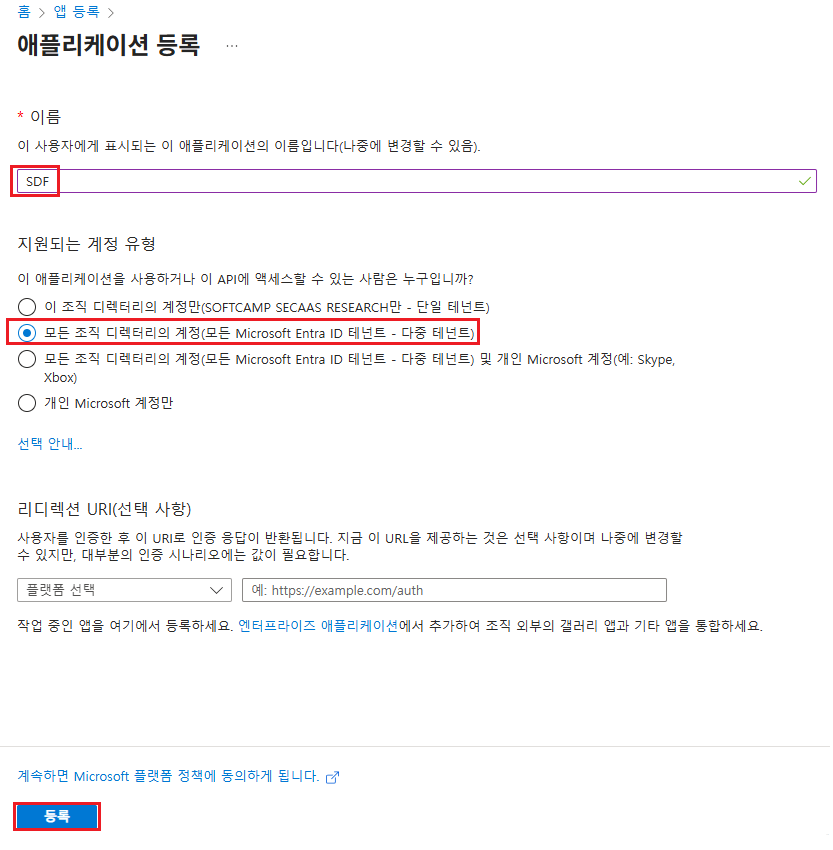
4.2 관리자 동의 허용
- API 사용 권한을 추가하고 "관리자 동의 허용"을 해야 합니다.