Dashboard Guide
※ Last updated: 2025-08-29
The SHIELD DRM dashboard is a screen that allows administrators to monitor the operational status of conditional policies and document statuses in real-time from the admin page. Each card and chart reflects real-time data and cumulative data, providing administrators with an intuitive view of the current security status of the system.
Home (Dashboard) Configuration
SHIELD DRM Admin Page
홈Click the menu to access the dashboard screen.
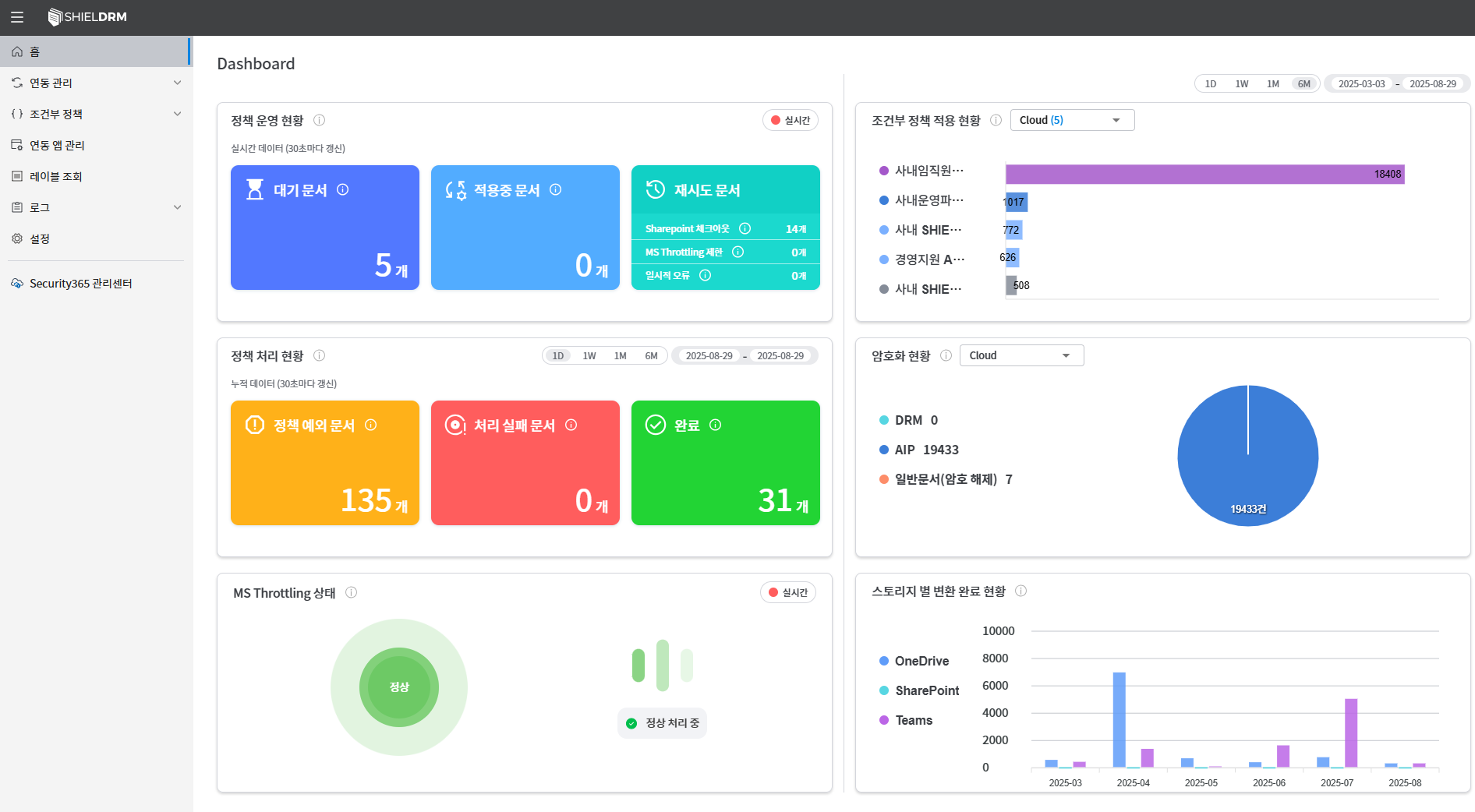
Dashboard Card Information
- Policy Operation Status Card (3 items)
- Policy Processing Status Card (3)
- Encryption Status Chart
- MS Throttling Status Card
- Status of Conditional Policy Application Bar Graph
- Storage Conversion Status Chart
Policy Operation Status Card
Data refresh cycle:
대기 문서,적용 중 문서,재시도 문서: Real-time data (updated every 30 seconds)
- Pending Document
- The number of documents waiting for conversion in the SHIELD DRM service.
- Document in Application
- The number of documents currently being converted in SHIELD DRM.
- Retry Document
- The number of documents waiting to retry due to a temporary error.
- Detailed Items:
- SharePoint Checkout Error
- MS Throttling Limit
- Other temporary errors
Policy Processing Status Card
Data refresh cycle:
정책 예외 문서,처리 실패 문서,완료 문서: Cumulative Data (Updated every 30 seconds)
- Policy Exception Document
- The number of documents that have been exception handled in the conditional policy.
- Processing Failure Document
- The number of documents that failed to convert.
- Completed Document
- The number of documents that have been converted.
Encryption Status Chart
- Displays the current status of conditional policy-specific DRM documents, AIP documents, and general documents in a pie chart.
MS Throttling Status Card
- Visualizing Microsoft Throttling Status as a Circular Animation.
- It is real-time data and updates every 5 seconds.
- Color and Status Definitions:
- Green: Normal (All requests are being processed normally)
- Yellow: Caution (Traffic auto-adjusting)
- Red: Warning (MS Throttling Limit Control in Operation)
- Color and Status Definitions:
Conditional Policy Application Status (Currently supports only Cloud Storage policies)
- You can visualize the application status of each policy with a bar graph to check the number of documents per policy.
- Policy Type:
- DRM → AIP Conversion
- AIP → DRM Conversion
- Decryption of General Documents
Conversion Status by Storage
- Displays the number of completed converted documents for each storage type such as OneDrive, SharePoint, and Teams in a bar graph.