Proxy Relay Service
1. What is a relay proxy service?
Proxy Relay Serviceis a basic Proxy, a relay service that performs both Inbound and Outbound roles.
- Inbound Role: Relay requests to allow external users to access internal systems.
- Outbound Role: Relay for securely accessing external internet or SaaS services in an internal network (closed network, LGWAN, corporate network, etc.) environment.
It is designed to protect internal IPs by preventing internal terminals from directly accessing the outside and allowing limited and secure external access only to specified URLs or SaaS.
Main Objectives
- Management of Control and Allowance Policies for External URL Access
- Blocking direct connections from the internal network to the external network
- Safe Use of External Services Based on RBI (Remote Browser Isolation)
- Protection of IP/Network Information in Internal Network
- Management based on logs and policies when accessing external web.
2. Key Features
2.1 Outbound URL Access Management
- Register external URLs in advance and allow access only to permitted addresses.
- Blocked URLs are prohibited by the proxy service.
- Preventing indiscriminate access from the internal network to the external internet
2.2 IP Masking and Security Relay
- Internal clients do not connect directly to the outside.
- Only the relay proxy service and SHIELDGate communicate with the external network.
- Internal IP is not exposed to the outside.
2.4 Integrated Log and Access History Management
- Record which device accessed which URL
- Access Policy Violation Record
- Can be used for security audits and post-analysis.
2.5 External SaaS Utilization Mediation
- For example: ChatGPT, Google Workspace, MS365, collaboration tools, etc.
- Safe use of external SaaS even on internal networks
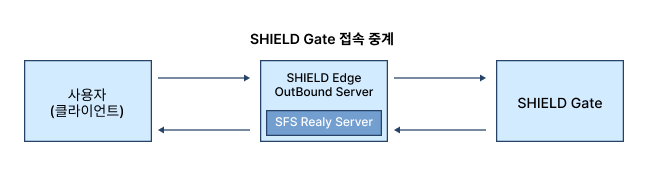
3. Relay Proxy Service Concept Diagram

Description
- Inbound: Securely relay external user access requests to internal systems
- Outbound: Internal devices cannot directly access the external internet,Proxy Relay Serviceperforms external requests on behalf of
- Access to external internet services (including SHIELDGate) is only possible for URLs allowed by the proxy service.
- Includes SFS Relay Server functionality for RBI technology
- All information transmitted from the external environment is safely streamed in the order of SHIELDGate → SFS Relay → internal terminal.
4. Components and Roles
| Components | role |
|---|---|
| Basic Proxy | A proxy that performs both Inbound and Outbound roles, providing communication relay between internal ↔ external and URL access control functionality. |
| URL Policy Management Module | Allow/Block URL Registration and Policy Application |
| Authentication/Policy Engine | Access Control Management, Access Control |
| Logging Module | Access History and Policy Violation Records |
| Admin Console | URL Policy · SFS Settings · Log Management UI |
5. Relay Proxy Service Processing Flow
When using SHIELDGate cloud service (Outbound example)
Step 1. URL Registration
The administrator registers the SHIELDGate URL and other necessary external site URLs in the relay proxy service console.
Step 2. Register Public IP (SFS Relay)
Register a public IP to the SFS Relay Server for using the Isolation Browser (RBI).
Step 3. Internal User Access Request
The user enters the registered URL (e.g., SHIELDGate URL) in the browser.
Step 4. Proxy Service Relay
The relay proxy service performs the following:
- Check URL Policy
- Allow external communication if it is a registered URL
- Establish a TLS session with the external SHIELDGate instead of the internal terminal.
Step 5. RBI Screen Streaming
SHIELDGate safely runs the actual website from the outside, and,
Streams only the screens rendered through the SFS Relay Server to internal devices.
Step 6. The internal terminal only receives the screen.
- The actual execution·script is not transmitted to the internal network.
- Maintaining Internal Network Security
6. Characteristics of Relay Proxy Service (In/Outbound)
6.1 Security Enhancement
- Internal ↔ External Direct Connection Block
- Internal IP Protection
- Application of URL-based minimum privilege policy
- Blocking the Influx of Malicious Scripts and Malicious Code
6.2 Management Efficiency
- Integrating Distributed External Access Policies for Centralized Management in a Single System
- Access to the SaaS service is possible with just URL registration.
- Providing audit convenience through log integration management
6.3 Stable Connection Structure
- When an external service outage or network issue occurs, the proxy service can track the cause.
- Maintain a consistent flow of internet traffic in the internal network
6.4 Usable in Various Environments
- Local Government LGWAN
- Internal Network of Public Institutions
- Corporate Internal Security Zone
- External network blocking environment such as research institutes