11. SDF App Pre-Check Guide
Limitations of the Existing Service Linker Product
Limitations of the Product
- Since the organizational chart and all encryption keys of the organization are stored in the system, there are concerns about the leakage of encryption keys.
- When the business system is on AWS, Azure, etc., the key will be located in the Cloud Platform.
- Potential security issues that operate in offline environments where encryption keys do not communicate with the server.
- No logging of encryption/decryption, making it impossible to trace in case of misuse.
- Microsoft365 AIP Not Supported
- eachEach business system requires separate implementation using the Microsoft MIP SDK.
Security Limitations
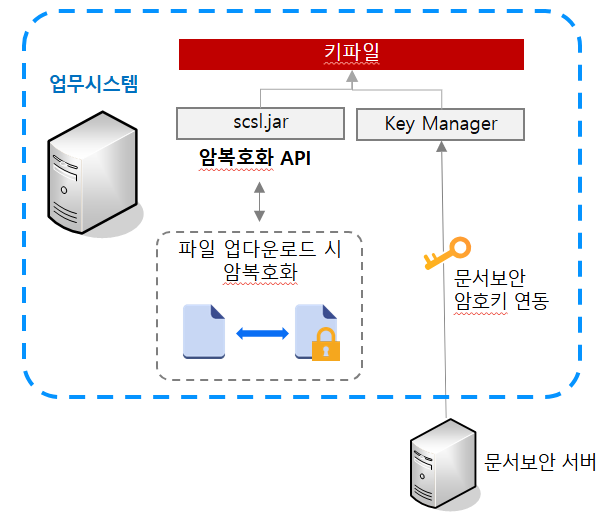
- Concerns about the leakage of encryption keys since all encryption keys are stored in the system.
- When the business system is on AWS, Azure, etc., the key will be located in the Cloud Platform.
- Potential security issues that operate in offline environments where encryption keys do not communicate with the server.
- No logging of encryption/decryption, making it impossible to trace in case of misuse.
The service linker that is linked to the device has limitations in responding to changing environments as a boundary-based DRM product.
SensitiveDocsFlow App Product Configuration (hereinafter SDF App)
SensitiveDocsFlow App
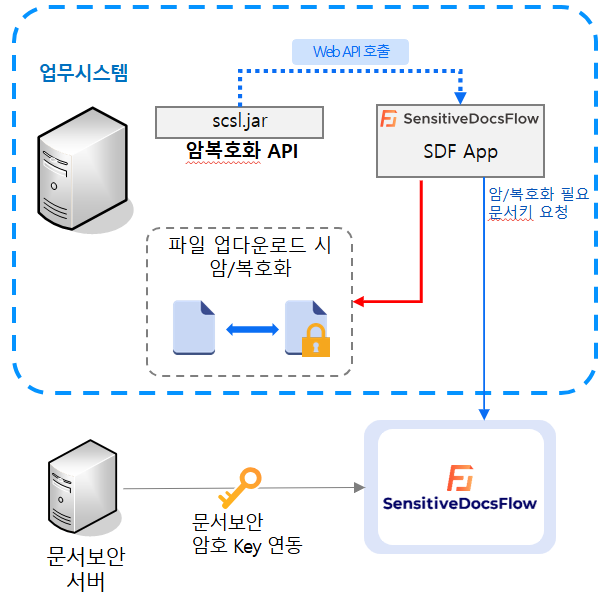
- Existing Service Linker for File andMaintain the same interface
- In the business system, SDF App installation and application are possible without source changes.
- The encryption keys are securely managed centrally, so they are not stored in each system.
- Microsoft365 AIP Support
- in each business systemUsing New API for AIP SupportCreate/Release AIP Document File
Pre-Check Guide #1
> SOFTCAMP Security365 Product Platform
- A service based on Security365 must be configured.
- Basic services such as communication token authentication, document security encryption key integration, log service, and Security 365 management center are required.
> Check Business System Platform
- The currently provided SDF App product isJava PlatformSupport (Business System Development and Support Language)
- same as beforescsl.jarThe interface SDK isJava 1.6 or higherSupport
> MIP SDK Support
- To check, create, and dismantle AIP document files,MIP SDK provided by MicrosoftFile Control Using
- To use the MIP SDK, two things need to be checked.
- Checking and creating AIP document filesBusiness System OS
- Check and create AIP document filesBusiness System Firewall and Network Infrastructure
Pre-Inspection Guide #2
> Business System OS
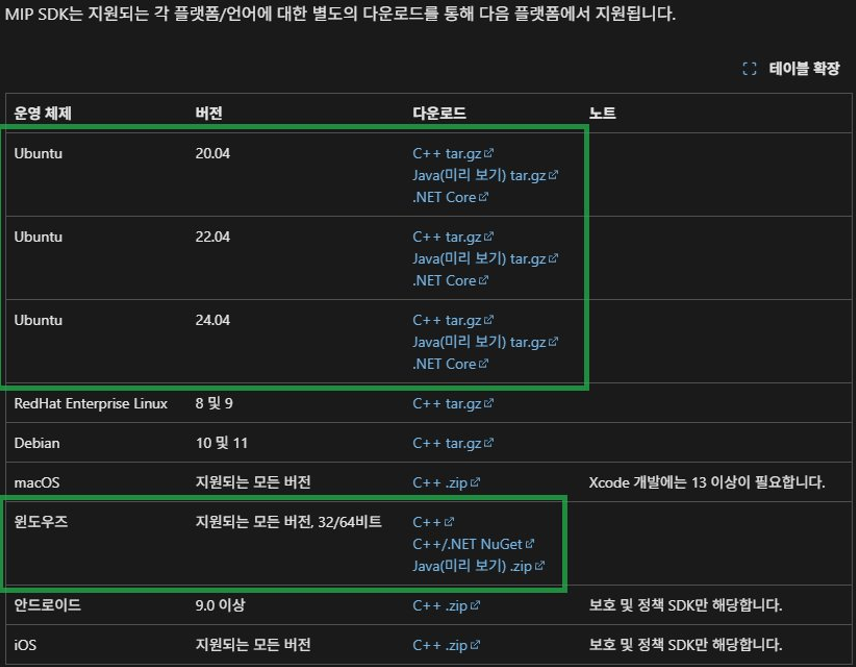
- MIP SDK for Java officially supports only the specified OS (link)
- Windows: All supported versions ofWindows
- Linux: Ubuntu 20.04 / 22.04 / 24.04
Pre-Inspection Guide #3
> Business System Firewall and Network Infrastructure
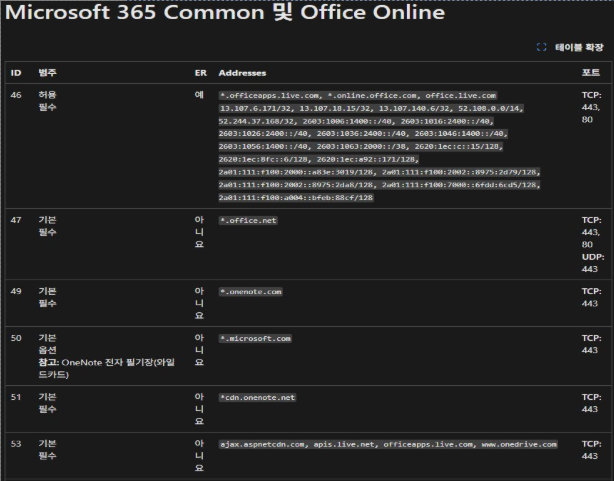
- Accessing AIP document files to use MIP SDK for JavaCommunicating with Microsoft Azure and Purviewmust be
- network firewallOut-BoundOpen required
- Microsoft 365 Common and Office Online ID46 ~ ID184Item
- Communicating with Security 365 Products
- Communicating with the EcDec service among Security 365 services
info
SDF App Service Configuration Example #1
SensitiveDocsFlow App
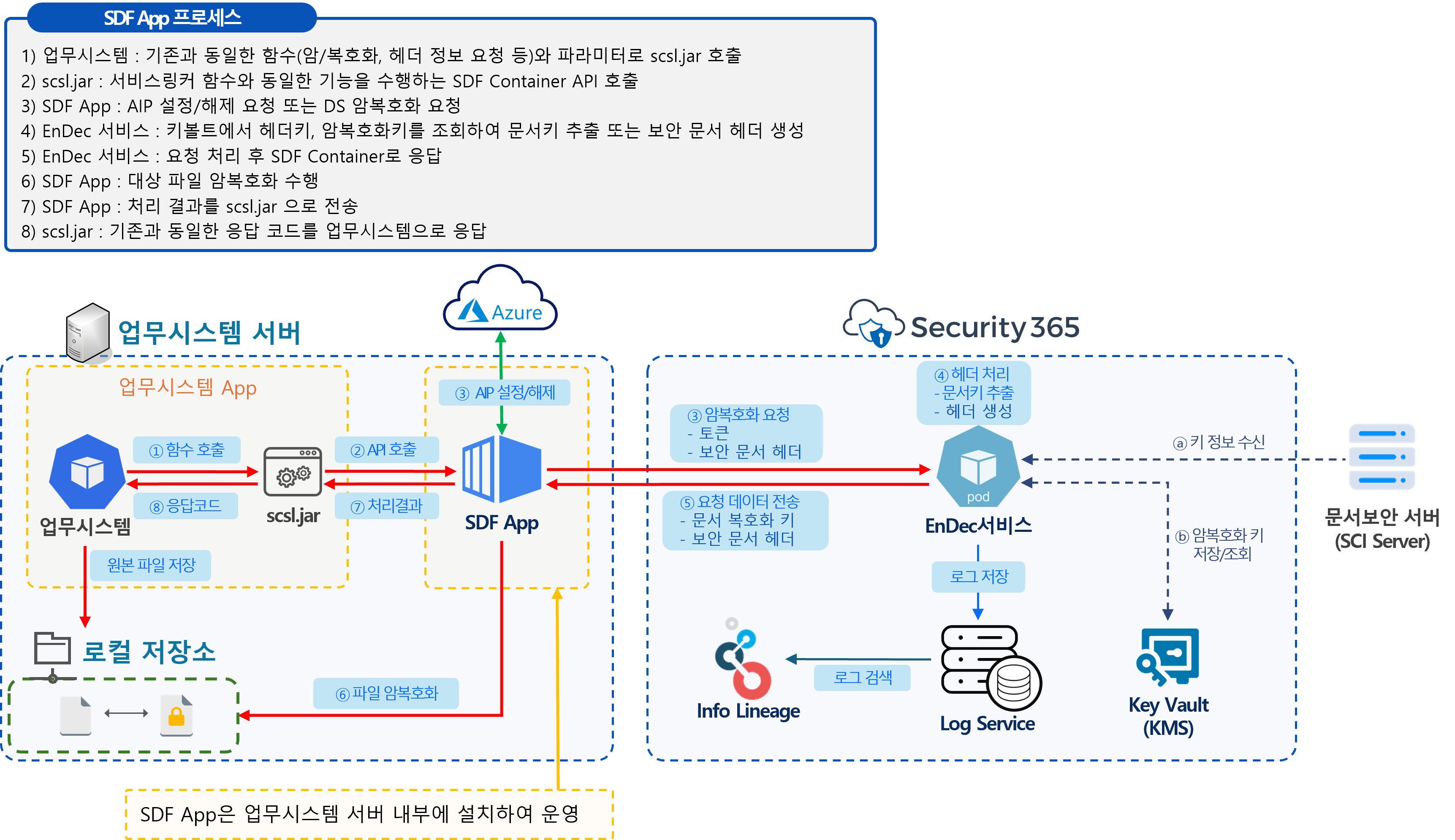
- Business System andInstalled on the same server equipmentOperation
- Supported MIP SDKSame as OS
- To support the MIP SDKMeet firewall and network infrastructure
SDF App Service Configuration Example #2
SeneitiveDocsFlow App
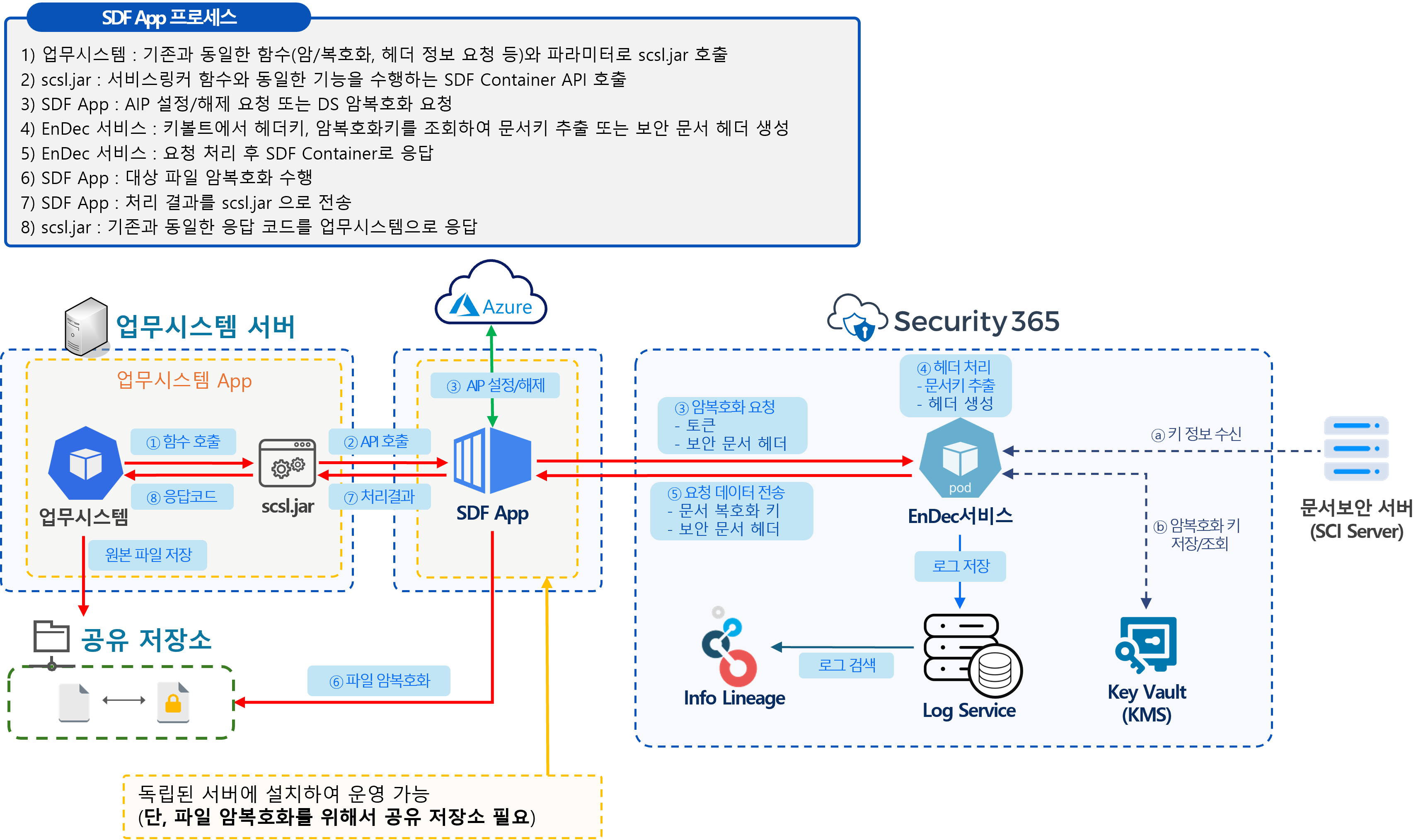
- Installed and operated on a separate server equipment that is distinct from the business system.
- Supported MIP SDKNot the same as the OS
- To support MIP SDKDoes not meet firewall and network infrastructure requirements
- For document file conversionFile Sharing Repository Needed
SDF App Pre-Check List
| Classification | Inspection Items | Detailed Information | Check | Environment |
|---|---|---|---|---|
| 1. Test Environment | Business System Test Server | Whether to provide a business system server and testing environment to test the SDF App | ☐ | |
| AIP Document Test Account | Preparation of AIP test account and policy labels | ☐ | ||
| Based on Security 365 | Configuration of Security 365 Integration Environment (Integration App Registration, Token Authentication, Log Service, Encryption Key Integration, etc.) | ☐ | ||
| 2. Business System Platform | Business System Development Language | Whether it is a Java-based system | ☐ | |
| Java Version | Use of Java 1.6 or higher | ☐ | Java 1.8 | |
| 3. System Compatibility | Types and Versions of Business System OS | Supported OS for MIP SDKWhether - Windows - Ubuntu 20.04 / 22.04 / 24.04 | ☐ | Windows 2019 |
| Outbound Firewall Configuration | Microsoft Azure and Purview, M365Related URL/PortOpen Status | ☐ | ||
| 4. Network Infrastructure | Connecting to M365 Office Online | Domains/Ports specified in ID46 ~ ID184Permission Status | ☐ | |
| Connecting Security 365 | Availability of EnDec service (varies by deployment environment) Example:https://sc.skms.security365.co.kr:443 | ☐ |