External Integration Menu Guide
※ Last updated: 2025-05-21
In the SHIELD Mail external integration menu, you can configure data integration with external systems when processing emails based on specific conditions.
Through this menu, if an email containing a specific header value is received, data can be sent to the designated API.
1. Accessing the External Integration Menu
Settings > API IntegrationYou can access the external integration management screen from the menu.
- If there are no registered integrations, a blank screen will be displayed on the initial screen.
API 연동 추가You can start a new API integration setup by clicking the button.
2. Register API Integration
To add API integrationAPI 연동 추가Click the button.
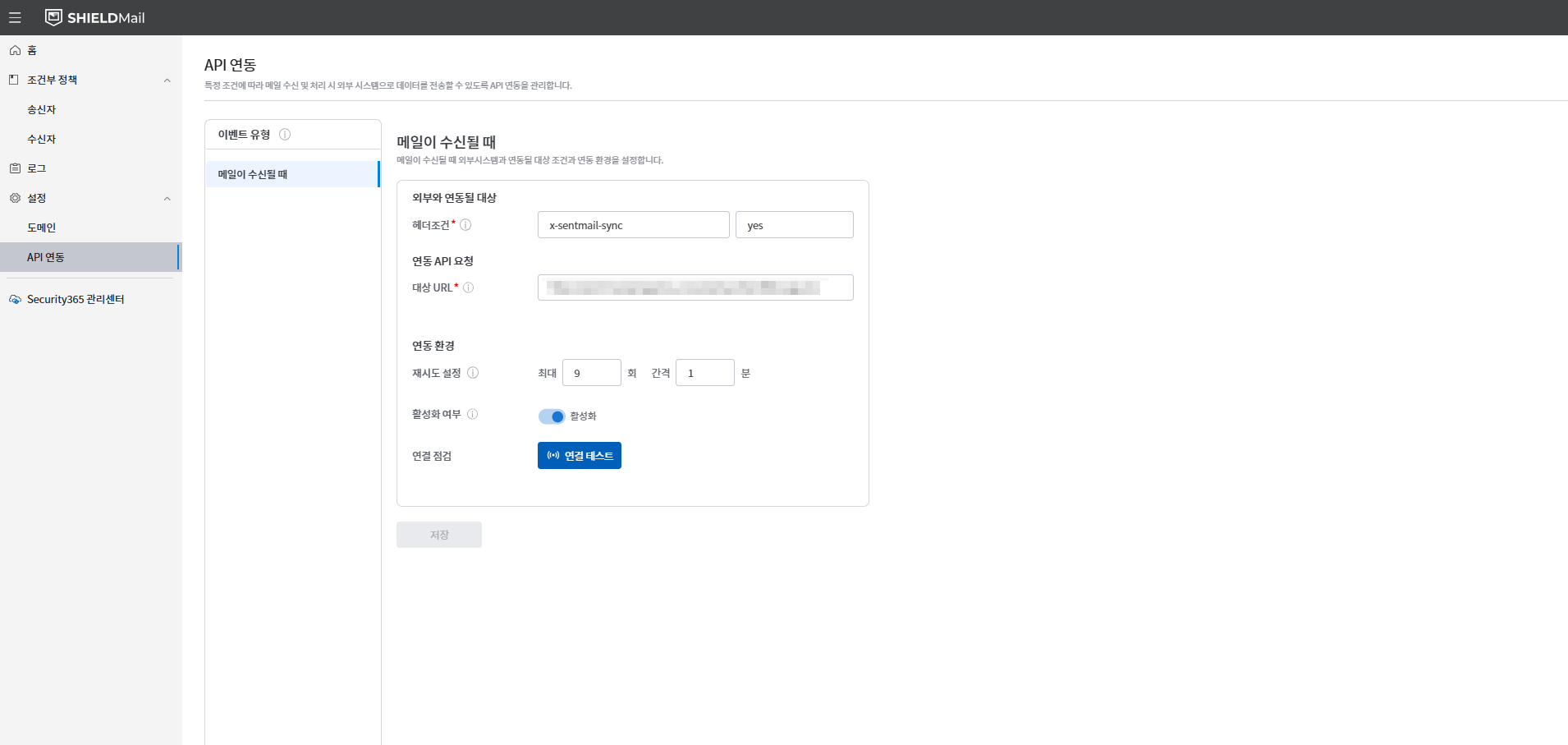
- **Event Type (Required):**The currently supported event types are
메일 수신됨is.- MAIL_RECEIVE: Event trigger on mail receipt
- **Header Key (Required):**Specify specific fields in the email header. For example:
x-sentmail-sync - **Header value (required):**The value that matches the specified header key. For example:
yes - **Target URL (required):**Enter the endpoint URL where the API call will be made.
- **Retry Settings:**You can set the number of retries and the interval when an API call fails.
- Maximum retry count: default value
3회 - Retry interval (minutes): Default value
1분
- Maximum retry count: default value
- **Activation status:**Set the activation status of the registered API integration.
After completing the setup,
저장Click the button to save the integration information.
3. API Integration List
When the API integration is registered, the integration list will be displayed on the main screen.
- The integration name, event type, header key, header value, target URL, and activation status are displayed.
- Each item can be clicked to
편집or삭제You can do it.
4. Connection Test
After the API integration is registered, to verify that the settings are functioning correctly,연결 테스트Provides functionality.
연결 테스트When the button is clicked, the API is called, and the configured header keys and values are sent.- Connection successful:
연결 성공Display connection time with message - Connection failure:
연결 실패Display Message- Error details support planned
5. Precautions and Recommendations
- The integration name and target URL are required fields.
- The retry settings should be adjusted appropriately according to the response time of the API server.
- The header key and header value must match exactly for the event to be triggered.
6. Notes
- current
MAIL_RECEIVEOnly event types are supported. - Additional Event Types (
MAIL_SEND,FILE_CONVERTis planned for future development. - The response time for API calls is limited to 10 seconds. If exceeded,
타임아웃An error has occurred.
Internal document link
It is scheduled for an update.