Conditional Policies - Cloud Storage Menu Guide (Under Revision)
※ Last updated: 2025-05-21
Conditional policies for Cloud Storage are features that allow you to set and manage security policies for documents stored in OneDrive, SharePoint, and Teams.
It is possible to convert general documents to AIP documents or DRM documents, or to convert between AIP documents and DRM documents.
This guide explains the components and configuration methods of Cloud Storage conditional policies.
Notice on the termination of the existing Add-In method and the transition to event receivers
**Microsoft will discontinue ACS (Azure Access Control) and the Add-In method as of April 2, 2026.**The current SHIELD DRM management page's Microsoft365 (Add-In) menu is in 2026.Replaced with Event Receiver Menucan be registered as Event Receiver with the existing Add-In method.Data MigrationIt works.After April 2, 2026Policies set in Add-In mode no longer function.
Existing Add-In Method:
.appInstall the file on each SharePoint site to receive events- Installation and management are required for each site.
- Authentication and Authorization Control through ACS (Azure Access Control)
Event Receiver method:
- Structure for Directly Receiving Events in a Cloud Environment
- Central management without a separate add-in installation process
- Receive file events (creation, modification, movement, etc.) from SharePoint and OneDrive in real-time.
Terminology Organization
- ACS (Azure Access Control Service): It is a legacy app, and currently, PowerShell scripts have been registered for each tenant during the SHIELD DRM setup.
- Multi GEO sites require the registration of PowerShell scripts for each domain (a domain is added when a GEO is added).
- Add-In :
.appIt is provided as a file, and if registered in the tenant's add-in catalog, the add-in can be installed on the tenant's site.- To receive events, installation is required on each site.
- RER (Remote Event Receiver): Currently running as an Azure Service and implemented in .NET using the SharePoint CSOM (Client-Side Object Model) library.
Detailed description link
Cloud Storage Conditional Policy Components
Click on the Conditional Policy menu in the SHIELD DRM admin page to access the Cloud Storage screen.
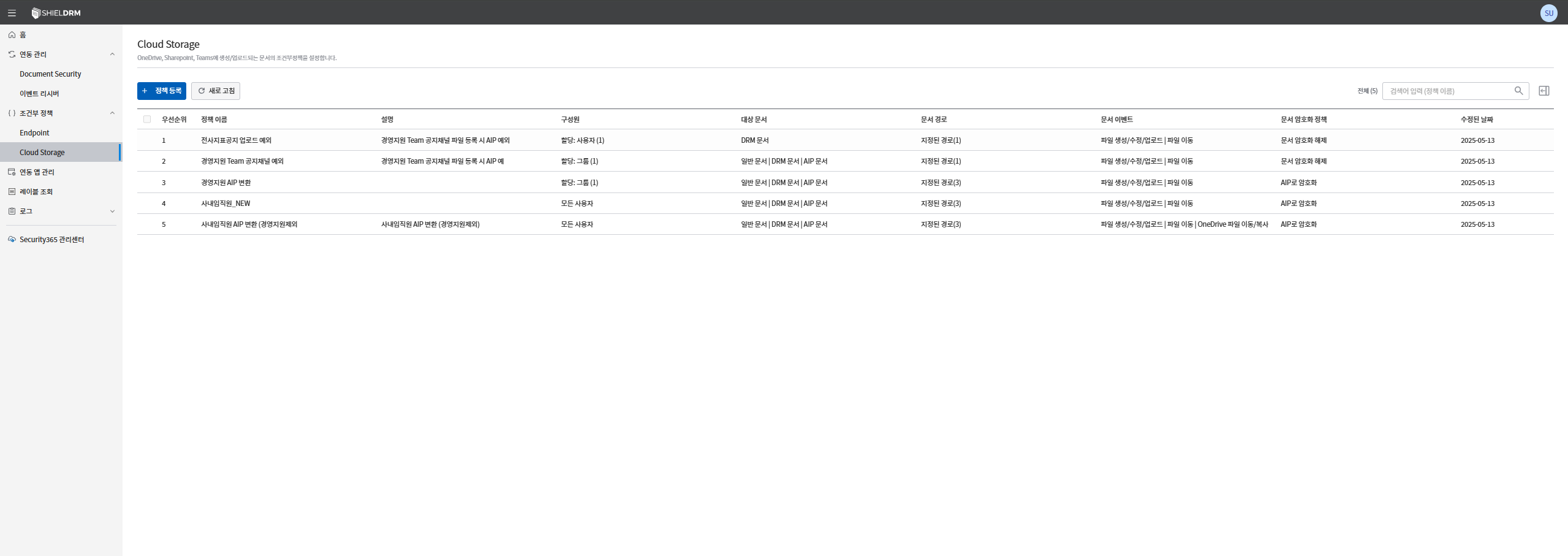
Policy List Table Structure
- **Priority:**It indicates the order of execution of the policy.
- **Policy Name:**This is the unique name of the policy.
- **Description:**The purpose of the policy or a brief description.
- **Members:**Specifies the users, groups, or policy groups to which the policy applies.
- **Target document:**Types of documents to which the policy applies (General Documents, DRM, AIP)
- **Document Path:**Specify the file path where the policy is applied.
- **Event Trigger:**Event Types for Policy Execution (File Creation/Modification/Upload, File Movement, etc.)
- **Document Encryption Policy:**Document encryption methods to which the policy will be applied (Encryption with AIP, document deletion, document decryption)
- **Last modified date:**This is the date when the policy was last modified.
How to Register Conditional Policies for Cloud Storage
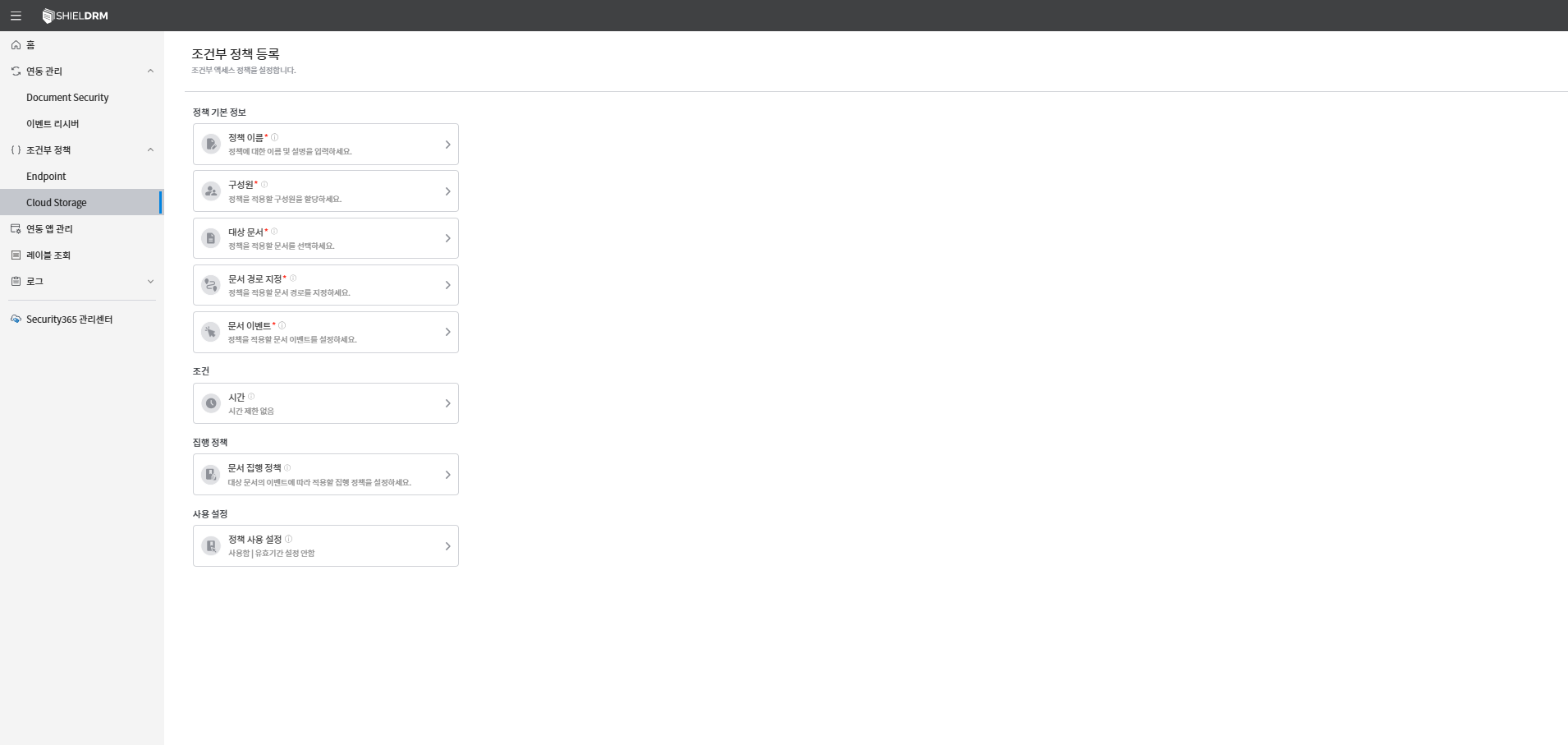
1. Policy Registration
Click the [Register Policy] button to enter the policy creation screen.
2. Enter Basic Policy Information
-
Policy Name *(required)*Enter the unique name of the policy.
-
Policy DescriptionYou can enter the purpose of the policy or a brief description.
-
Member Designation (required) :
- Select the user or group to which the policy will be applied.
- Can be specified as [All Users], specific users, groups, or policy groups.
-
Specify the target document type (required) :
- Select the document type to which the conditional policy will be applied.
- Multiple selection available(e.g.: General Document + DRM Document
- The selectable document types and supported extensions are as follows:
| Document Type | Description | Supported Extensions |
|---|---|---|
| General Document (Add-in) | Unencrypted plaintext document | doc, docx, docm, xls, xlsx, xlsb, xlsm, ppt, pptx, pps, ppsx, pptm, pdf |
| General Document (Event Receiver) | Unencrypted plaintext document | doc, docx, docm, xls, xlsx, xlsb, xlsm, ppt, pptx, pps, ppsx, pptm, pdf, hwp, hwpx |
| DRM Document (Add-in) | Document Security (DS) based DRM applied document | doc, docx, docm, xls, xlsx, xlsb, xlsm, ppt, pptx, pps, ppsx, pptm, pdf |
| DRM Document (Event Receiver) | Document Security (DS) based DRM applied document | doc, docx, docm, xls, xlsx, xlsb, xlsm, ppt, pptx, pps, ppsx, pptm, pdf, hwp, hwpx |
| AIP Document (Add-in & Event Receiver Same) | Documents based on Microsoft Azure Information Protection | doc, docx, docm, xls, xlsx, xlsb, xlsm, ppt, pptx, pps, ppsx, pptm, pdf |
(+) Additional settings when selecting the specified DRM document:
- Check Constructor Information
- Check if the document creator is the same as the logged-in user
- Option: Same / Not the same
- DRM Document Encryption Types
- Select from DAC(ACL), MAC(Category), GRADE(Rating)
- You can enter the relevant ID depending on the selected type.
- DRM Document Permission Assignment
- Check document permissions for logged-in users, creators, and added groups
- Types of permissions: Read, Edit, Output, Export, Release, Change Permission, Print Marking, Validity Period
- File Extension Specification
- Specifying the Extension of the Target DRM Document
-
Document Path Specification (Required):
- You can specify a specific folder or the entire path within the three types of storage.
- OneDrive
- SharePoint
- Select Teams/Channels
- You can specify a specific folder or the entire path within the three types of storage.
-
Document Event Specification (Required):
- Set the event for the policy to be executed.
- Both events can be selected simultaneously, and individual execution policies can be set for each event.
- File Creation/Modification/Upload
- File Move
3. Setting Conditions
- **Time:**You can specify the time zone in which the policy will be applied.
시간 제한 없음If you select it, the policy will always be applied.등록된 시간에서 선택You can specify a specific time zone through __PH_0__.- You can set exception times so that policies do not apply during specific time zones.
4. Document Execution Policy Settings
- The document enforcement policies that can be set in the Cloud Storage policy are as follows:
- **Encryption with AIP:**Encrypts the document with the specified AIP label.
- **Document Deletion:**The document will be deleted and will be permanently removed without moving to the recycle bin.
- **Document Decryption:**Decrypt the document and convert it to a regular document.
5. Enable Policy
- You can set the usage and validity period of the policy.
- Usage statusYou can set the activation or deactivation of the policy through the toggle button.
- Expiration Date: You can specify a start date and an expiration date, and the expiration date will
무기한You can also set it to.
6. Save and Complete
- Once all settings are complete
저장Click the button. - Registered in the policy list, and thereafterEdit/DeleteIt is possible.
Editing Conditional Policies for Cloud Storage
- You can click on the policy you want to edit from the policy list to change the detailed settings.
- When changing the order of policies, the priority is reset.
Cautions
- The policy name must be unique and cannot be duplicated.
- Fields marked with an asterisk (*) are required to save the policy.
- For DRM and AIP documents, you need to check and set the list of convertible file extensions.
- Items with higher priority in the policy will be executed first.
- When editing the policy, the changes will be applied by clicking the save button.