※ Last updated: 2025-05-21
Integration Management - Event Receiver Menu Guide
The event receiver menu is provided in two tabs due to the differences in event reception methods between OneDrive and SharePoint.
- **OneDrive Tab:**Detects events when files are added, modified, or moved in OneDrive.
- **SharePoint Tab:**Receive events (file creation, modification, etc.) occurring in each document library of SharePoint individually.
Each platform has a different event structure, so SHIELD DRM provides an independent event receiver integration method suitable for this. As a result, the tabs are separated and organized on the admin page.
OneDrive Event Receiver
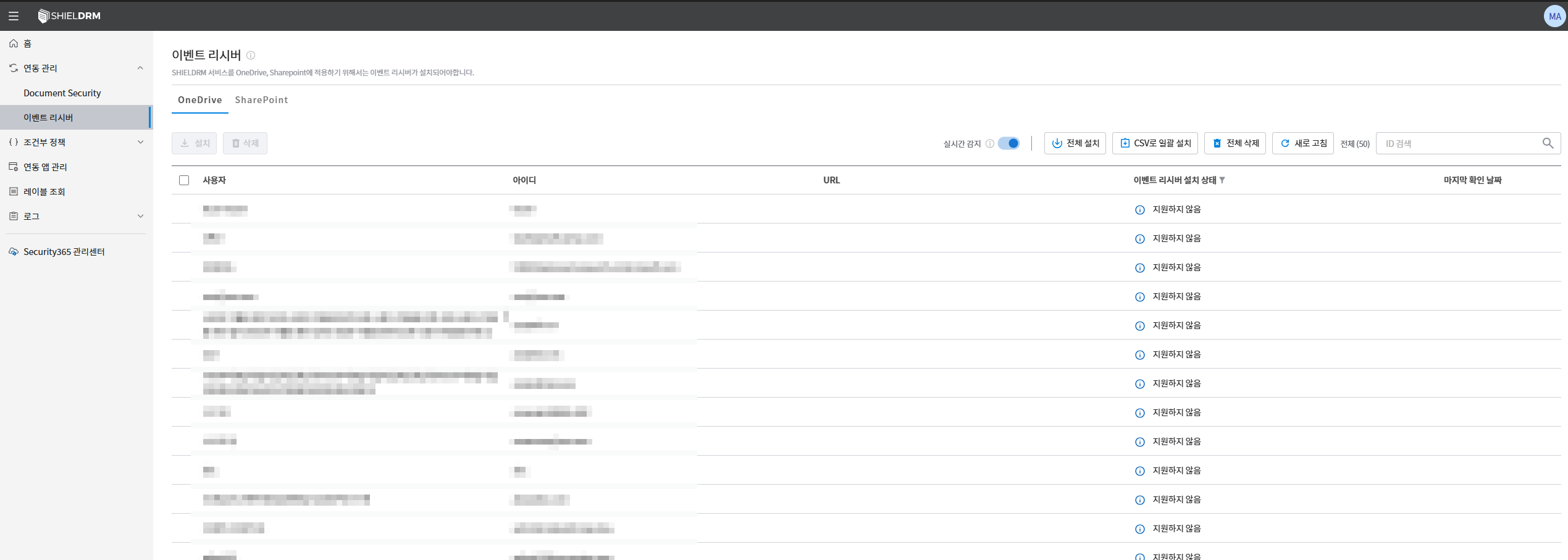
- Check User List
- User accounts and the corresponding email and URL are displayed.
이벤트 리시버 설치 상태You can check the installation status in the column.마지막 확인 날짜You can check the date when the event receiver status was last checked in the column.
- Real-time Detection Settings
실시간 감지When the toggle is enabled, an event receiver will automatically run when new files are created or moved within OneDrive.
- Full Installation/Uninstallation
전체 설치You can install the event receiver for all users listed by clicking the button.전체 삭제You can remove the event receiver for all users through the button.
- CSV Bulk Installation
CSV 일괄 설치You can upload a user list via a CSV file through the button to install event receivers in bulk.CSV로 내보내기You can download the data of the current list as a CSV file through the button.
SharePoint Event Receiver
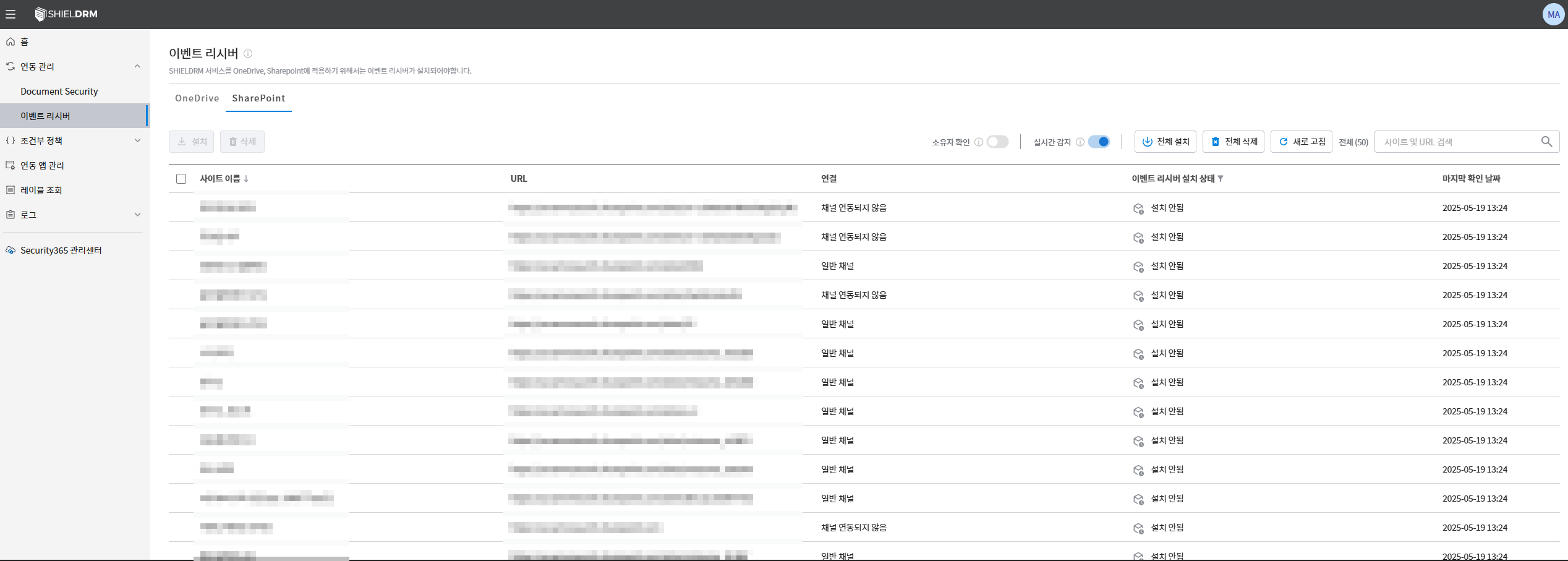
- Check Site List
- The name and URL of the SharePoint site are displayed.
연결You can check the connection status of each site in the column (normal channel, channel not linked, etc.).이벤트 리시버 설치 상태You can check the installation status in the column.마지막 확인 날짜You can check the date when the event receiver status was last checked in the column.
- Owner Verification Feature
소유자 확인When the toggle is enabled, only the owner of the current SharePoint site can install the event receiver.- This prevents unauthorized users from installing event receivers.
- Classification of Sites by Region
- (When Multi GEO is configured in SharePoint) This feature allows you to manage sites registered in each region separately.
- You can select each region (Korea, USA, Japan, etc.) to check whether the event receiver installation for the site belonging to that region is in place.
- (When Multi GEO is configured in SharePoint) This feature allows you to manage sites registered in each region separately.
- Real-time Detection Settings
실시간 감지When the toggle is activated, an event receiver will automatically run when a new site is created or files are moved within SharePoint.
- Full Installation/Uninstallation
전체 설치You can install event receivers on all sites listed by clicking the button.전체 삭제You can remove the event receivers from all sites through the button.
Cautions
CSV 내보내기You can periodically check the event receiver status and back it up through the feature. (Under development)- With the SharePoint Multi-GEO feature, global organizations can easily manage sites.