conversion
Right-click menu for files/folders
When setting the runMode of the DS_MIP_INIT custom policy to "s365"
Right-click support is only available for a single document file when using runMode: "appAuth".
Related Modules
| File Name | path | version | Description | Build Path |
|---|---|---|---|---|
| SCPD_DS36564.dll | C:\Windows\Softcamp\sdk\scsa | 6.1.0.4 | Document Security Event Module | \sctfsbuild.softcamp.co.kr\AzureBuild\2025\DS6.0_VS2019(ZTCA_AIP)| |
| SCPD_DS365.dll | C:\Windows\Softcamp\sdk\scsa | 6.1.0.4 | Document Security Event Module | \sctfsbuild.softcamp.co.kr\AzureBuild\2025\DS6.0_VS2019(ZTCA_AIP)| |
Resource file
| File Name | path | version | Description | Build Path |
|---|---|---|---|---|
| ResUIKOR.rc | C:\Windows\Softcamp\SDK\Res\DS\ | 6.0.0.20 | Korean Resources | |
| conv_fail.png | C:\Windows\Softcamp\SDS\Image\drm_icons\04.MIP | Conversion failed | BuildServer\DS6.0_VS2019(ZTCA_AIP)\InstallSheild\DS27.SCMIP\SCMIP_x86\SOFTCAMP\sds\Image | |
| conv_ing.png | C:\Windows\Softcamp\SDS\Image\drm_icons\04.MIP | Converting | BuildServer\DS6.0_VS2019(ZTCA_AIP)\InstallSheild\DS27.SCMIP\SCMIP_x86\SOFTCAMP\sds\Image | |
| conv_restart.png | C:\Windows\Softcamp\SDS\Image\drm_icons\04.MIP | Re-execute conversion | BuildServer\DS6.0_VS2019(ZTCA_AIP)\InstallSheild\DS27.SCMIP\SCMIP_x86\SOFTCAMP\sds\Image | |
| conv_skip.png | C:\Windows\Softcamp\SDS\Image\drm_icons\04.MIP | exclusion from conversion | BuildServer\DS6.0_VS2019(ZTCA_AIP)\InstallSheild\DS27.SCMIP\SCMIP_x86\SOFTCAMP\sds\Image | |
| conv_standby.png | C:\Windows\Softcamp\SDS\Image\drm_icons\04.MIP | Conversion Waiting | BuildServer\DS6.0_VS2019(ZTCA_AIP)\InstallSheild\DS27.SCMIP\SCMIP_x86\SOFTCAMP\sds\Image | |
| conv_success.png | C:\Windows\Softcamp\SDS\Image\drm_icons\04.MIP | Conversion successful | BuildServer\DS6.0_VS2019(ZTCA_AIP)\InstallSheild\DS27.SCMIP\SCMIP_x86\SOFTCAMP\sds\Image | |
| conv_warning.png | C:\Windows\Softcamp\SDS\Image\drm_icons\04.MIP | Conversion Warning | BuildServer\DS6.0_VS2019(ZTCA_AIP)\InstallSheild\DS27.SCMIP\SCMIP_x86\SOFTCAMP\sds\Image | |
| doc.ico | C:\Windows\Softcamp\SDS\Image\drm_icons\01.MSOffice\04.O365 | Document Type Image | BuildServer\DS6.0_VS2019(ZTCA_AIP)\InstallSheild\DS27.SCMIP\SCMIP_x86\SOFTCAMP\sds\Image | |
| docm.ico | C:\Windows\Softcamp\SDS\Image\drm_icons\01.MSOffice\04.O365 | Document Type Image | BuildServer\DS6.0_VS2019(ZTCA_AIP)\InstallSheild\DS27.SCMIP\SCMIP_x86\SOFTCAMP\sds\Image | |
| docx.ico | C:\Windows\Softcamp\SDS\Image\drm_icons\01.MSOffice\04.O365 | Document Type Image | BuildServer\DS6.0_VS2019(ZTCA_AIP)\InstallSheild\DS27.SCMIP\SCMIP_x86\SOFTCAMP\sds\Image | |
| pdf.ico | C:\Windows\Softcamp\SDS\Image\drm_icons\03.ETC\01.AcroRD | Document Type Image | BuildServer\DS6.0_VS2019(ZTCA_AIP)\InstallSheild\DS27.SCMIP\SCMIP_x86\SOFTCAMP\sds\Image | |
| pps.ico | C:\Windows\Softcamp\SDS\Image\drm_icons\01.MSOffice\04.O365 | Document Type Image | BuildServer\DS6.0_VS2019(ZTCA_AIP)\InstallSheild\DS27.SCMIP\SCMIP_x86\SOFTCAMP\sds\Image | |
| ppsx.ico | C:\Windows\Softcamp\SDS\Image\drm_icons\01.MSOffice\04.O365 | Document Type Image | BuildServer\DS6.0_VS2019(ZTCA_AIP)\InstallSheild\DS27.SCMIP\SCMIP_x86\SOFTCAMP\sds\Image | |
| ppt.ico | C:\Windows\Softcamp\SDS\Image\drm_icons\01.MSOffice\04.O365 | Document Type Image | BuildServer\DS6.0_VS2019(ZTCA_AIP)\InstallSheild\DS27.SCMIP\SCMIP_x86\SOFTCAMP\sds\Image | |
| pptm.ico | C:\Windows\Softcamp\SDS\Image\drm_icons\01.MSOffice\04.O365 | Document Type Image | BuildServer\DS6.0_VS2019(ZTCA_AIP)\InstallSheild\DS27.SCMIP\SCMIP_x86\SOFTCAMP\sds\Image | |
| pptx.ico | C:\Windows\Softcamp\SDS\Image\drm_icons\01.MSOffice\04.O365 | Document Type Image | BuildServer\DS6.0_VS2019(ZTCA_AIP)\InstallSheild\DS27.SCMIP\SCMIP_x86\SOFTCAMP\sds\Image | |
| xls.ico | C:\Windows\Softcamp\SDS\Image\drm_icons\01.MSOffice\04.O365 | Document Type Image | BuildServer\DS6.0_VS2019(ZTCA_AIP)\InstallSheild\DS27.SCMIP\SCMIP_x86\SOFTCAMP\sds\Image | |
| xlsb.ico | C:\Windows\Softcamp\SDS\Image\drm_icons\01.MSOffice\04.O365 | Document Type Image | BuildServer\DS6.0_VS2019(ZTCA_AIP)\InstallSheild\DS27.SCMIP\SCMIP_x86\SOFTCAMP\sds\Image | |
| xlsm.ico | C:\Windows\Softcamp\SDS\Image\drm_icons\01.MSOffice\04.O365 | Document Type Image | BuildServer\DS6.0_VS2019(ZTCA_AIP)\InstallSheild\DS27.SCMIP\SCMIP_x86\SOFTCAMP\sds\Image | |
| xlsx.ico | C:\Windows\Softcamp\SDS\Image\drm_icons\01.MSOffice\04.O365 | Document Type Image | BuildServer\DS6.0_VS2019(ZTCA_AIP)\InstallSheild\DS27.SCMIP\SCMIP_x86\SOFTCAMP\sds\Image |
When selecting a single file
| User Screen | Content | Note |
|---|---|---|
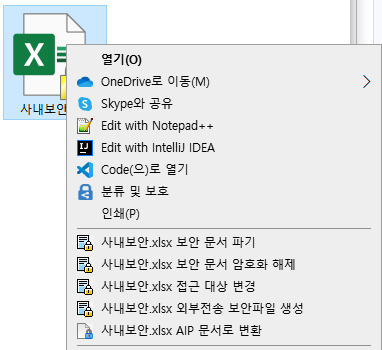 | Single Security Document Right Click | Add menu to convert to AIP document |
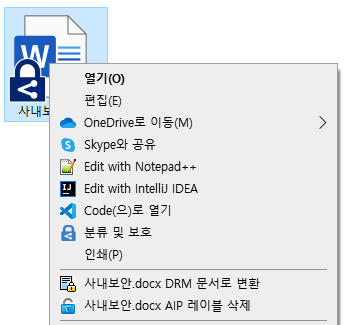 | Right-click on a single AIP document | Add AIP Label Deletion Menu |
When selecting multiple files/folders
| User Screen | Content | Note |
|---|---|---|
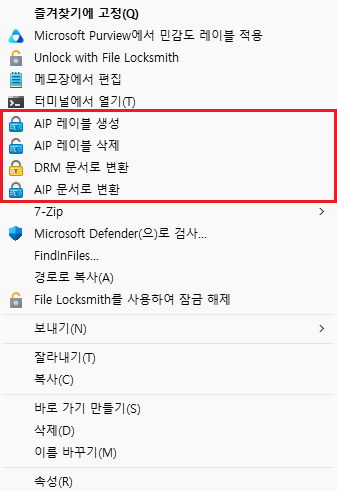 | Multiple Folder/File Right Click | Custom Policy (DS_MIP_SHELL_MENU) Settings |
Right-click menu execution screen
| User Screen | Content | Note |
|---|---|---|
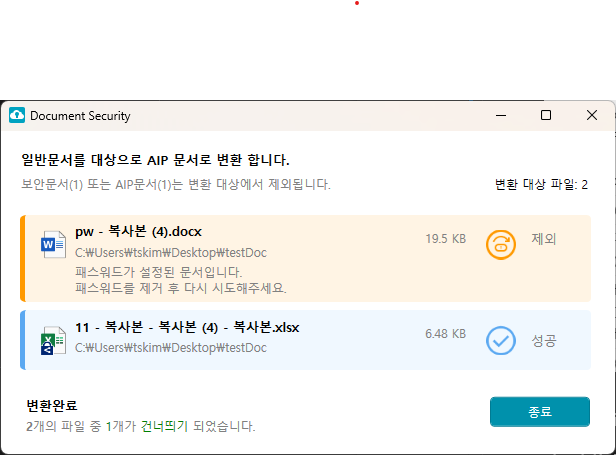 | Creating AIP Labels | Target Document: General Document AIP, security documents, and regular documents with password protection are excluded from the conversion list. Convert to designated AIP label document according to ZTCAP policy Integrated Log: Usage SCI Log: Unused |
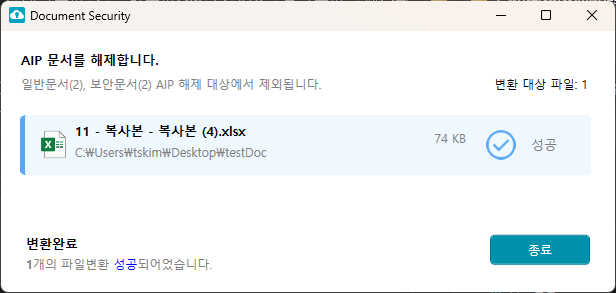 | Delete AIP Label | Target Document: AIP Document General and security documents are excluded from the conversion list. Add menu when setting custom policy DS_MIP_SHELL_MENU:SHELL_AIP_DELETE Integrated Log: Usage SCI Log: Unused |
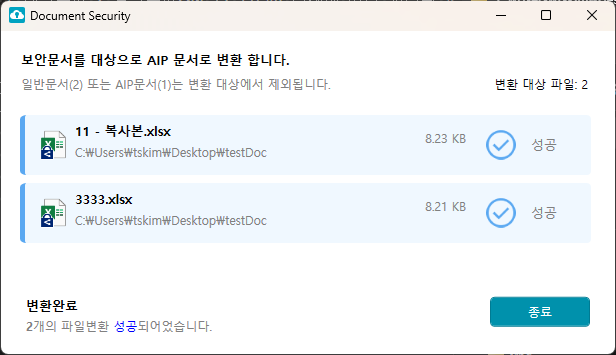 | Convert to AIP document | Target Document: Security Document AIP, general documents are excluded from the conversion list. Convert to designated AIP label document according to ZTCAP policy. Integrated Log: Usage SCI log: Unused (Release log of the original security document not sent) |
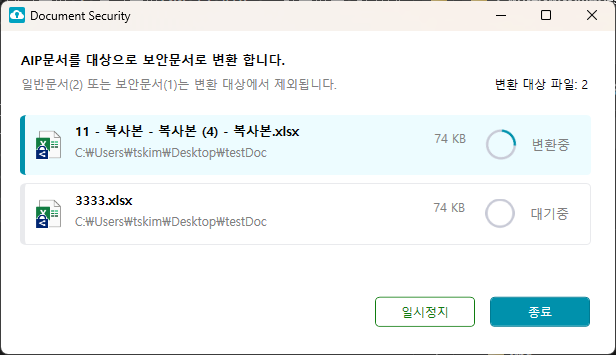 | Convert to DRM Document | Target Document: AIP Document General and security documents are excluded from the conversion list. Converted to designated security document according to ZTCAP policy. Integrated Log: Usage SCI Log: Usage (Transmission of Generated Security Document Logs) |
Right-click menu by item
Some items may vary depending on policy settings.
| division | Detail |
|---|---|
| General Document | •Creating AIP └ AIP, security documents, and general documents with password protection are excluded from the conversion list. • General Document Encryption |
| DRM Document | •Convert to AIP document └ AIP, general documents are excluded from the conversion list. • Document Destruction Security • Decrypting secure documents • Change Access Target • External Transfer Secure File Creation |
| AIP Document | •Convert to DRM Document └ General, security documents are excluded from the conversion list. • Delete AIP Label └ General, security documents are excluded from the conversion list. • General Document Encryption |
| Multi-Select | •Creating AIP Labels └ Only general documents are subject to conversion. • Delete AIP Label └ This only applies to the AIP document conversion list. • Convert to DRM Document └ AIP document corresponds to the conversion list • Convert to AIP document └ The DRM document corresponds to the conversion list. └ AIP, general documents are excluded from the conversion list. • General Document Encryption |
| Folder | •Creating AIP Labels └ Only general documents are subject to conversion. • Delete AIP Label └ This only applies to the AIP document conversion list. • Convert to DRM Document └ AIP document corresponds to the conversion list • Convert to AIP document └ The DRM document corresponds to the conversion list. • File Encryption in Folder └ Supported Encrypted Extensions (Localset) • File Decryption in Folder • Simple Encryption of Files in a Folder └ Unsupported encryption extensions (Localset) |
Add resource content for ResUIKOR.rc
ResUIKOR Information Path: C:\Windows\SOFTCAMP\SDK\Res\DS Version: version = 6.0.0.14
[DS365_ERROR]
ERROR_MSG_TITLE = 알림
ERROR_SUCCESS = 성공
ERROR_FAIL = 실패
ERROR_DOC_PASSWORD = 패스워드가 설정된 문서입니다.\n패스워드를 제거 후 다시 시도해주세요.
ERROR_CONNECT_FAIL=네트워크 연결이 실패되었습니다.
ERROR_BYPASS=예외 대상 문서입니다.
ERROR_NETWORK_NOT_CONNECT=인터넷연결이 되지 않습니다. 네트워크 환경을 확인해주세요.
ERROR_SHARING_VIOLATION=이미 열려있는 문서일 경우 해당 문서 및 프로세스 종료 후 다시 시도해주세요.
ERROR_DRM_DEC_FAIL=문서보안 복호화가 실패되었습니다.
ERROR_AIP_DEC_FAIL=AIP 해제가 실패되었습니다.
ERROR_DRM_ENC_FAIL=보안문서 암호화가 실패되었습니다.
ERROR_AIP_ENC_FAIL=AIP 문서 생성이 실패되었습니다.
ERROR_FILE_NOT_FOUND=파일을 찾을 수 없습니다.\n파일명 또는 경로명이 변경되었는지 확인 해주세요.
ERROR_TARGET_FILE_SZIE_ZERO=파일 사이즈가 0Byte인 파일은 변환할 수 없습니다.
ERROR_POLICY_NOT_FOUND=ZTCAP 정책에 설정된 집행정책이 없습니다.
ERROR_FAIL_AIP_LIBRARY=Microsoft MIP SDK 오류
ERROR_ALREADY_AIP=이미 MS Label 이 적용된 문서입니다.
ERROR_WRITE_FAIL=쓰기 권한이 없어 실패되었습니다.
ERROR_TOKEN_EMPTY=사용자 인증 정보가 없습니다.\n문서보안 로그아웃 후 재로그인 후 다시 시도해주세요.
ERROR_TOKEN_DATA=토큰정보가 유효하지 않습니다.\n재인증 후 다시 시도해주세요
ERROR_ZTCAP_PROC_NOT_FOUND=ZTCAP 프로세스가 실행중이지 않습니다.
ERROR_UNKONWN=알수 없는 오류입니다.
Add content to DS365Agent.json resource
DS365Agent.json Information Path: C:\Windows\SOFTCAMP\Security365\DS365\x64 Version: version = 6.0.0.3
{
  "version": "6.0.0.3",
  "KOR": {
    "DS365_ERROR": {
      "ERROR_MSG_TITLE": "알림",
      "ERROR_DOC_PASSWORD": "패스워드가 설정된 문서입니다.\n패스워드를 제거 후 다시 시도해주세요.",
      "ERROR_THROTTLING_FAIL": "Microsoft AIP 문서변환 요청이 급증하여 기능이 제한되고 있습니다.\n\n잠시 후 다시 시도해 주세요.",
      "MIP_NOT_AVAILABLE_S365_TITLE": "알림",
      "MIP_NOT_AVAILABLE_S365_MSG": "인터넷 연결이되지 않아, Document Security6 기능이 제한됩니다."
    },
    "DS365AGENT_CONVUI": {
      "CONNECT_TEST_URL": "https://login.security365.com",
      "END_REASON_CONVERT_EXCEED": "변환 가능한 최대 파일에 도달하여 종료됩니다.\n\n변환되지 않은 파일에 대하여 재시도 하시기 바랍니다.",
      "UI_LABEL_CONVERT_FILE_COUNT": "변환 대상 파일 :",
      "UI_LABEL_AIP_CREATE_TITLE": "일반문서를 대상으로 AIP 문서로 변환 합니다.",
      "UI_LABEL_AIP_CREATE_DESC": "보안문서({0}) 또는 AIP문서({1})는 변환 대상에서 제외됩니다.",
      "UI_LABEL_AIP_DELETE_TITLE": "AIP 문서를 해제합니다.",
      "UI_LABEL_AIP_DELETE_DESC": "일반문서({0}), 보안문서({1}) AIP 해제 대상에서 제외됩니다.",
      "UI_LABEL_AIP_TO_DRM_TITLE": "AIP문서를 대상으로 보안문서로 변환 합니다.",
      "UI_LABEL_AIP_TO_DRM_DESC": "일반문서({0}) 또는 보안문서({1})는 변환 대상에서 제외됩니다.",
      "UI_LABEL_DRM_TO_AIP_TITLE": "보안문서를 대상으로 AIP 문서로 변환 합니다.",
      "UI_LABEL_DRM_TO_AIP_DESC": "일반문서({0}) 또는 AIP문서({1})는 변환 대상에서 제외됩니다.",
      "UI_LABEL_CONVERT_FINISH": "변환완료",
      "UI_LABEL_CONVERT_FINISH_SUCCESS": "<b>{0}</b>개의 파일변환 <blue>성공</blue>되어었습니다.",
      "UI_LABEL_CONVERT_FINISH_FAIL": "<b>{0}</b>개의 파일 중 <red>{1}</red>개가 <red>변환실패</red>되었습니다.\n실패한 파일을 확인하고 다시 시도해 주세요.",
      "UI_LABEL_CONVERT_FINISH_SKIP": "<b>{0}</b>개의 파일 중 <green>{1}</green>개가 <green>건너띄기</green> 되었습니다.",
      "UI_LABEL_CONVERT_FINISH_FAIL_SKIP": "<b>{0}</b>개의 파일 중 <b>{1}</b>개(<red>실패{2}</red>, <green>건너뛰기{3}</green>)가 변환되지 않았습니다.\n실패한 파일을 확인하고 다시 시도해주세요.",
      "UI_BTN_EXIT": "종료",
      "UI_BTN_START": "시작",
      "UI_BTN_PAUSE": "일시정지",
      "UI_BTB_RESUME": "재실행",
      "UI_LISTVIEW_FILE_STATUS_STANDBY": "대기중",
      "UI_LISTVIEW_FILE_STATUS_RUNNING": "변환중",
      "UI_LISTVIEW_FILE_STATUS_PASSWD": "패스워드",
      "UI_LISTVIEW_FILE_STATUS_EXT": "확장자",
      "UI_LISTVIEW_FILE_STATUS_SUCCESS": "성공",
      "UI_LISTVIEW_FILE_STATUS_FAIL": "실패",
      "UI_LISTVIEW_FILE_STATUS_SKIP": "제외",
      "UI_LISTVIEW_FILE_STATUS_WARRING": "경고",
      "MSGBOX_TITLE": "알림",
      "MSGBOX_NORMAL_FILE_NOT_EXIST": "변환 대상 문서인 일반문서가 선택 목록에 없습니다.",
      "MSGBOX_DRM_FILE_NOT_EXIST": "변환 대상 문서인 DRM 문서가 선택 목록에 없습니다.",
      "MSGBOX_AIP_FILE_NOT_EXIST": "변환 대상 문서인 AIP 문서가 선택 목록에 없습니다."
    }
  }
}
(Old) Right-click menu execution screen
If the DS365Agent64.exe file is not present in the C:\Windows\SOFTCAMP\Security365\DS365\x64\ path, perform the action.
| User Screen | Content | Note |
|---|---|---|
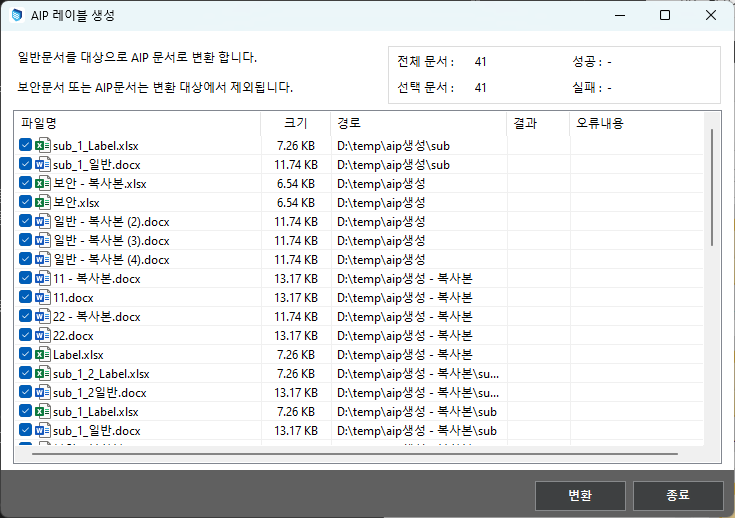 | Creating AIP Labels | Target Document: General Document Convert to designated AIP label document according to ZTCAP policy Integrated Log: Usage SCI Log: Unused |
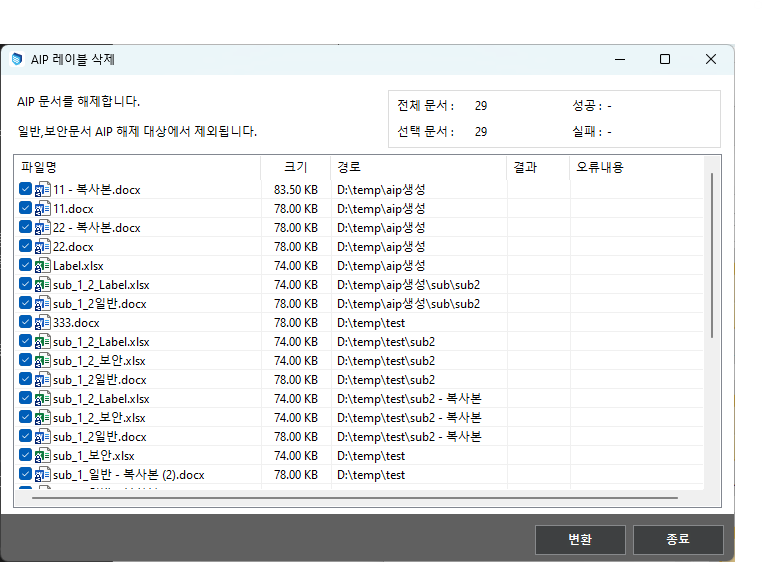 | Delete AIP Label | Target Document: AIP Document Add menu when setting custom policy DS_MIP_SHELL_MENU:SHELL_AIP_DELETE Integrated Log: Usage SCI Log: Unused |
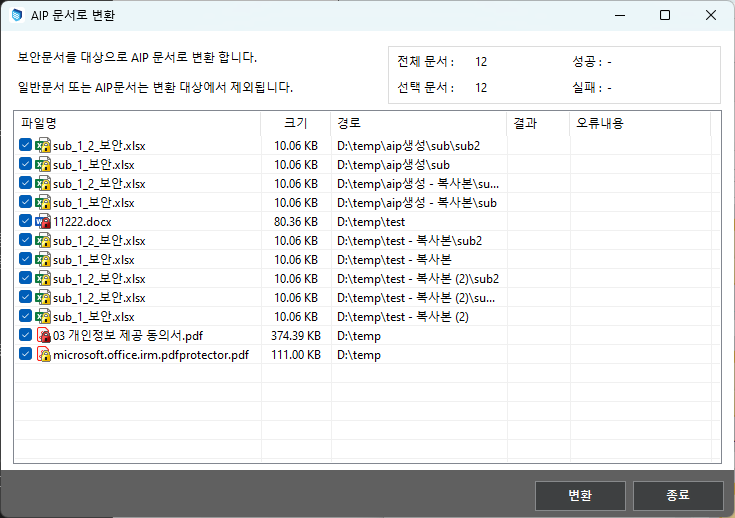 | Convert to AIP document | Target Document: Security Document Convert to designated AIP label document according to ZTCAP policy Integrated Log: Usage SCI log: Unused (Release log of the original security document not sent) |
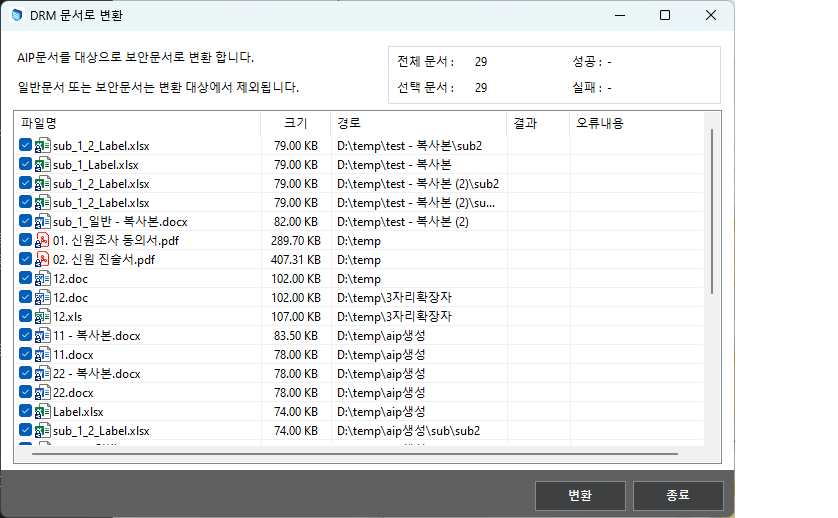 | Convert to DRM Document | Target Document: AIP Document Converted to designated security document according to ZTCAP policy Integrated Log: Usage SCI Log: Usage (Transmission of Generated Security Document Logs) |
Owner retention feature during Mip document conversion
The feature that retains the Owner Id of the original MIP document when converting a MIP document to a DRM document and then back to a MIP document.
1. Overview
After the DRM conversion of an AIP document created by User A with owner permissions, User B converts that document to AIP. In this case, the final document is converted to an AIP document with owner permissions for User B. Even if that document is ultimately converted multiple times, a development request is made for User A to retain owner permissions.
2. Related Modules
| File Name | path | version | Description | Build Path |
|---|---|---|---|---|
| SCPD_DS365.dll | C:\Windows\Softcamp\sdk\scsa | 6.1.0.21 | \sctfsbuild.softcamp.co.kr\AzureBuild\2025\DS6.0_VS2019(ZTCA_AIP)| | |
| SCPD_DS36564.dll | C:\Windows\Softcamp\sdk\scsa | 6.1.0.21 | \sctfsbuild.softcamp.co.kr\AzureBuild\2025\DS6.0_VS2019(ZTCA_AIP)| | |
| DS365.Core.dll | C:\Windows\Softcamp\Security365\DS365\x64 | 6.2.0.17 | \sctfsbuild.softcamp.co.kr\AzureBuild\2025\DS6.0_VS2019(ZTCA_AIP)| |
3. Flowchart
4. Other and Limitations
- The ownerId information of the Mip document is not retained when the Mip document is released. When converted to a DRM document, the information is linked.
- The ownerId information is included in the DRM document header VFI (DSBSDT_VFI_MIP_OWNER_ID) and can be checked in the security document header feature in SDSWizard version 6.0.0.13 or higher.
- In the current DS 6.0, document conversion uses the access token issued by the ssevtr app instead of a user token, and the app must have the InformationProtectionPolicy.Read.All permission set in Microsoft Entra ID. This setting must be applied correctly for the ownerId retention feature to function properly.