User Guide for Log Menu in Each Product Management Page
Log Management Functionality
Basic Screen Layout
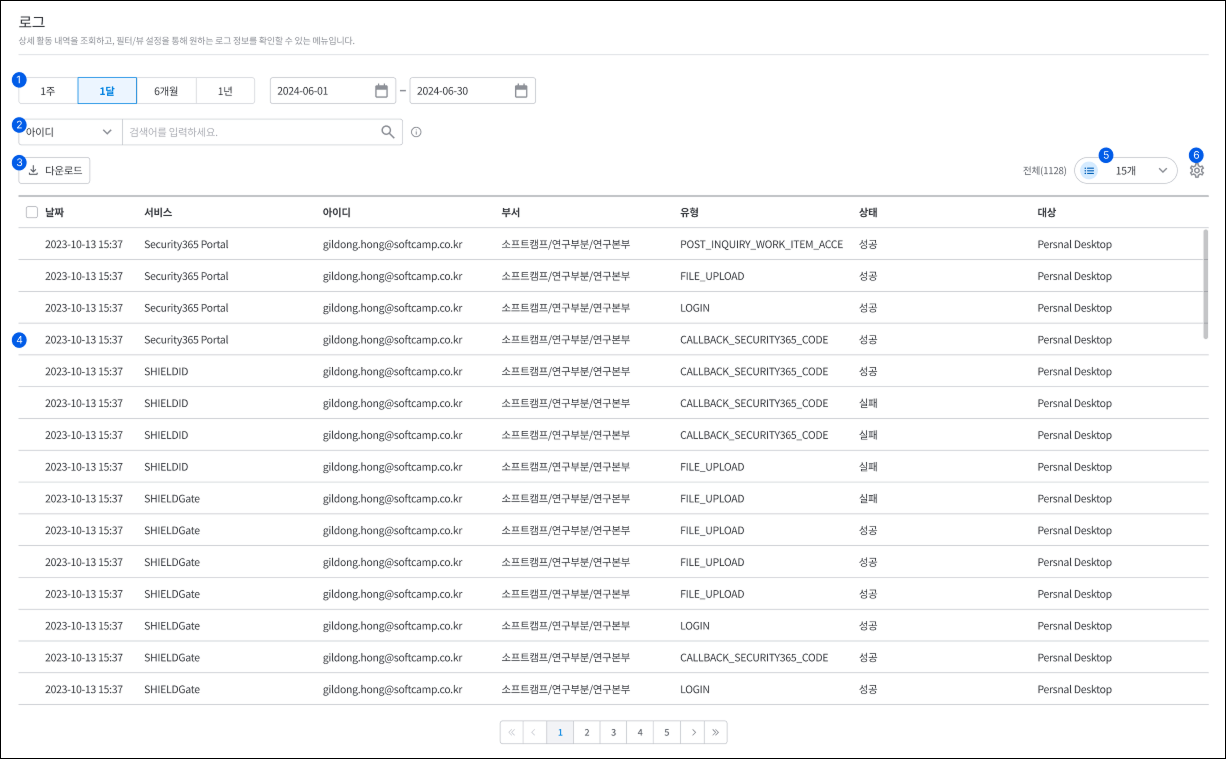
- You can select a query period of 1 week, 1 month, 6 months, or 1 year, or you can set the period directly through the calendar.
- Select an item to search and enter a search term to log.Searchdoes.
- the retrieved logsDownloaddoes.
- You can view the detailed information slide by selecting a log in the log list.
- You can choose the number of logs to display on a page as 15, 30, 50, 100, or 200.
- List SettingsYou can set the items and order to be displayed in the list through the feature.
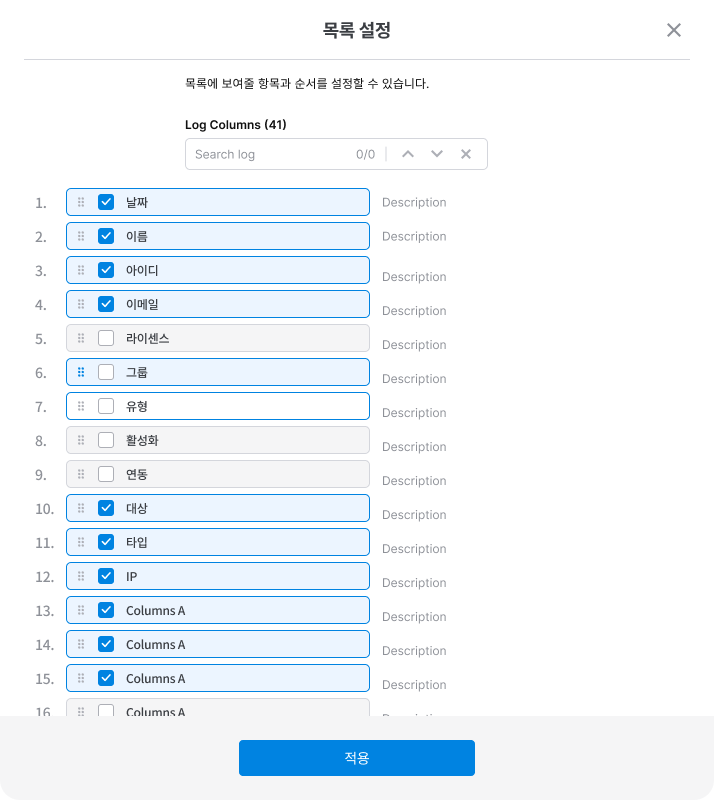
- Clicking the gear icon will bring up the "List Settings" dialog.
- By specifying the items and order to be displayed in the list and clicking [Apply], the log list will be displayed according to the selected settings.
Log Search Functionality
📌 Search Criteria and Specifications
**⚠️ Warning:**The search items and screen layout provided on the product-specific log pages may vary slightly. This guide serves as a comprehensive standard, and for product-specific details, please refer to the individual manuals.
| Item Number | Item Name | Search Method | Description |
|---|---|---|---|
| 1 | Tracking Identifier | = | Search with the exact ID |
| 2 | Log Generation Time | = | Search by specific time (range search possible) |
| 3 | Log Generation IP | = | Search by exact IP address |
| 4 | Service | = | Search by specific service name |
| 5 | id | = | Accurate User ID Search |
| 6 | Name | LIKE | Allow partial name search |
| 7 | Department | LIKE | Allow search including some department names |
| 8 | Type | = | Search for Event Code (Exact Value) |
| 9 | Log Status | = | Searching for specific values such as ERROR, WARN, INFO |
| 10 | Target | LIKE | Allow search including document name, user, URL, etc. |
| 11 | Log Types | = | Exact value search for APP, ADMIN, USER, etc. |
| 12 | Event Description | LIKE | Allow search including some event details |
| 13 | Service Identifier | = | Accurate ID Search |
| 14 | Service Application Name | = | Search for a specific application name |
| 15 | Service Host Name | = | Search for a specific hostname |
| 16 | Company ID | = | Search for specific company ID |
| 17 | Log details | LIKE | Allow search with additional explanations for developers |
| 18 | Checksum | = | Searching for the Correct Checksum Value |
| 19 | ID | = | Accurate ID Search |
| 20 | Sorting Criteria | = | Specify Sorting Conditions |
| 21 | Company Name | LIKE | Allow search including some company names |
| 22 | Company Identifier | = | Search by Specific ID |
| 23 | External Authentication Information | = | Search for specific authentication integration information |
| 24 | User Position | LIKE | Allow partial title search |
| 25 | Original file identifier | = | Search for Specific File ID |
| 26 | Document Identifier | = | Search for specific document ID |
| 27 | Document Title | LIKE | Allow search including some document names |
| 28 | File Extension | = | Search by specific file extensions (.pdf, .docx, etc.) |
| 29 | File Path | LIKE | Allow file inclusion search within a specific folder |
| 30 | SHIELDrive file ID | = | Search for Specific File ID |
| 31 | File Size | = | Exact Size Search (Range Search Available) |
| 32 | File Creation Time | = | Search by Specific Time (Range Search Available) |
| 33 | File Modification Time | = | Search by Specific Time (Range Search Available) |
| 34 | File Hash Value | = | Searching for a specific hash value |
| 35 | Document Type | = | Searching for specific values such as ds, normal, mip, etc. |
| 36 | Previous Document Details | LIKE | Allow search including some DRM information and sensitivity labels |
| 37 | Previous Document Type | = | Search for Specific Document Types |
| 38 | Previous Document Type Details | LIKE | Allow partial inclusion search |
| 39 | Folder Identifier | = | Search for Specific Folder ID |
| 40 | folder name | LIKE | Allow search including some folder names |
| 41 | Folder Path | LIKE | Allow inclusion search within a specific folder |
| 42 | SHIELDrive folder ID | = | Search for Specific Folder ID |
| 43 | Device Identifier | = | Search for Specific Device ID |
| 44 | Device IP Address | = | Searching for Specific Device IP |
| 45 | Device MAC Address | = | Search for a specific MAC address |
| 46 | Process Name | LIKE | Allow search including some process names |
| 47 | Process Path | LIKE | Allow search including processes within a specific path |
| 48 | Source Name | LIKE | Allow search including some source names |
| 49 | Source Information | LIKE | Allow search including urlHost, server name, usb, and part of filepath |
| 50 | Reference Path | LIKE | Allow search including specific URL and file path |
| 51 | Upper Quarter Information | = | Search for specific branch.self value |
| 52 | Current Quarter Information | = | Search for specific file.oid value |
| 53 | Encryption and Decryption Subject | = | Search for Specific Entities |
| 54 | Document Conversion Process | = | Search for a specific process |
| 55 | Print Count | = | Exact Count Search (Range Search Available) |
| 56 | Read Count | = | Exact Count Search (Range Search Available) |
| 57 | Type ID | = | Search by Specific ID |
| 58 | Document Type | = | Search for Specific Document Types |
| 59 | Policy Identifier | = | Search for Specific Policy ID |
| 60 | Policy Application Subject | = | Search for Specific Entities |
| 61 | Policy Name | LIKE | Allow search including some policy names |
| 62 | Previous Policy Name | LIKE | Allow search including some policy names |
| 63 | Policy Rules | LIKE | Allow search including some details of the policy |
| 64 | repository identifier | = | Search for a specific repository ID |
| 65 | repository name | LIKE | Allow search including some repository names |
| 66 | Repository Description | LIKE | Allow search with some description |
| 67 | Repository Type Code | = | Search for Specific Repository Types |
| 68 | External Storage Identifier | = | Search for a specific repository ID |
| 69 | Repository Creation Time | = | Search by Specific Time (Range Search Available) |
| 70 | Repository Change Time | = | Search by Specific Time (Range Search Available) |
| 71 | Repository URL Information | LIKE | Allow search with some URLs |
| 72 | Repository Usage | = | Search for Specific Usage |
| 73 | Site Address | LIKE | Allow search with some URLs |
| 74 | Site Identifier | = | Search for Specific Site ID |
| 75 | Site Type | = | Search by Specific Site Type |
| 76 | Item Identifier | = | Search for Specific Item ID |
| 77 | Add-in Events | = | Search for Specific Events |
| 78 | Edge Server ID | = | Search for Specific Server ID |
| 79 | Edge Server Type | = | Search for Specific Server Types |
| 80 | Edge server name | LIKE | Allow search including some server names |
| 81 | Edge Server Description | LIKE | Allow search with some description |
| 82 | CSSB Service URL | = | Search for a specific URL |
| 83 | WEBDAV service URL | = | Search for a specific URL |
| 84 | WEBDAV event collection address | = | Search for a specific URL |
| 85 | Hancom Web Office Service Address | = | Search for a specific URL |
| 86 | EKMS service address | = | Search for a specific URL |
| 87 | Document Viewer Service Address | = | Search for a specific URL |
| 88 | Whether to set as default | = | Search for Specific Values (TRUE/FALSE) |
| 89 | Business System Category | LIKE | Allow search including some categories |
| 90 | Business System Description | LIKE | Allow search with some description |
| 91 | Business System Domain | LIKE | Allow search with some domain inclusion |
| 92 | Business System ID | = | Search for Specific System ID |
| 93 | Whether the business system is IAP | = | Specific Search |
| 94 | Business System Name | LIKE | Allow search including some system names |
| 95 | Business System Type | = | Search by Specific Type |
| 96 | Business System URL | LIKE | Allow search with some URLs |