Document Grade Guide
Document grade is a feature that controls the upload, download, movement, and copying of files by comparing the security grades assigned to storage and files. This document provides guidance on the grade display visible on the user screen and the actions for each operation. The content below is displayed and operates only when the security grade feature is activated, and storage without a designated grade is not subject to grade control.
1. Security Classification and Labeling
| division | Explanation |
|---|---|
| Security Level | A top-level classification that distinguishes the security levels of data such as confidential, sensitive, and public. Each grade has a ranking (e.g., confidential > sensitive > public) |
| Label | A marking that classifies files and storage in detail within the security level. Labels of the same grade apply the same security level. |
- Security levels and labels are managed in the Security365 Management Center.
- The storage grade is designated by the administrator and cannot be changed by the user.
2. Security Level Indication
In storage with a designated grade, the security grade is displayed as a badge at the location below.
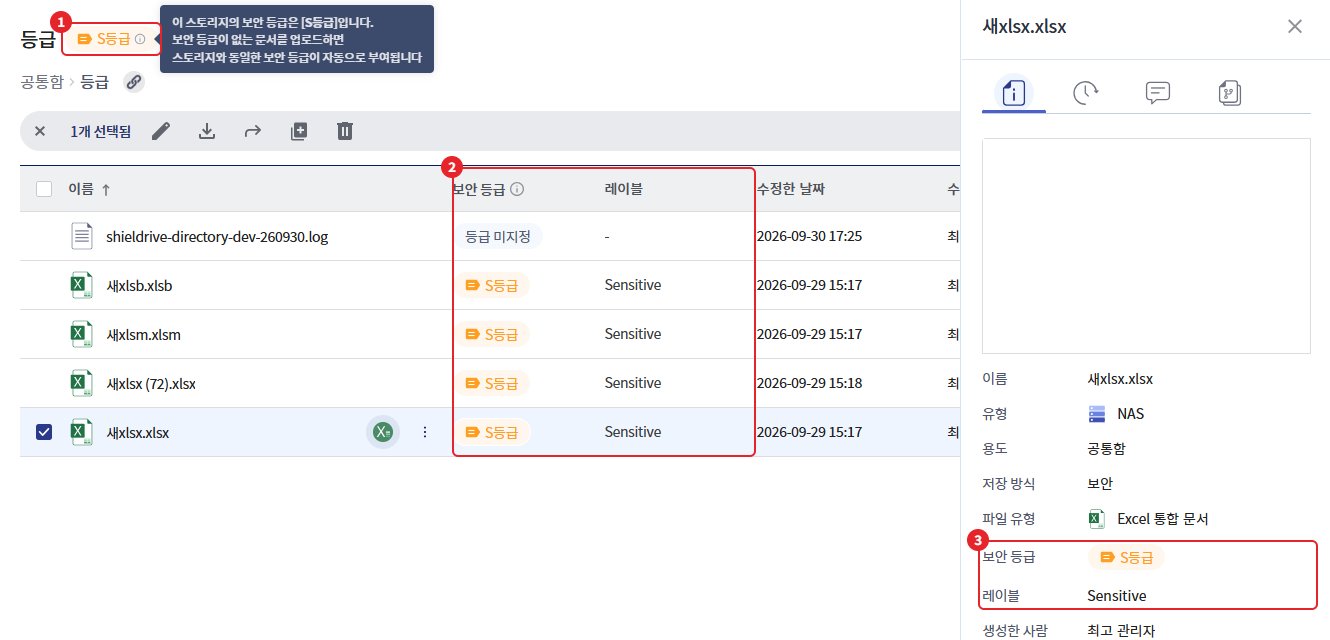
| number | Location | Display content |
|---|---|---|
| 1 | next to the storage name | Current storage security level badge. Hover over the info icon to display the level guide. |
| 2 | File List [Security Level] / [Label] Column | File-specific security level badges and labels |
| 3 | [Detailed Information] Panel | The [Security Level] and [Label] of the selected file·storage |
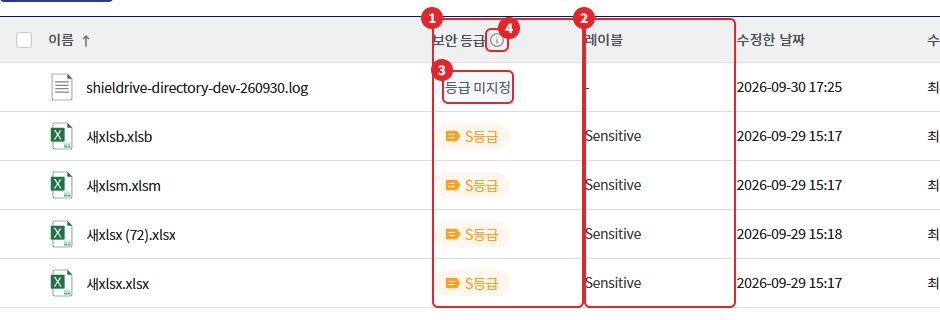
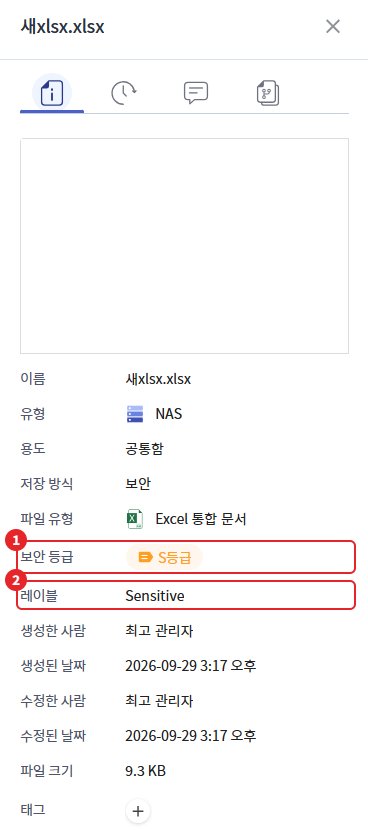
- Files without a grade are marked as "Grade Not Specified"
- File List Hovering over the guide icon in the [Security Level] column header displays a summary of unclassified storage, file handling, and move/copy policies.
The guidance text next to the storage name badge is as follows.
The security level of this storage is [level]. If you upload a document without a security level, it will automatically be assigned the same security level as the storage.
3. Actions on Upload
When you upload a file to storage with a specified grade, it compares the file grade and the storage grade.
| File Status | Action |
|---|---|
| Storage or lower grade | Upload |
| Higher grade than storage | Upload Blocked |
| Unrated | According to the administrator's [Unspecified Grade File Upload] settings. If allowed, it will be uploaded and automatically assigned the same grade as storage; if blocked, the upload will be blocked. |
- Example: Sensitive grade storage allows only sensitive and public grade files to be uploaded, while confidential grade files are blocked.
- If blocked, display the message "You cannot perform this action according to the security level policy."
Caution - Unsupported Format: Files of a format that cannot have a security level assigned follow the [Upload Unclassified Files] setting like unclassified files. If allowed, they will be uploaded without a security level assigned and will be displayed as "Unclassified" in the list.
4. Actions on Download
When downloading files from storage with a designated tier, the tier policy is also applied.
| File Status | Action |
|---|---|
| Rating Specification File | Allow or block downloads (exports) according to the classification policy |
| Unrated file | According to the administrator's [Unrated File Download] settings. If allowed, download in an unrated state. |
- If blocked, display the message "You cannot perform this action according to the security level policy."
- When downloading after approval from storage where approval has been applied, if blocked, display the message "Cannot export due to rating policy." (Refer to "Approval Request Guide")
Caution - Unsupported Format: Files of formats that cannot have a security level assigned follow the [Unclassified File Download] setting. If allowed, they will be downloaded as is.
5. Move·Copy Actions
When moving or copying files to another storage, compare the source storage, destination storage, and the file's classification. Files can only be moved or copied to storage of the same classification or a higher classification. (e.g., Public → Confidential possible, Confidential → Public not possible)
If blocked, the move/copy window will display the following message and cannot be executed.
(Image to be attached later)
| situation | Guide text |
|---|---|
| Moving and Copying Between Designated Storage and Undesignated Storage | Moving/copying between designated storage and unspecified storage is not possible. |
| Move/Copy to Storage of Lower Grade than File Grade | Moving/copying to a storage of a lower grade than the current file's grade is not possible. |
| Move or copy files of a higher grade than the current storage grade to another storage. | Files of a higher grade than the current storage cannot be moved/copied to another storage. |
- Movement and copying within the same storage are not subject to grade control.
- Moving and copying between unclassified storage is not subject to grade control.
- When moving or copying a folder, check the rating for each file inside the folder.
Caution - Unsupported Format: Files in formats that cannot have a security level assigned follow the same criteria as unclassified files.