Cloud Download Document Conversion Feature
info
Performs conversion functions for documents downloaded from cloud storage (OneDrive, SharePoint, Teams).
- The definition of the conversion method follows the Ztcap policy.
1. Overview
- It provides conversion functionality for documents downloaded from cloud storage (OneDrive, SharePoint, Teams).
- The policy regarding conversion follows the Ztcap policy.
2. Related Modules
| File Name | path | version | Description | Build Path |
|---|---|---|---|---|
| SCRA_DS365Shell.dll | C:\Windows\Softcamp\sdk | 6.0.0.37 | Explorer, Browser, TeamsApp Hook Module | \sctfsbuild.softcamp.co.kr\AzureBuild\2025\DS6.0_VS2019(ZTCA_AIP)| |
| SCRA_DS365Shell64.dll | C:\Windows\Softcamp\sdk | 6.0.0.37 | Explorer, Browser, TeamsApp Hook Module | \sctfsbuild.softcamp.co.kr\AzureBuild\2025\DS6.0_VS2019(ZTCA_AIP)| |
| SCPD_DS365.dll | C:\Windows\Softcamp\sdk\scsa | 6.1.0.4 | Document Security Event Module | \sctfsbuild.softcamp.co.kr\AzureBuild\2025\DS6.0_VS2019(ZTCA_AIP)| |
| SCPD_DS36564.dll | C:\Windows\Softcamp\sdk\scsa | 6.1.0.4 | Document Security Event Module | \sctfsbuild.softcamp.co.kr\AzureBuild\2025\DS6.0_VS2019(ZTCA_AIP)| |
| DSEDCon.dll | C:\Windows\Softcamp\SDS | 6.0.0.12 | Document Security Global Module | \sctfsbuild.softcamp.co.kr\AzureBuild\2025\DS_vs2019| |
| DSEDCon64.dll | C:\Windows\Softcamp\SDS\x64 | 6.0.0.12 | Document Security Global Module | \sctfsbuild.softcamp.co.kr\AzureBuild\2025\DS_vs2019| |
| SCTL_ZipMngr.dll | C:\Windows\Softcamp\SDS | 6.0.0.4 | Document Security Zip Compression Utility Module | \sctfsbuild.softcamp.co.kr\AzureBuild\2025\DS_vs2019| |
| SCTL_ZipMngr64.dll | C:\Windows\Softcamp\SDS | 6.0.0.4 | Document Security Zip Compression Utility Module | \sctfsbuild.softcamp.co.kr\AzureBuild\2025\DS_vs2019| |
| SDSEnc.exe | C:\Windows\Softcamp\SDS | 6.0.0.3 | Document Security Secure Document Module | \sctfsbuild.softcamp.co.kr\AzureBuild\2025\DS_vs2019| |
| DSResChn.ini | C:\Windows\Softcamp\SDS | 6.0.0.3 | Multilingual Resources | \sctfsbuild.softcamp.co.kr\AzureBuild\2025\DS_vs2019| |
| DSResCht.ini | C:\Windows\Softcamp\SDS | 6.0.0.3 | Multilingual Resources | \sctfsbuild.softcamp.co.kr\AzureBuild\2025\DS_vs2019| |
| DSResCze.ini | C:\Windows\Softcamp\SDS | 6.0.0.3 | Multilingual Resources | \sctfsbuild.softcamp.co.kr\AzureBuild\2025\DS_vs2019| |
| DSResDeu.ini | C:\Windows\Softcamp\SDS | 6.0.0.3 | Multilingual Resources | \sctfsbuild.softcamp.co.kr\AzureBuild\2025\DS_vs2019| |
| DSResEng.ini | C:\Windows\Softcamp\SDS | 6.0.0.4 | Multilingual Resources | \sctfsbuild.softcamp.co.kr\AzureBuild\2025\DS_vs2019| |
| DSResFra.ini | C:\Windows\Softcamp\SDS | 6.0.0.3 | Multilingual Resources | \sctfsbuild.softcamp.co.kr\AzureBuild\2025\DS_vs2019| |
| DSResJpn.ini | C:\Windows\Softcamp\SDS | 6.0.0.4 | Multilingual Resources | \sctfsbuild.softcamp.co.kr\AzureBuild\2025\DS_vs2019| |
| DSResKor.ini | C:\Windows\Softcamp\SDS | 6.0.0.6 | Multilingual Resources | \sctfsbuild.softcamp.co.kr\AzureBuild\2025\DS_vs2019| |
| DSResRus.ini | C:\Windows\Softcamp\SDS | 6.0.0.4 | Multilingual Resources | \sctfsbuild.softcamp.co.kr\AzureBuild\2025\DS_vs2019| |
3. Related Custom Policies
| ID | HOOK_LOAD_DYNAMIC Policy Description Link | ||
|---|---|---|---|
| TYPE | EDIT | ||
| Policy Value Format | ModuleName1;x64(0) or x86(1);ProcessNameToLoad | Module Name 2;x64(0) or x86(1);Process Name to Load 2 | ... |
| Description | - Policy for Download Transformation of TeamsApp - For TeamsApp, the process that hooks the download action is the webview2 process, so this process must be hooked through the SCRA_DS365Shell hook module. - The DSEDCommon included in the policy value has been added because it is required by the SCGMEX64 module. If it is not needed in certain cases, the policy can be removed. However, it is necessary if hooking fails in SCRA_DS365Shell.dll. | ||
| Policy Value | DSEDCommon.dll;1;msedgewebview2.exe|DSEDCommonx64.dll;0;msedgewebview2.exe|SCRA_DS365Shell.dll;1;msedgewebview2.exe|SCRA_DS365Shell64.dll;0;msedgewebview2.exe |
4. Ztcap Policy Related
4-1 Example of decisionFactors queried by ztcap at the Endpoint during function operation
// 단일 문서(docx Aip문서) 다운로드시 문서에 대한 질의 json
{
    "decisionFactors": [
  {
    "category": "document",
    "target": {
      "info": {
        "ext": "docx",
        "zoneIdentifier": "https://softcamp-my.sharepoint.com/personal/jaekwon_lee_softcamp_co_kr/_layouts/15/download.aspx?UniqueId=ed4e27ad%2Dda48%2D476b%2Da99a%2Dd517a54ad6db"
      },
      "type": "mip"
    }
  },
  {
    "category": "storage",
    "target": {
      "info": {
        "folder": "%USERS%\\Downloads"
      },
      "type": "local"
    }
  },
  {
    "category": "fileEvent",
    "target": {
      "info": {
        "event": "DownloadFile_FromCloud"
      },
      "type": "local"
    }
  }
]
}

// 여러문서 선택시 Zip파일에 대한 질의 json
{
    "decisionFactors": [
        {
        "category": "document",
        "target": {
            "info": {
                "ext": "zip",
                ...
                "zoneIdentifier": "https://japaneast1-mediap.svc.ms/transform/zip?cs=fFNQTw"
            },
            "type": "zipArchive"
        }
        },
        {
        "category": "storage",
        "target": {
            "info": {
                "folder": "%USERS%\\Downloads"
            },
            "type": "local"
        }
        },
        {
        "category": "fileEvent",
        "target": {
            "info": {
                "event": "DownloadFile_FromCloud"
            },
            "type": "local"
        }
        }
    ]
}
4-2 ztcap Policy Configuration Precautions
⚠️When setting policies, the following must be considered for the Ztcap policy to be configured for functionality to operate.
- The policy settings for target.info.zoneIdentifier of the json object where category is document in decisionFactors are required.
- The policy value of target.info.zoneIdentifier in the json object where category is document in decisionFactors must be set to include the ZoneIdentifier Url that is entered in the downloaded document upon download.
- Example) The URL of the downloaded document is
https://japaneast1-mediap.svc.ms/transform/zip?cs=fFNQTwAssuming that the policy value of target.info.zoneIdentifier in the json object with category document among the decisionFactors that should be set in the Ztcap policy is "*mediap.svc.ms/transform/zip*" Set by adding wildcards (*) before and after part of the URL, as shown.
- The policy value of target.type in the json object where category is document in decisionFactors is"ds"It is not recommended to include (assuming there is a DRM document in the cloud, this feature is fundamentally for converting general documents and mip documents in the cloud into DRM documents).
- The target.info.event of the json object with category fileEvent in decisionFactors must be"DownloadFile_FromCloud"Set as value (Currently not supported in Ztcap console policy)
//Ztcap 정책 예시
"category": "document",
  "targets": [
    {
      "type": "normal",
      "use": true,
      "operation": "AND",
      "info": {
        "ext": [
          "pptx",
          "zip",
          "xlsx",
          "pdf",
          "ppt",
          "doc",
          "xls",
          "docx"
        ],
        "zoneIdentifier": [ // 다운로드 받은 문서의 zoneidentifier url이 정책에 포함되어야함
          "*microsoftonline.com*",
          "*sharepoint.com*",
          "*mediap.svc.ms/transform/zip*"
        ]
      }
    }

    ....
    {
      "category": "fileEvent",
      "targets": [
        {
          "type": "local",
          "use": true,
          "operation": "OR",
          "info": {
            "event": [
              "DownloadFile_FromCloud" // 파일 이벤트는 DownloadFile_FromCloud가 설정되어야함함
            ]
          }
        }
      ]
    }
4-3 Default Included Policies When Setting ztcap Policy
info
When downloading documents from cloud storage (OneDrive, SharePoint, Teams), the URL information entered in the document Zone.identifier must be included in the default ztcap policy, and additional URL policies may be required in the future depending on changes from the client or the cloud side.
- The URL value of the ztcap policy must be included in the policy.
*mediap.svc.ms/transform/zip**sharepoint.com**microsoftonline.com*
How to Add Cloud Storage URL Policy
- Check the Zone.Identifier file of the downloaded file
# 명령 프롬프트(cmd)에서 확인
more < "filename:Zone.Identifier"
- Add policy based on URL information found in the Zone.Identifier file
- Check the values of the ReferrerUrl or HostUrl fields.
- Add the domain part of the URL to the policy.
- When adding a policy, a wildcard (*) will automatically be added to the front and back of the domain during registration.
- example
https://example-cloud.com/download→example-cloud.comInput →*example-cloud.com*Completed after application :::
5. Application Method
- Module Patch
- Ztcap Policy Settings (4. Application of Ztcap Policy Related Items Required)
- Custom Policy Settings
6. Constraints
- Cloud storage other than OneDrive, SharePoint, and Teams is currently not supported.
- This feature was developed to capture the download timing in a hook manner, so if the logic for writing zoneidentifier information is changed in browsers other than the supported versions below or in newer browsers, the functionality may not work.
| Program | version |
|---|---|
| Msedge |  |
| Chrome | 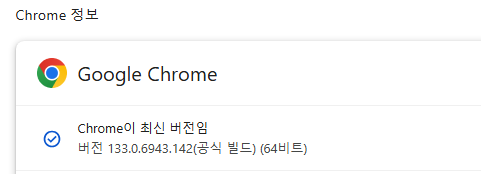 |
| TeamsApp | 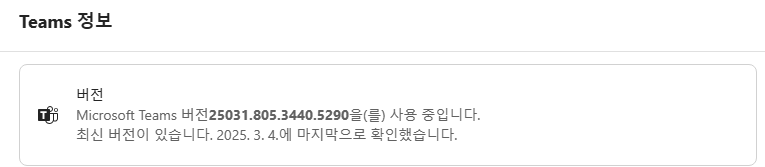 |
- Custom Policy Settings for Windows and Document Security
- The ZoneIdentifier use On/Off Windows setting (registry) should be configured as follows.
- Registry path: HKEY_CURRENT_USER\Software\Microsoft\Windows\CurrentVersion\Policies\Attachments
- Registry Value:SaveZoneInformation : 2 (or the item must not exist for the document conversion feature to work during download)
| SaveZoneInformation value | Zone Identifier (MoTW) Storage Status | Security Warning Display Status (Generally) |
|---|---|---|
| 1 (Enabled) | Not saved | Not displayed |
| 2 (Disabled/Not Configured) | storage box | Displayed |
- Document Security Custom Policy
- DS_NOT_USE_SENDLOG_ZONE_IDF Custom Policy 0 or Policy Not Used (Removed)
- If the above custom policy is set to 1, the ZoneIdentifier will not be registered in the downloaded document files. (SaveZoneInformation: set to 1)
- The cloud download document conversion feature operates through hooking at the time of ZoneIdentifier registration.
- DS_NOT_USE_SENDLOG_ZONE_IDF Custom Policy 0 or Policy Not Used (Removed)
7. Troubleshooting
⚠️If the function is not working, check the following items to determine which one applies.
- When TeamsApp is not functioning
- Check if the SCRA_DS365Shell.dll or SCRA_DS365Shell64.dll module is loaded in the TeamsApp subprocess msedgewebview2.exe using tools like Process Explorer.
- Check DSEDCon version and whether custom policies are applied if not loaded
- When not functioning in the browser
- Check if the SCRA_DS365Shell.dll or SCRA_DS365Shell64.dll module is loaded in the browser process msedgewebview2.exe using tools like Process Explorer.
- If not loaded, it is necessary to check whether the registration of SCRA_DS365Shell.dll and SCRA_DS365Shell64.dll simple add-ins is missing.
- Common
- If SCRA_DS365Shell.dll is loaded correctly, during the download operation, the SDSMonitor log will show'[SCRA_DS365Shell64] Hooked_WritePrivateProfileStringW:526 L"[INFO] Condition met"'Check if this is being collected
- When collecting SDSMonitor logs, the logs contain
[SCPD_DS365] GetZtcaPolicy:888 strLog.c_str() : '{"code":1621,"message":"Conditional policies does not exist that match the conditions"}'If logs like this are collected, it indicates a ztcap policy setting error, so the ztcap policy needs to be checked again. - If the log is missing or if it does not work even after being collected, collect the SDSMonitor log and send it to the developer.