SHIELD ID User Account Deactivation: DS6 Authentication Blocking and Logout Functionality
info
If the user account of SHIELD ID is deactivated, the SHIELD ID authentication will fail in the DS6 client, and at this time, the existing SCI server authentication will also be blocked (handled as a login failure).
1. Overview
- Detect user threats through the KB threat detection system, and provide APIs that can control (block) users with detected threats through the KB enhanced authentication system, as well as request DS6 control measures.
- Related Azure
2. Related Modules
| File Name | path | version | Description | Download Path |
|---|---|---|---|---|
| SCPD_DS365.dll | C:\Windows\Softcamp\SDK\scsa | 6.1.0.4 | SHIELD DRM Module | \sctfsbuild.softcamp.co.kr\AzureBuild\2025\DS6.0_VS2019(ZTCA_AIP) |
| SCPD_DS36564.dll | C:\Windows\Softcamp\SDK\scsa | 6.1.0.4 | SHIELD DRM Module | \sctfsbuild.softcamp.co.kr\AzureBuild\2025\DS6.0_VS2019(ZTCA_AIP) |
| DS365.Agent.exe | C:\Windows\Softcamp\Security365\DS365\x64 | 6.2.0.1 | SHIELD DRM Module | \sctfsbuild.softcamp.co.kr\AzureBuild\2025\DS6.0_VS2019(ZTCA_AIP) |
| DS365.Core.dll | C:\Windows\Softcamp\Security365\DS365\x64 | 6.2.0.4 | SHIELD DRM Module | \sctfsbuild.softcamp.co.kr\AzureBuild\2025\DS6.0_VS2019(ZTCA_AIP) |
| DSResKor.ini | C:\Windows\Softcamp\SDS | 6.0.0.19 | \sctfsbuild.softcamp.co.kr\AzureBuild\2025\DS_vs2019 | |
| DSResJpn.ini | C:\Windows\Softcamp\SDS | 6.0.0.19 | \sctfsbuild.softcamp.co.kr\AzureBuild\2025\DS_vs2019 | |
| DSResEng.ini | C:\Windows\Softcamp\SDS | 6.0.0.19 | \sctfsbuild.softcamp.co.kr\AzureBuild\2025\DS_vs2019 | |
| DSResDeu.ini | C:\Windows\Softcamp\SDS | 6.0.0.19 | \sctfsbuild.softcamp.co.kr\AzureBuild\2025\DS_vs2019 | |
| DSResChn.ini | C:\Windows\Softcamp\SDS | 6.0.0.19 | \sctfsbuild.softcamp.co.kr\AzureBuild\2025\DS_vs2019 | |
| DSResRus.ini | C:\Windows\Softcamp\SDS | 6.0.0.19 | \sctfsbuild.softcamp.co.kr\AzureBuild\2025\DS_vs2019 |
- cf) DSResXXX.ini is a multilingual resource file for message boxes for user deactivation notifications.
3. Description
- security365 User Deactivation
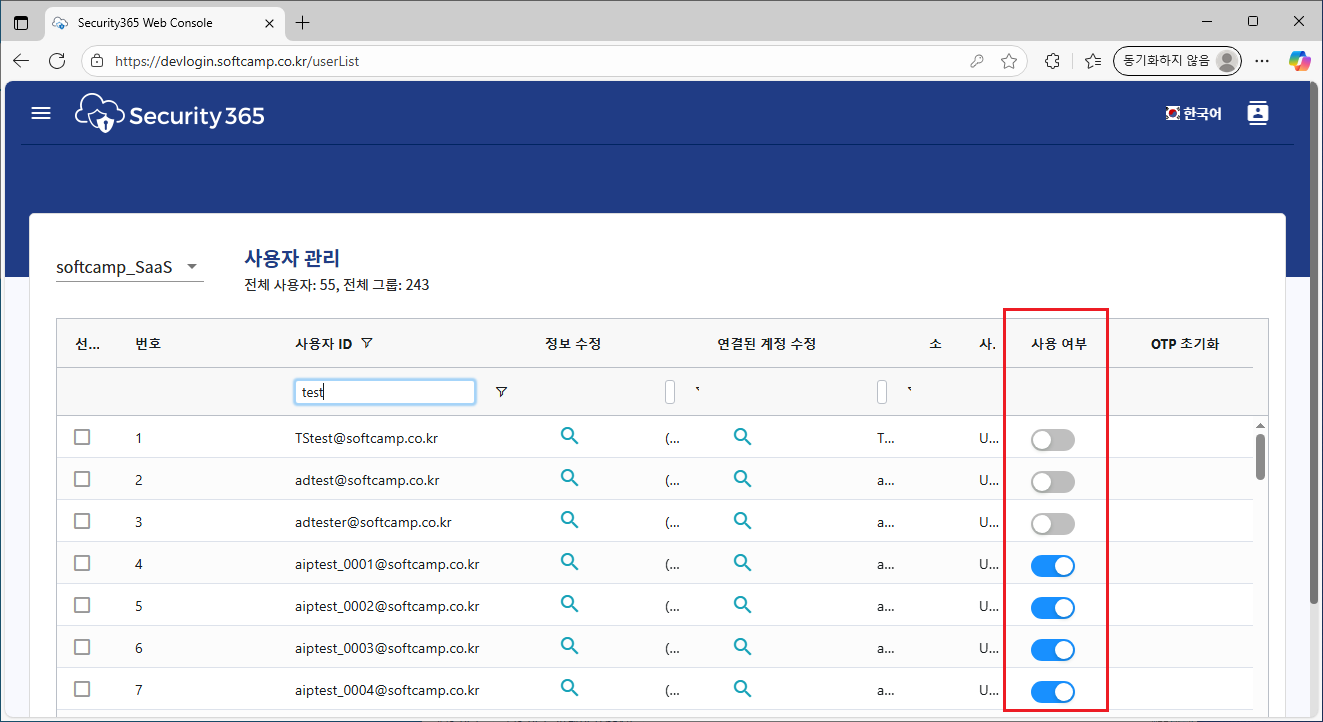
- Inactive users will experience the following two situations where blocking actions occur.
- Document Security Login Status
- If a user is deactivated due to actions evaluated by the ztcap policy (e.g., document conversion via right-click Aip, Aip->Drm document conversion, etc.), a notification message window will appear, and the document security logout status will be activated.
- Document Security Not Logged In
- In the case of using the Runmode sso of the DS_MIP_INIT policy, before receiving s365 authentication, if the user is inactive, a notification message window will appear immediately after login, and the user will be logged out again.
- For values of Runmode policy other than SSO, support is currently unavailable (refer to the constraints below for reasons).
- Document Security Login Status
4. Application Method
- Module Patch
5. Limitations
- When using a Runmode other than sso for the DS_MIP_INIT policy (s365, appauth, aad, ds), the functionality to block login for ShieldID users who are deactivated and to log out immediately after login will not work for the following reasons.
- In the case of s365 and ds, the integrated login window is used to perform s365 authentication, and since the user's shieldID operates on the browser and the securiy365 front end, there is no way for the DS 6.0 client to obtain the ShieldID. (Without the ShieldID, it is impossible to check whether it is deactivated.)
- In the case of appauth, it operates based on the shieldrm svc app rather than individual user's shieldId, making the functionality meaningless.
- In the case of aad, currently, you can obtain the shieldID from the token after authenticating with the tenant ID, but development will be needed after the module restructuring in the future.
- In the case of AIP release, there is no existing logic to determine the release status using ztcap, so this functionality cannot be applied in the current structure. It is necessary to proceed with the additional development of the ztcap policy query function when releasing AIP.
- Scheduled to proceed immediately afterward
6. Notification Messages and Resources
- If the user is deactivated, the document security will be logged out with the following notification message.

- Value for selecting icon resources starting with IMG_ICON in the installation path (Windows\SOFTCAMP\SDS\Image\drm_icons\04.MIP) for ERROR_BLOCKED_DISABLE_USER_ICON.
7. Custom Policy for On/Off Logout Function in Document Security
- DS_MIP_INIT PolicyofForceLogoutOnUserDisabledThe document security logout feature for disabled users can be toggled On/Off with a policy value.