Application of Overlay Icons for C/S/O Document Grades
info
An overlay icon is applied to designated documents to identify them through the document grade feature.
- Applicable Colors (Red, Green, Yellow)
- If there are multiple overlay icons (more than 12 overlay icons) installed in the Windows program, existing overlay icons may not be displayed.\
1. Overview
- Provides overlay icon identification feature for documents designated with document grade (C/S/O) in DS 6.0 ENT.
2. Related Modules
- The build path should be entered from the following path: \sctfsbuild.SOFTCAMP.co.kr\AzureBuild\Package\Product
| File Name | path | version | Description | Build Path |
|---|---|---|---|---|
| SDSEnc.exe | C:\Windows\Softcamp\sds | 6.0.0.15 | Document Security Encryption and Decryption Module | \DS_vs2019\InstallSheild\D1.DS4.0_DSOnly_Default\Windows_x86\Softcamp\SDS |
| DSEDAg.dll | C:\Windows\Softcamp\sds | 6.0.0.5 | Document Security Encryption and Decryption Module | \DS_vs2019\InstallSheild\00.SDS_Common\Windows_x86\Softcamp\SDS |
| DSEDAg64.dll | C:\Windows\Softcamp\sds\x64 | 6.0.0.5 | Document Security Encryption and Decryption Module | \DS_vs2019\InstallSheild\00.SDS_Common\Windows_x64\Softcamp\SDS\x64 |
| DSSteganoDataAg.dll | C:\Windows\Softcamp\sds | 6.0.0.7 | Document Security Hidden Information Module | \DS6.0_VS2019(ZTCA_AIP)\InstallSheild\DS27.SCMIP\SCMIP\Softcamp\sds |
| DSSteganoDataAgx64.dll | C:\Windows\Softcamp\sds\x64 | 6.0.0.7 | Document Security Hidden Information Module | \DS6.0_VS2019(ZTCA_AIP)\InstallSheild\DS27.SCMIP\SCMIP\Softcamp\sds\x64 |
| DS365.Core.dll | C:\Windows\Softcamp\Security365\DS365\x64 | 6.2.0.11 | DS6 Library Module | \DS6.0_VS2019(ZTCA_AIP)\InstallSheild\DS27.SCMIP\SCMIP\Softcamp\Security365\DS365\x64 |
| SCPD_DS365.dll | C:\Windows\Softcamp\sdk\scsa | 6.1.0.15 | Document Security Event Module | \DS6.0_VS2019(ZTCA_AIP)\InstallSheild\DS27.SCMIP\SCMIP\Softcamp\SDK\scsa |
| SCPD_DS36564.dll | C:\Windows\Softcamp\sdk\scsa | 6.1.0.15 | Document Security Event Module | \DS6.0_VS2019(ZTCA_AIP)\InstallSheild\DS27.SCMIP\SCMIP\Softcamp\SDK\scsa |
| SCRA_DS365Icon.dll | C:\Windows\Softcamp\sdk | 6.0.0.1 | Explorer Icon Handler | \DS6.0_VS2019(ZTCA_AIP)\InstallSheild\DS27.SCMIP\SCMIP\Softcamp\SDK |
| SCRA_DS365Icon64.dll | C:\Windows\Softcamp\sdk | 6.0.0.1 | Explorer Icon Handler | \DS6.0_VS2019(ZTCA_AIP)\InstallSheild\DS27.SCMIP\SCMIP\Softcamp\SDK |
3. Related Custom Policies
- None
4. Constraints
- In a client environment where the module is applied before feature development, the identification information of the document grade icon is deleted when a document with a document grade icon is edited/saved.
The information that is deleted is the metadata stored in the pre header, and the classification information data is stored within the document, so classification-related icons will be added again when the file is opened/saved. - When a document with a document grade icon is uploaded to and downloaded from Teams or SharePoint document libraries, the icon information regarding the document grade may be deleted according to site policies.
5. Troubleshooting
⚠️If the function is not working, check the following items to determine which one applies.
-
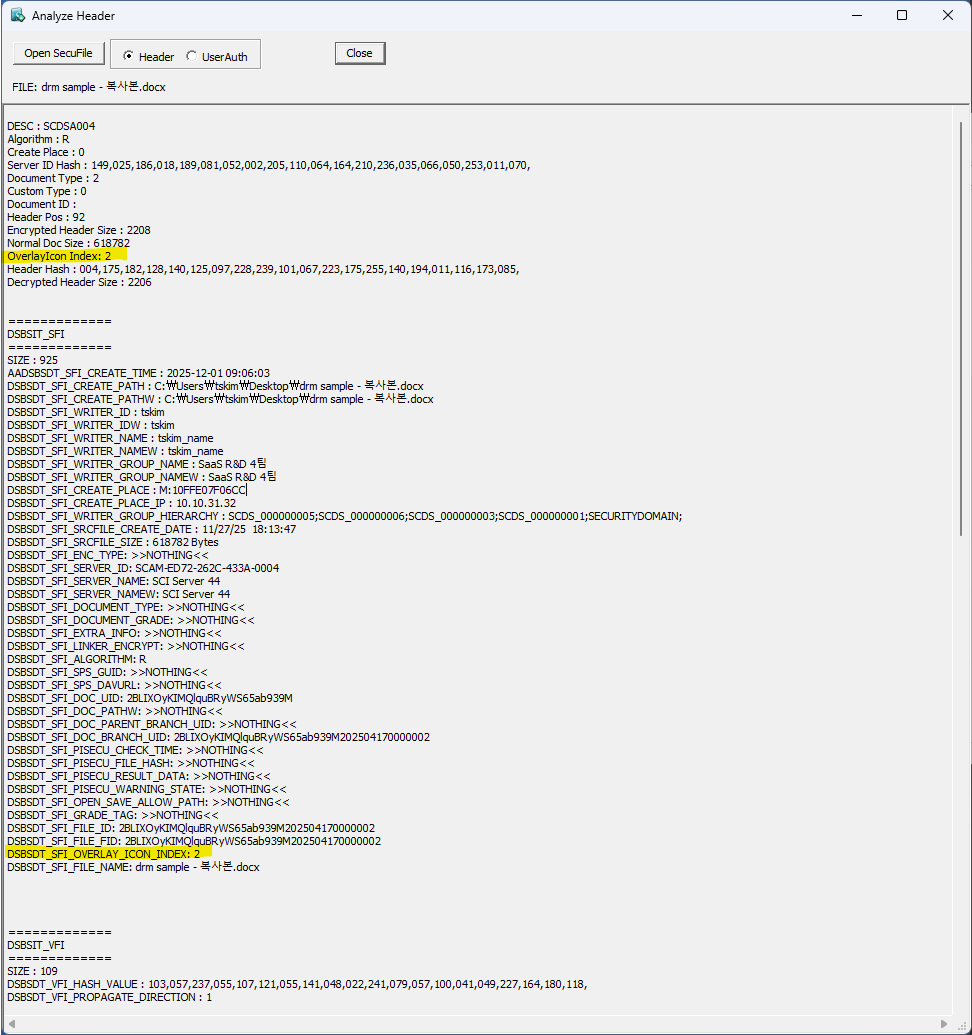
Check icon information for security documents in versions after SDSWizard.exe(6.0.0.12) (Index range: 1~3)
-
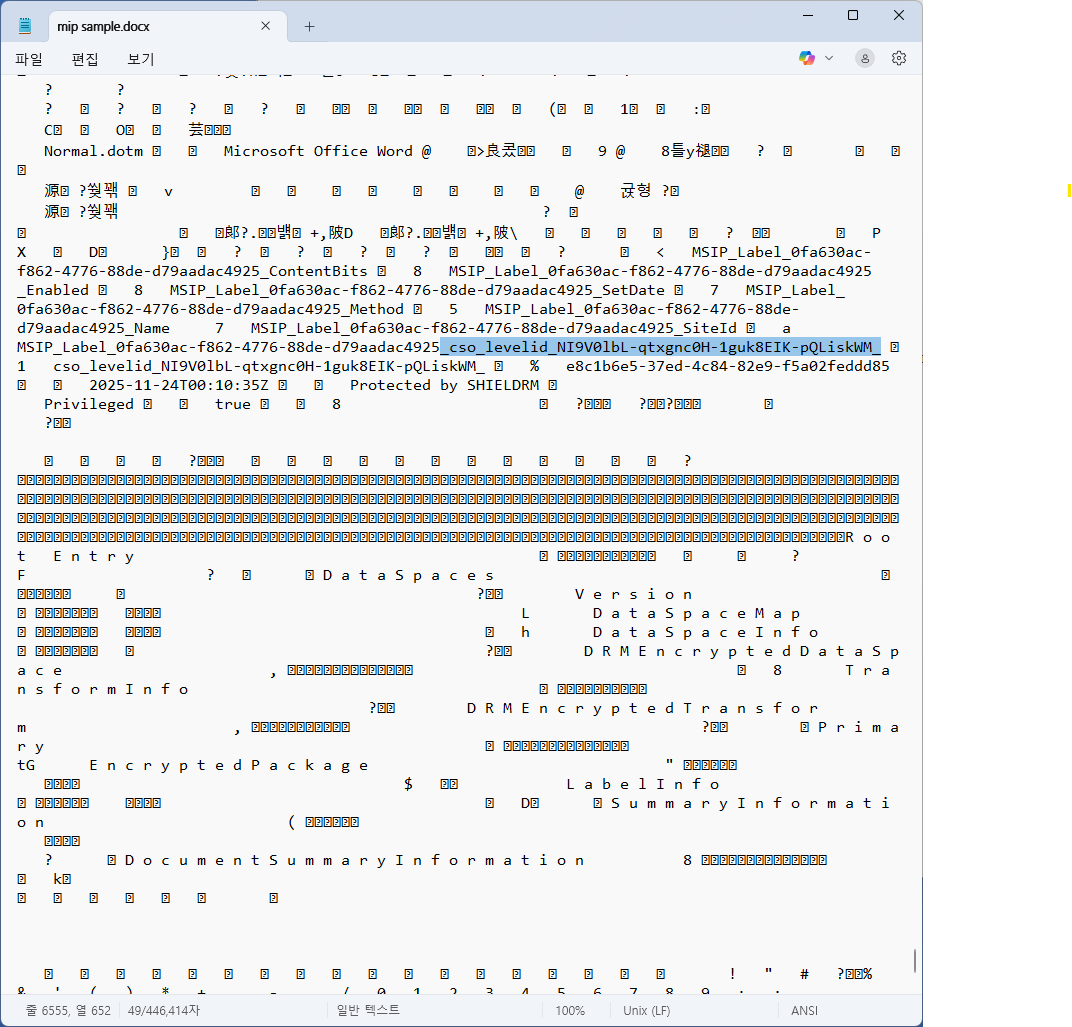
For MIP documents, check the document grade data when opening the document with a text editor as shown below.
cso_levelidA string that starts with __ and ends with _ is a document grade ID (level ID), and the corresponding data is randomly generated when registering the document grade on C/S/O applied sites.