Product Introduction
Why is the SHIELDEX File necessary?
Email attachments, file sharing services, cloud storage, etc. throughMalicious file influxThis is emerging as a major attack vector.
existingAntivirusIsandboxis the maliciousness of the fileDetectionin a way that,Zero-Day AttackIt is vulnerable to this and variant malware and requires continuous updates.
Approach to SHIELDEX File
SHIELDEX Fileis not a detection method**CDR(Content Disarm & Reconstruction)Extraction and Reconstruction Method Based on**It operates as.
By extracting only safe content regardless of whether it is malicious, it is possible to proactively block unknown threats.
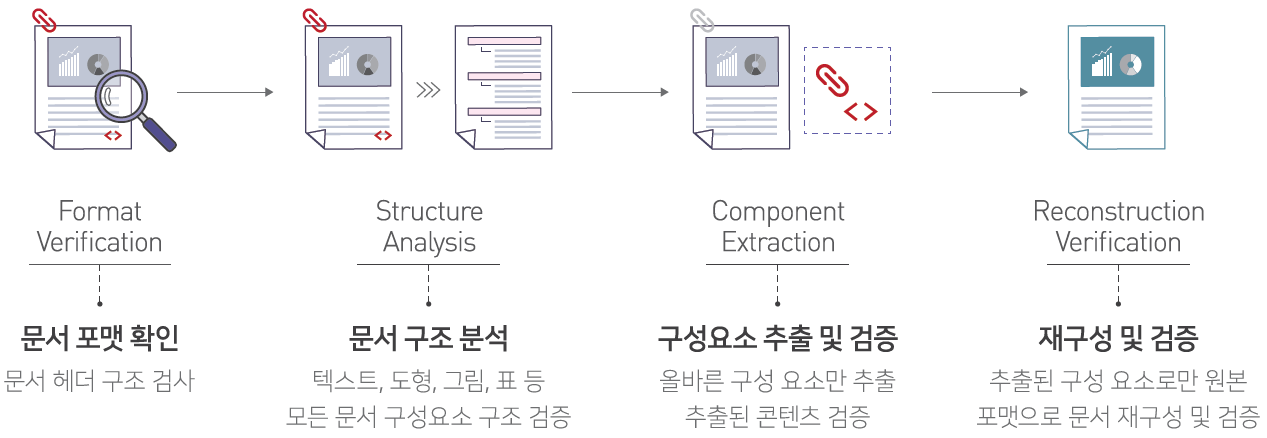
Processing Example
- Extension Forgery Attack: By checking the document format, we block the infiltration of disguised malicious files where the extension does not match the actual file format.
- Macro-based attacks: Blocks malware attacks that are automatically executed when opening documents by identifying macros.
- Script-based Attack: Identifies scripts such as JavaScript, VBScript, and blocks phishing site connections and malware download attacks.
- External Link Based Attacks: Identifies external links and blocks automatic connection attacks to malicious sites.
- Steganography-based attacks: Identifies hidden malware in images to block malware execution attacks within image files.
CDR vs Existing Security Technologies
| item | Antivirus / Sandbox | CDR |
|---|---|---|
| Operating Principle | Signature / Behavior-Based Detection | Zero TrustBase Extraction and Reconstruction |
| Zero-Day Response | Detection failure possibility | Identify risk factors and extract only safe content for response. |
| Processing speed | slowness | high |
| System Load | high | low |
| Update Dependency | Signature DB update required | No update dependencies |
Main Features
| Features | Description |
|---|---|
| Zero-Day AttackResponse | Reconstruct files with only safe content to block unknown potential sources of risk. |
| High-Performance Processing | Fast processing based on a high-performance demilitarization engine (sandboxExecution process unnecessary) |
| Support for various formats | MS Office, PDF, Hancom Office, HTML, JSON, images, compressed files (ZIP/TAR/7Z) and other extensive format support |
| Detailed Analysis | 6-step risk visualization (Safe → Doubt → Warning → Danger → Serious →Tampering) andForensic DataProvision |
| Steganography Detection | Detection and Removal of Hidden Malware in Images |
| Flexible Policy Management | Detailed policies by file type, policies by user/group, and support for policy change history management |
Application Environment
- Email Gateway: Email Attachment Sanitization
- Web Gateway: File Download Neutralization via the Web
- Interconnected Environment: Sanitization during file transfer in a network-separated environment
- Cloud Storage: Cloud File Sharing Service Integration
- API Integration: Integration of various systems through REST API
Learn more
- Main Features: Complete list of provided features
- Application Scenario: Real-world application cases and scenarios
- Administrator Guide: How to Use the Web Admin Console
- API Guide: How to Integrate REST API
- Glossary: Definition of Technical Terms