Registered Desktop
Desktop
on the SHIELDGate admin page
데스크톱Click on the menu to access the desktop menu. In the desktop menu,등록된 데스크톱check,조건부정책You can set __PH_0__.
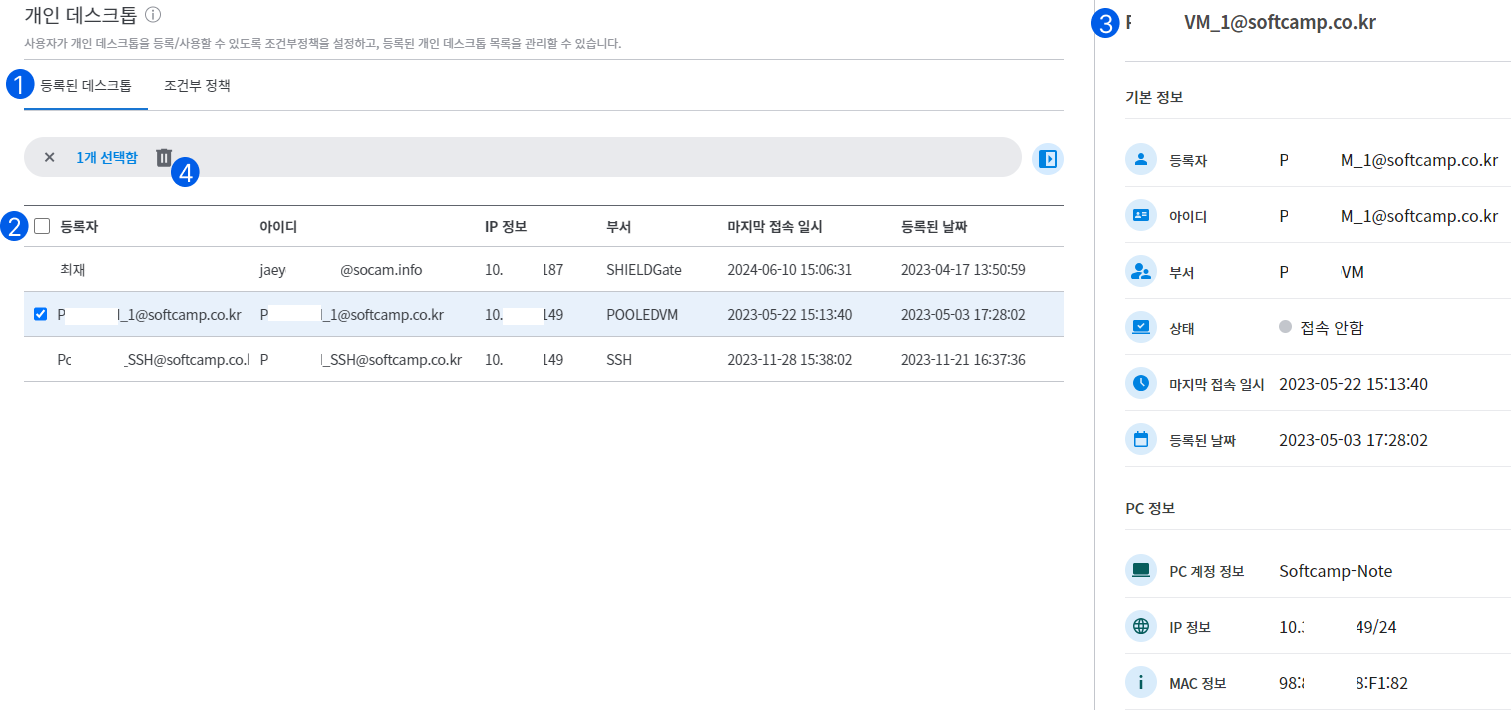
Registered Desktop
1. Registered Desktop
- You can check the information about the registered desktop.
2. List
- The registered desktop will display a list of the registrant, ID, IP information, department, last access date and time, and the registration date.
3. List Details
**When you click on the list, a detailed information slide expands, allowing you to check the detailed information and connection status of the registered desktop.**
- Basic Information
- Registrant: Name
- ID: email address
- Department: Department
- Status:
접속중,접속 안함It is displayed in two states. If the user is connected,접속중It is displayed as. If the user is not connected,접속 안함is displayed. - Last access date and time: The date and time of the last access to the desktop.
- Registration date: The date the user registered the desktop.
- PC Information
- PC account information: PC name
- IP information: IP of the registered desktop
- MAC Information: MAV Address of the registered desktop
4. Delete Desktop
- When clicking on an item in the list,
삭제It provides functionality. When the delete button is clicked, the desktop information registered by the user will be deleted, and if the user wants to use it again, they must re-register the desktop. (If the user is currently connected, the desktop connection will be disconnected.)