8) Azure App 登録ガイド
SDFアプリ登録
1. 概要
Security365共通アプリを使用しない会社の場合、SDFサービスで使用するAzureアプリを別途登録します。
2. アプリ登録
2.1 Azure Portal ログイン
- Azure Portalえ管理者アカウントにログインします。
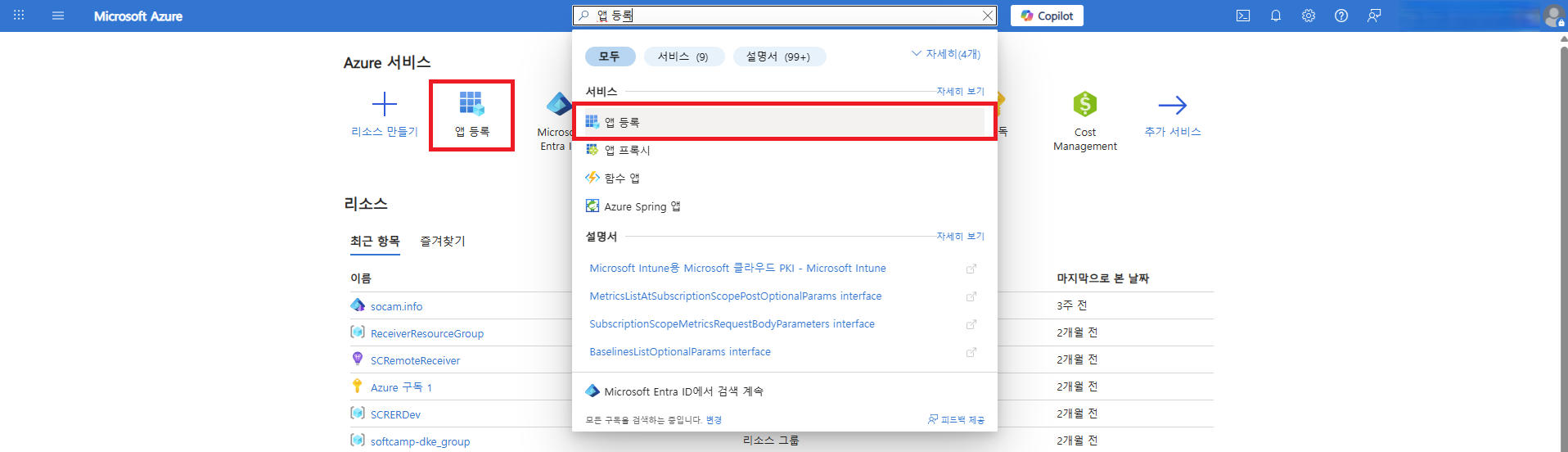
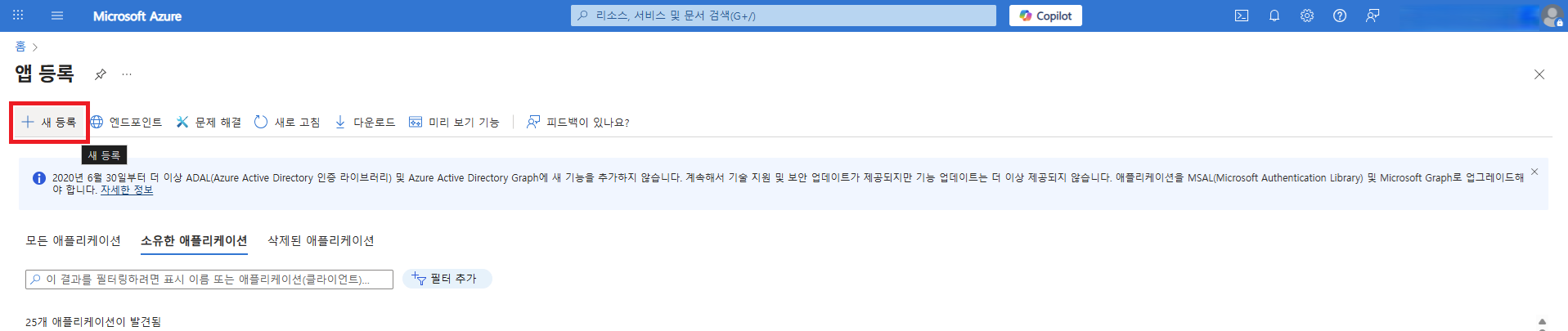
- アプリ登録メニューを選択して、新規登録ボタンを通じてアプリケーション登録ページに移動します。
2.2 アプリ登録情報
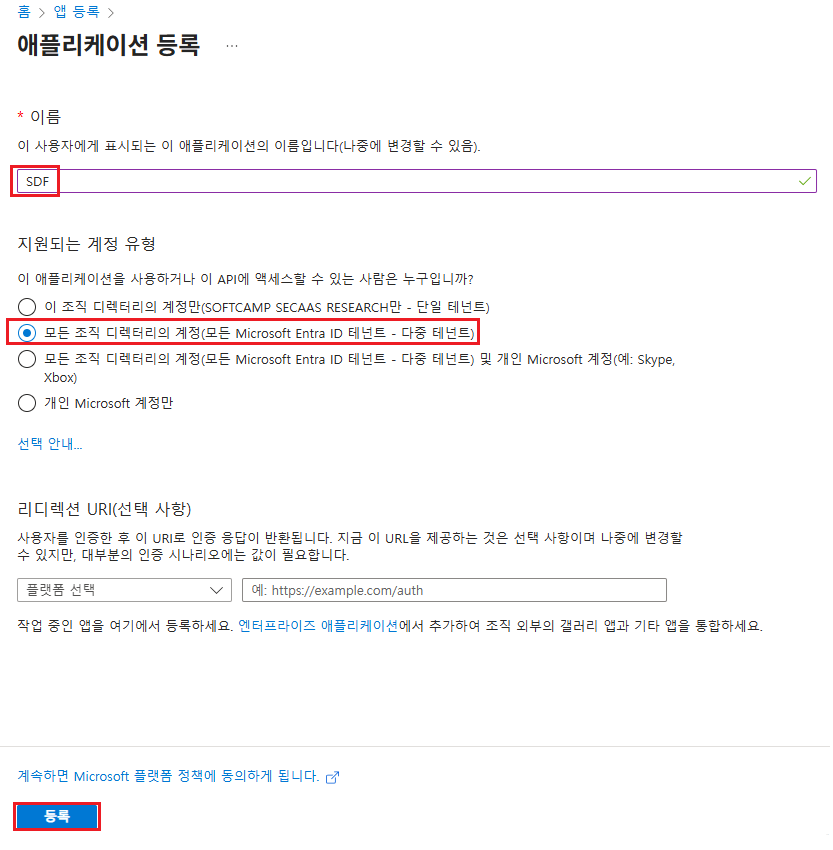
- 名前 :SDF
- アカウントタイプ :マルチテナント
- 登録ボタンをクリックしてアプリケーションを登録します。
2.3 アプリ ID 情報の確認
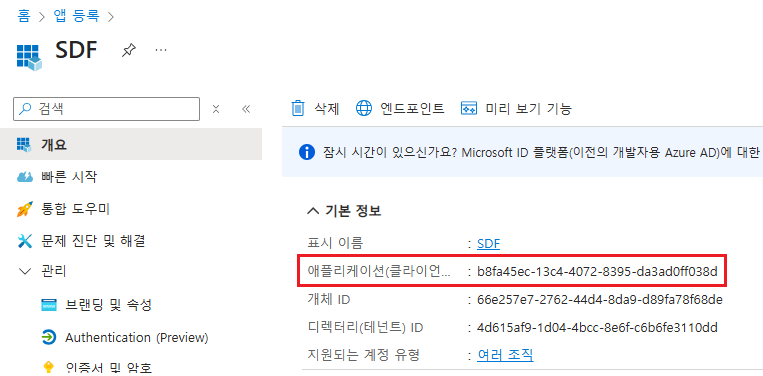
3. クライアント暗号設定
3.1 Azure CLI のインストール
- サービス認証時に使用するパスワードを設定するために、Azure CLIをインストールします。
- WindowsにAzure CLIをインストール
3.2 Azure CLI ログイン (Powershell)
- Powershellを管理者権限実行した後、Azure 管理者アカウントにログインします。
- 該当テナントのサブスクリプションが複数ある場合、適切なサブスクリプションを選択します。
az login
3.3 新しいクライアントパスワードの生成
- 新しいクライアントパスワードを有効期限とともに設定します。
- 有効期限が設定されていない場合、生成時間を基準に1年に設定されます。
az ad app credential reset --id {appId} --append --end-date {end-date}- パラメーター
appId: アプリIDappend: 既存のパスワードを維持しながら新しいパスワードを生成します。このパラメータを削除すると、既存のパスワードが削除されます。end-date: パスワードの有効期限(形式: 'YYYY-MM-DD')- 例: '2126-01-22'
3.4 暗号値の保存
- クライアント暗号生成後に出力されるpassword値を確認し、別途保存します。
{
  "appId": "b8fa45ec-13c4-4072-8395-da3ad0ff038d",
  "password": "moh8Q~yeUQVK.aptj-sbjwFup9jS.v81_D-CwaQ-",  //appSecret
  "tenant": "4d615af9-1d04-4bcc-8e6f-c6b6fe3110dd"
}
3.5 パスワード生成の確認
- パスワードが正常に生成されたか確認します。
az ad app credential list --id {appId}
PS C:\Users\Security365> az ad app credential list --id b8fa45ec-13c4-4072-8395-da3ad0ff038d
[
  {
    "customKeyIdentifier": null,
    "displayName": null,
    "endDateTime": "2126-01-22T00:00:00Z",
    "hint": "moh",
    "keyId": "3b27e547-a7fe-4ad3-800f-2167c162b13d",
    "secretText": null,
    "startDateTime": "2026-01-22T05:52:37Z"
  }
]
3.6 クライアント暗号生成全体実行プロセスの例
PS C:\Users\Security365> az login
Select the account you want to log in with. For more information on login with Azure CLI, see https://go.microsoft.com/fwlink/?linkid=2271136

Retrieving tenants and subscriptions for the selection...

[Tenant and subscription selection]

No     Subscription name    Subscription ID                       Tenant
-----  -------------------  ------------------------------------  ------------------------
[1] *  Azure 구독 1         581f6af6-8dc0-4ec4-b42c-fe3b732fdd8e  SOFTCAMP SECAAS RESEARCH
[2]    종량제               763f6b12-8cd0-4592-9751-93ddb39fb970  SOFTCAMP SECAAS RESEARCH

The default is marked with an *; the default tenant is 'SOFTCAMP SECAAS RESEARCH' and subscription is 'Azure 구독 1' (581f6af6-8dc0-4ec4-b42c-fe3b732fdd8e).

Select a subscription and tenant (Type a number or Enter for no changes): 1

PS C:\Users\Security365> az ad app credential reset --id b8fa45ec-13c4-4072-8395-da3ad0ff038d --append --end-date '2126-01-22'
The output includes credentials that you must protect. Be sure that you do not include these credentials in your code or check the credentials into your source control. For more information, see https://aka.ms/azadsp-cli
{
  "appId": "b8fa45ec-13c4-4072-8395-da3ad0ff038d",
  "password": "moh8Q~yeUQVK.aptj-sbjwFup9jS.v81_D-CwaQ-",
  "tenant": "4d615af9-1d04-4bcc-8e6f-c6b6fe3110dd"
}

PS C:\Users\Security365> az ad app credential list --id b8fa45ec-13c4-4072-8395-da3ad0ff038d
[
  {
    "customKeyIdentifier": null,
    "displayName": null,
    "endDateTime": "2126-01-22T00:00:00Z",
    "hint": "moh",
    "keyId": "3b27e547-a7fe-4ad3-800f-2167c162b13d",
    "secretText": null,
    "startDateTime": "2026-01-22T05:52:37Z"
  }
]
3.7 クライアント暗号生成確認
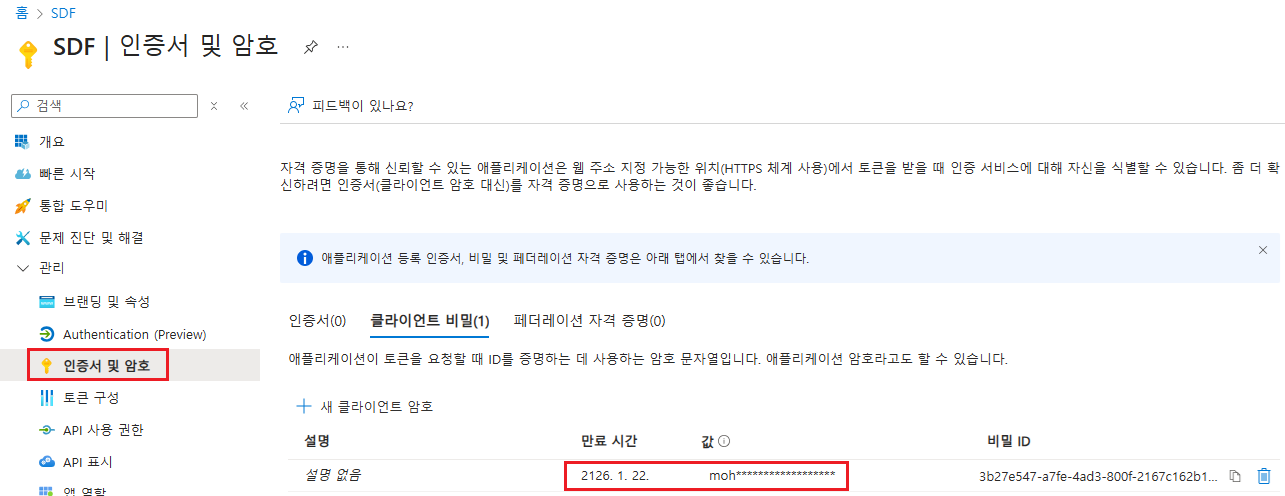
4. APIの使用権限追加
4.1 追加する必要がある権限リスト
Microsoft Graph
| API/権限名 | タイプ | 管理者の同意が必要です | 権限の説明 |
|---|---|---|---|
| InformationProtectionPolicy.Read.All | アプリケーション | はい | AIPラベルの保護テンプレートIDを取得しました |
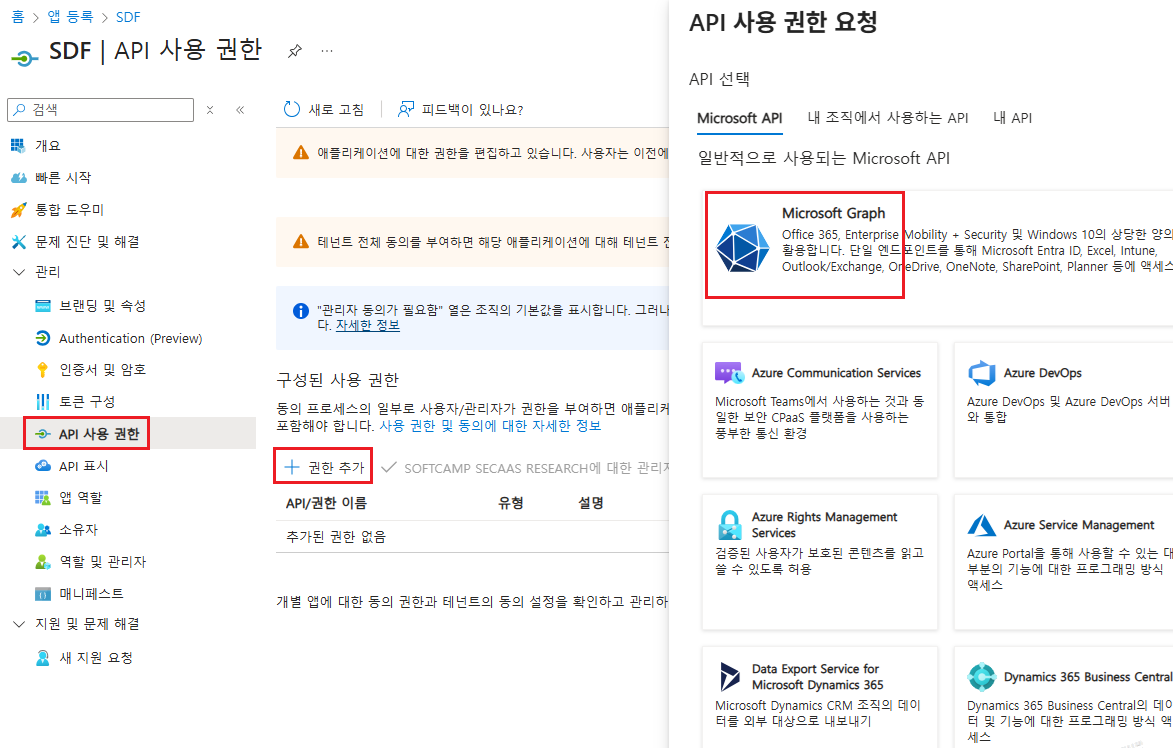
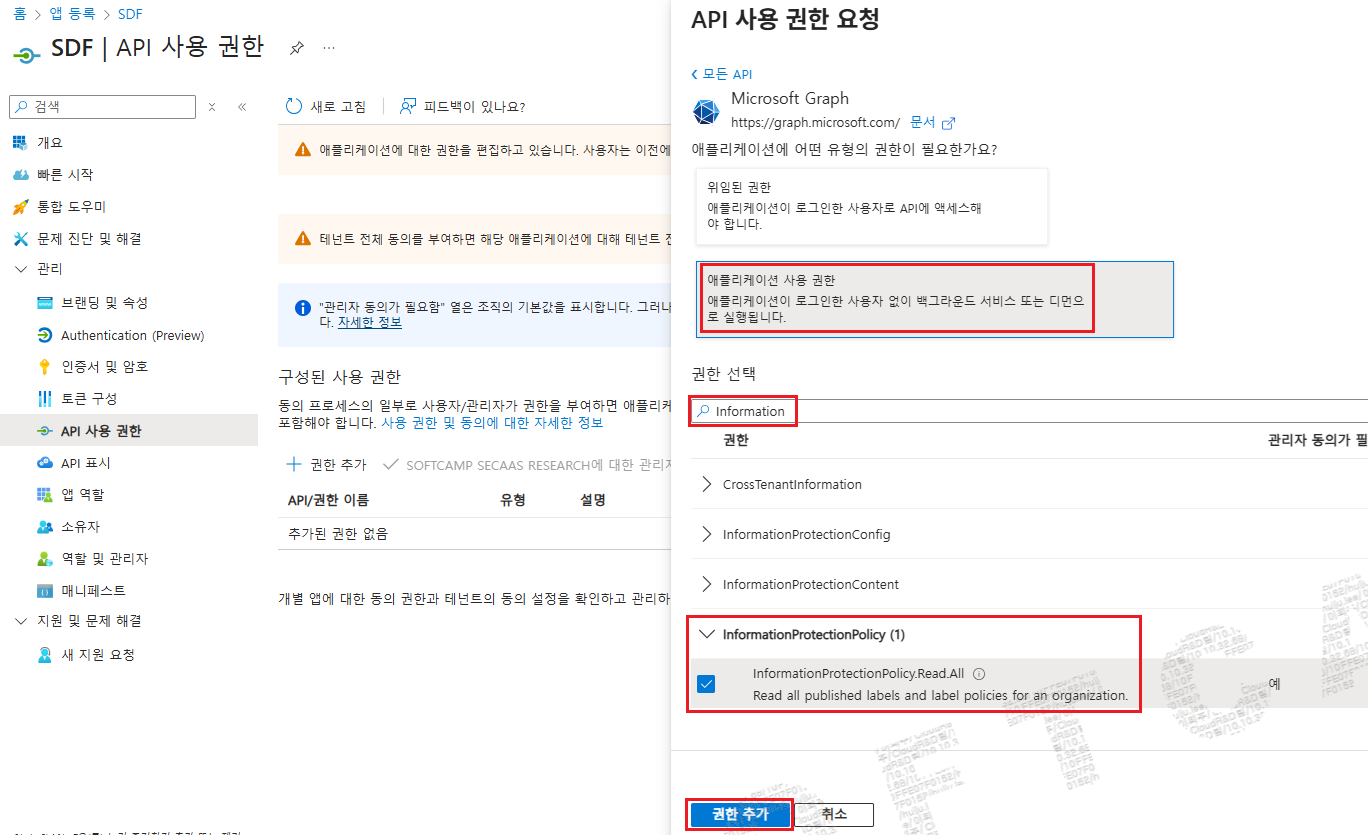
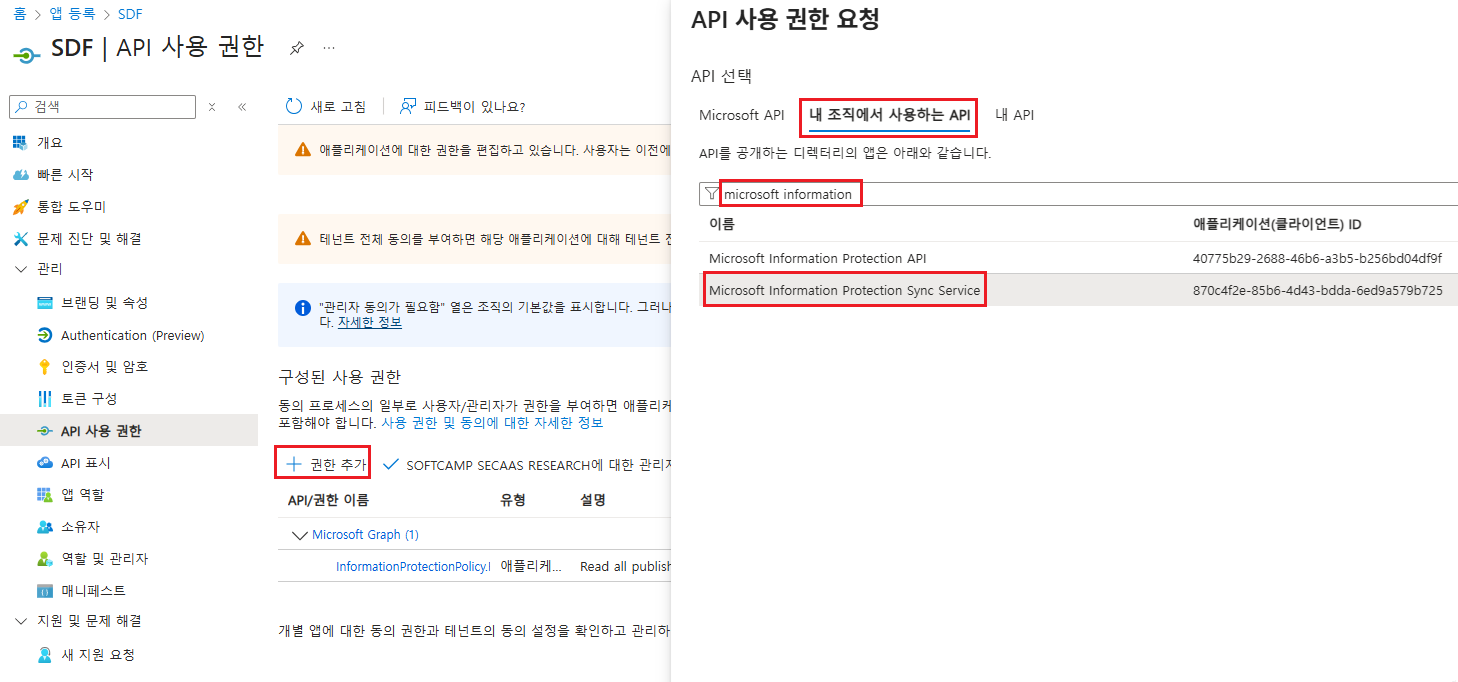
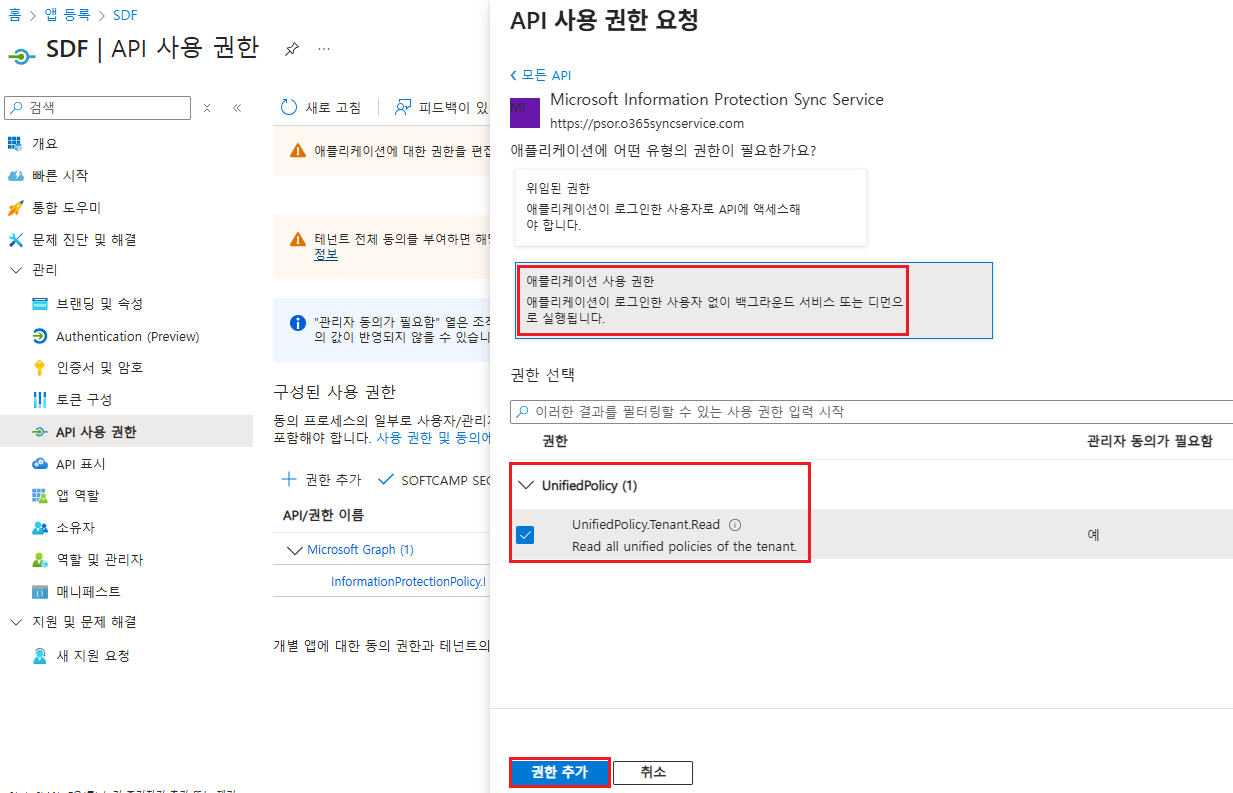
Microsoft Information Protection Sync Service
| API/権限名 | タイプ | 管理者の同意が必要です | 権限の説明 |
|---|---|---|---|
| UnifiedPolicy.Tenant.Read | アプリケーション | はい | ユーザーがアクセス権を持つすべての統合ポリシーを読みました |
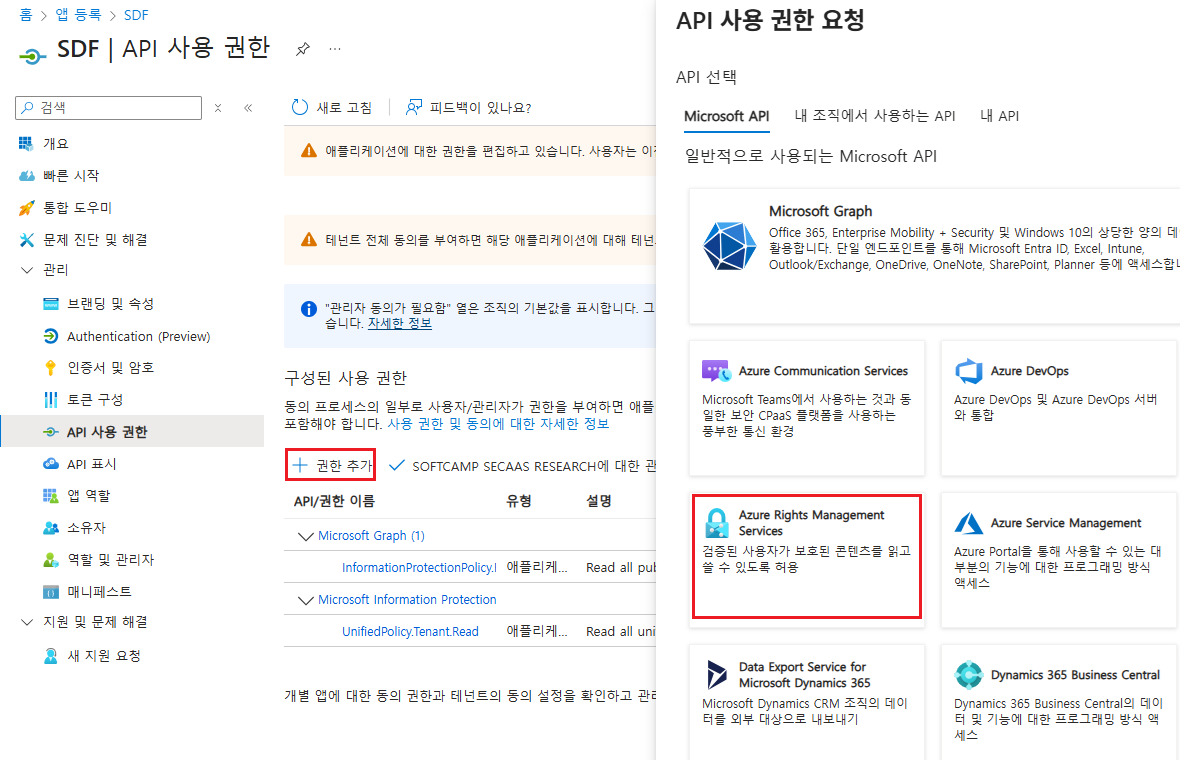
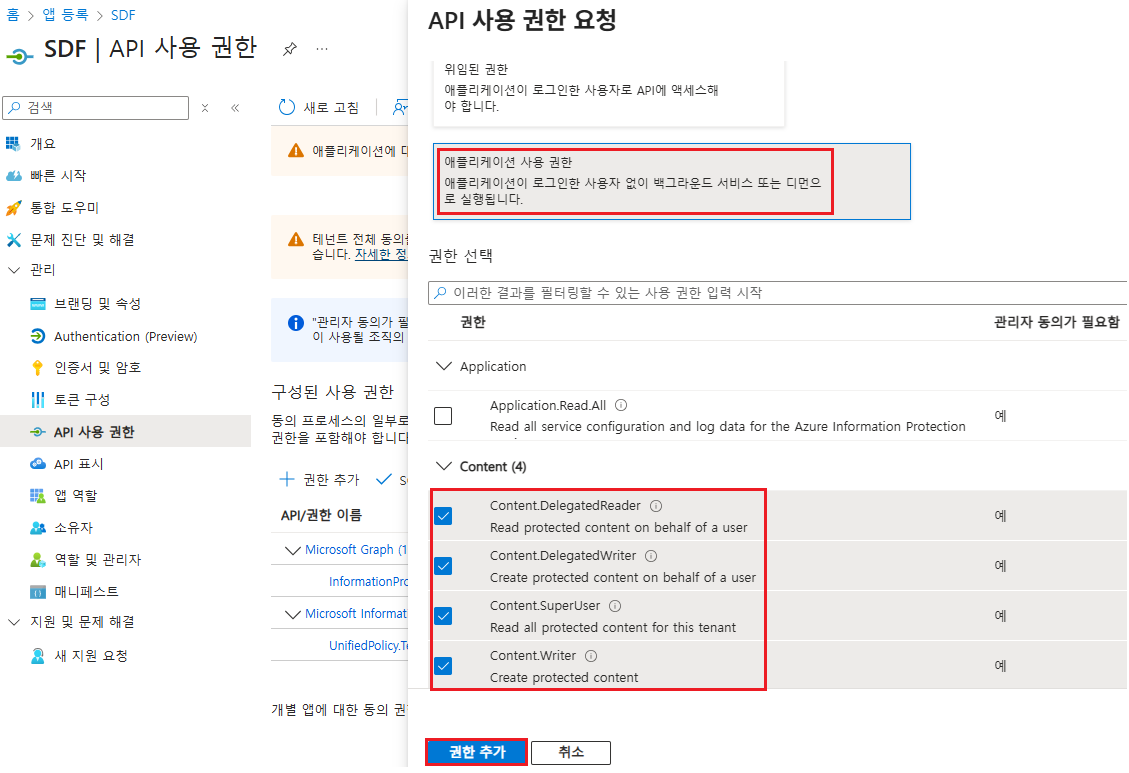
Azure Rights Management Services
| API/権限名 | タイプ | 管理者の同意が必要です | 権限の説明 |
|---|---|---|---|
| Content.DelegatedReader | アプリケーション | はい | ユーザーに代わって保護されたコンテンツを読みます |
| Content.DelegatedWriter | アプリケーション | はい | ユーザーに代わって保護されたコンテンツを生成する |
| Content.SuperUser | アプリケーション | はい | 賃借人のすべての保護されたコンテンツを読みました |
| Content.Writer | アプリケーション | はい | 保護されたコンテンツを生成します |
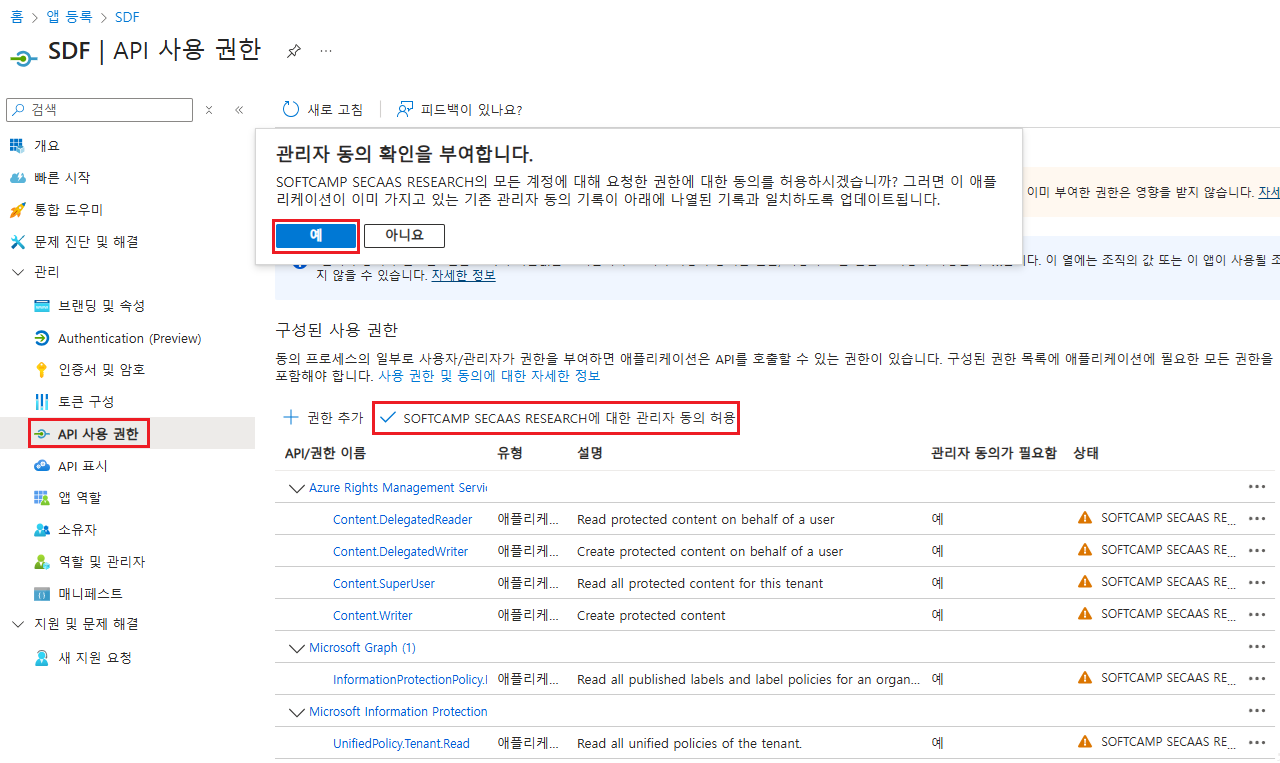
4.2 管理者の同意を許可
- APIの使用権限を追加し、「管理者の同意を許可」する必要があります。