1) EKMS App Registration
MASTER-TENANT App Registration
Description
- EKMS operates organically with the Security365 authentication/authorization service to provide services to clients.
- To do this, you need to register basic information about the app in the Security365 app service. (manual work)
Registering an app (service) in master-tenant
- Registering an App to Use the EKMS Authentication/Authorization Service API
- EKMS is expected to support multi-tenancy (companies), so it will be registered under the master-tenant. (only once initially)
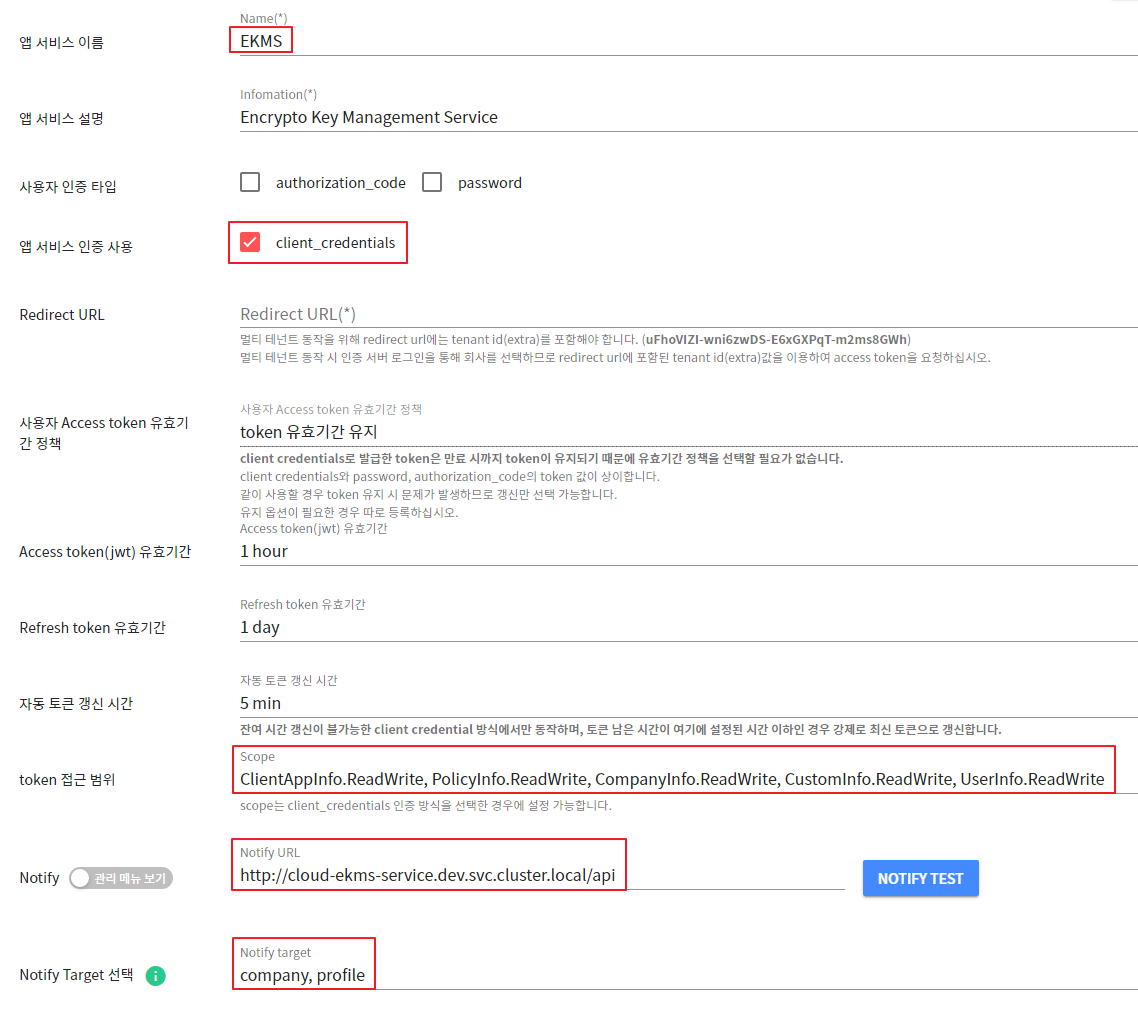
- App Service Name: EKMS
- Authentication Type: client_credentials
- Required configuration of access scope (scope) to use the authentication/authorization API.
ClientAppInfo.ReadWrite, PolicyInfo.ReadWrite, CompanyInfo.ReadWrite, CustomInfo.ReadWrite, UserInfo.ReadWrite- Notify settings: Used for caching the public keys of the entire company list and updating the built-in profiles of the app services registered in the master-tenant.
- Notify URL : http://cloud-ekms-service.dev.svc.cluster.local/api
- Notify target : company, profile
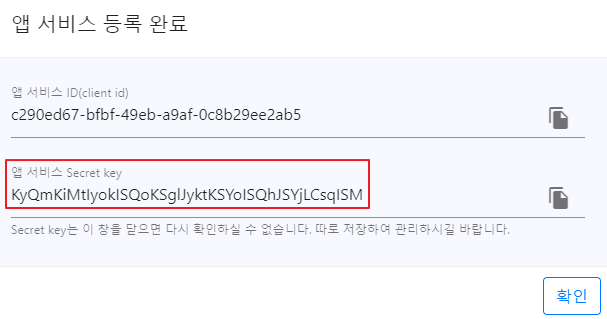
The app service ID and Secret key displayed after registration should be entered as the value of the corresponding key in the ConfigMap during EKMS Deploy.
- The app service Secret key can only be checked initially, so it needs to be stored separately (important)
[ConfigMap Input Items]
- CUSTOM_AUTH_SERVICE_EXTRA : Company ID (tenant ID) of mater-tenant
- CUSTOM_APP_TENANT_ID : Enter the app service ID (client id) value registered in the master tenant.
- CUSTOM_APP_TENANT_SECRET: Enter the Secret key value of the app service registered in master-tenant.
Setting Up Policy Profiles for Master-Tenant
- Attributes registered in the master-tenant are automatically created for all companies.
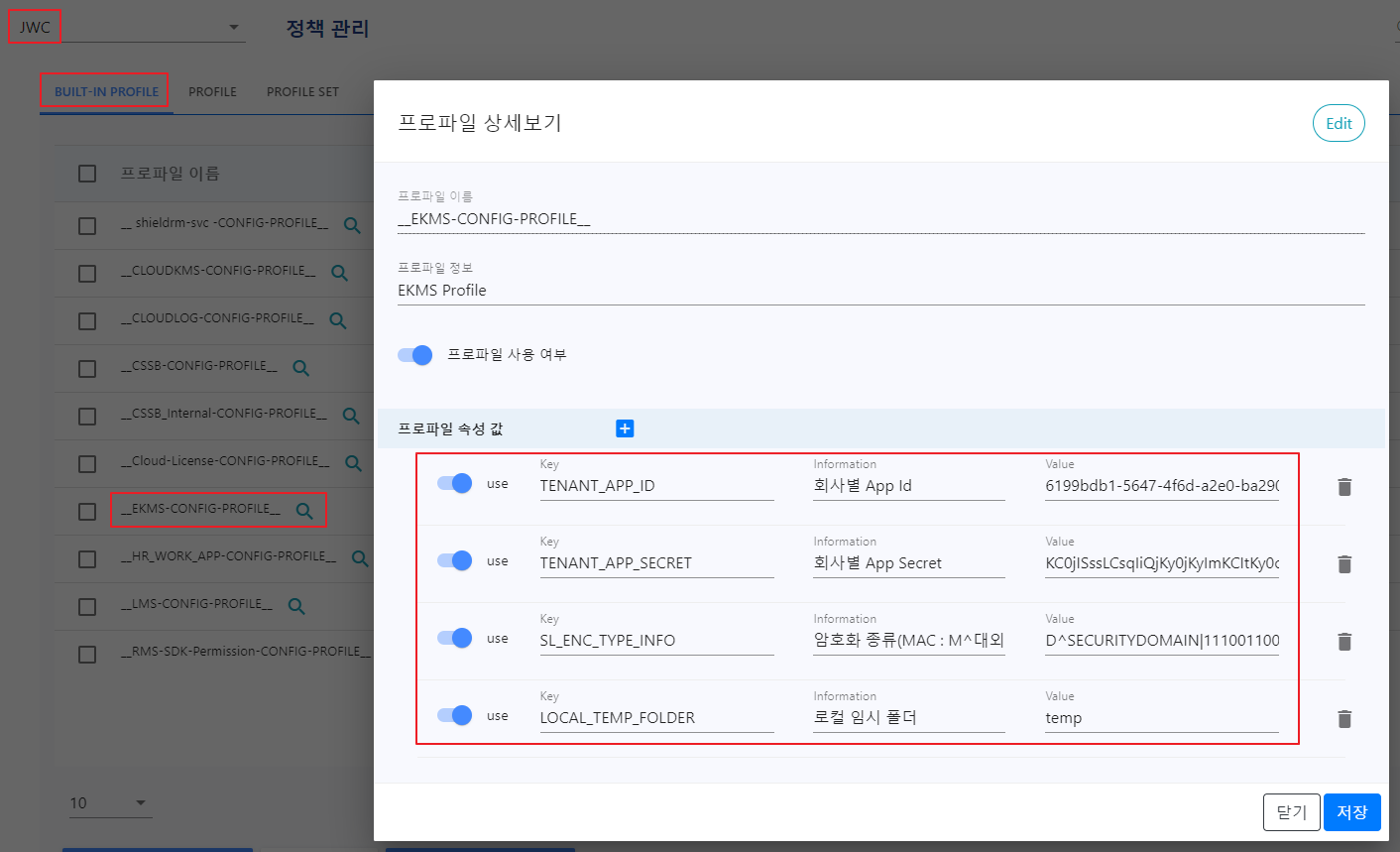
- After selecting master-tenant in the BUILT-IN-PROFILE menu, enter only the Key of the profile property value. (Enter in uppercase)
- TENANT_APP_ID : Company-specific APP_ID
- TENANT_APP_SECRET : Company-specific APP_SECRET
- SL_ENC_TYPE_INFO : Encryption Policy (MAC : M^Confidential|0000001 / DAC : D^SECURITYDOMAIN|111001100 / GRADE : G^Grade 1|0000001)
- LOCAL_TEMP_FOLDER : Local Temporary Folder
- CUSTOM_HEADER_KEY : Custom header key used by existing clients
- This policy requires Value input (fixed value): AVdoskcyLVr72U7N/lCbiw==
App Registration by Company
Registering an app (service) for a newly added company
- App registration for the added company to use EKMS services
- App registration is required for each company that wants to use EKMS.
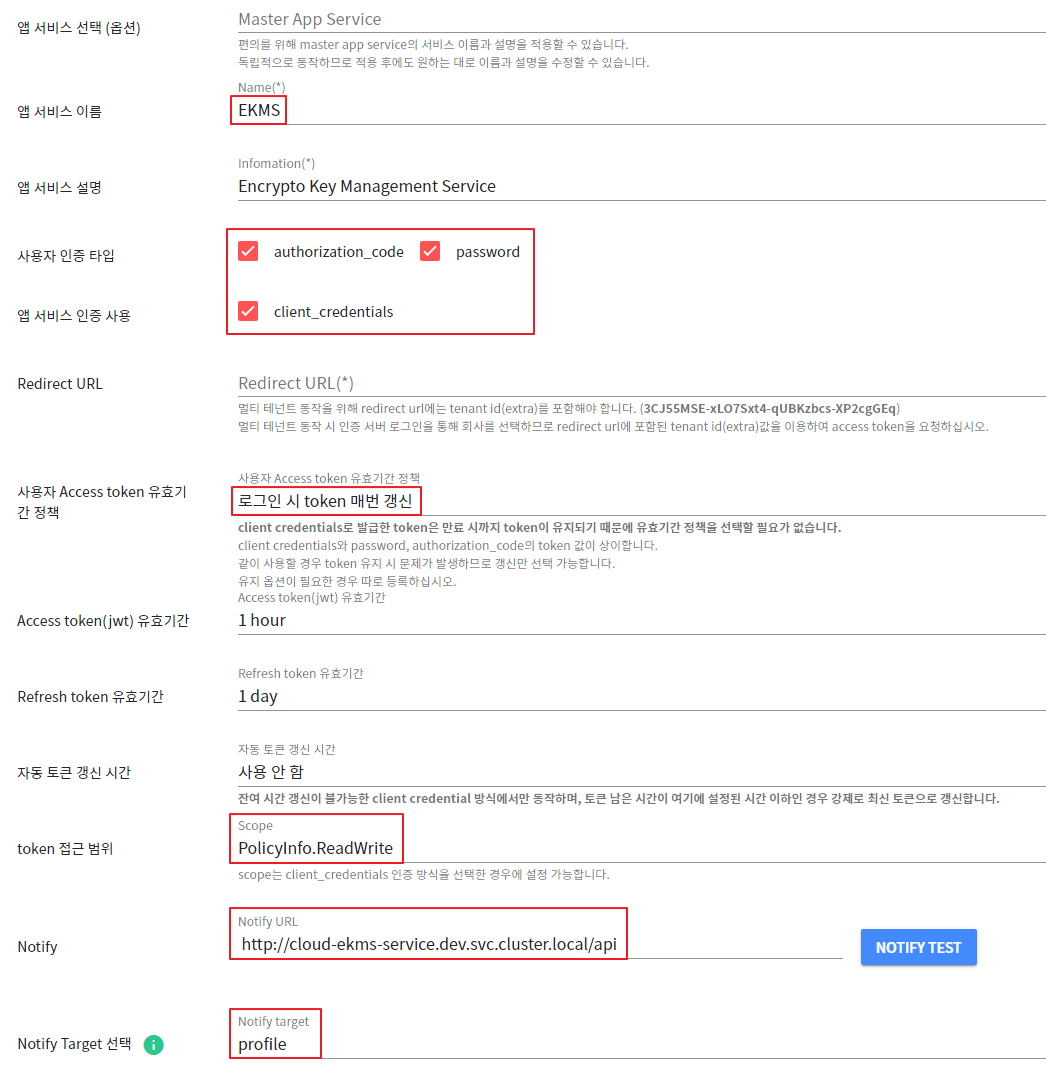
- App Service Name: EKMS
- Authentication Type: authorization_code, password, client_credentials
- Required configuration of access scope (scope) to use the authentication/authorization API.
PolicyInfo.ReadWrite- Notify settings: Used to update the built-in profile of the registered app service.
- Notify URL : http://cloud-ekms-service.dev.svc.cluster.local/api
- Notify target : profile
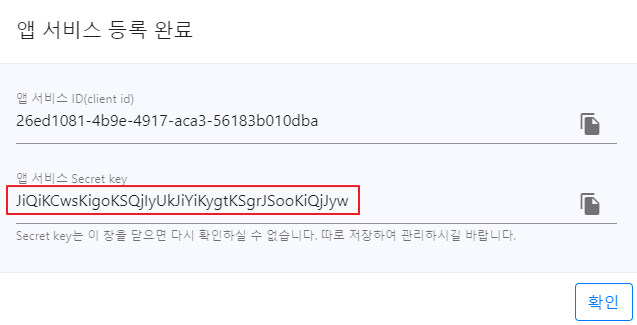
The app service ID and Secret key displayed after registration are used in the company-specific policy profile management > BUILT-IN-PROFILE tab menu.
- The App Secret generated after registration can only be confirmed initially, so it needs to be stored separately (important).
- To use the app, it is essential to activate the EKMS app service by going to App Service Management > Select Company > Enable EKMS App Service.

Setting Up Policy Profiles for Newly Added Companies
- In the BUILT-IN-PROFILE menu, select a new company and enter the Value of the profile attribute.
- TENANT_APP_ID : The APP_ID issued when registering the company app
- TENANT_APP_SECRET : APP_SECRET issued when registering the company app
- SL_ENC_TYPE_INFO : Encryption Policy (MAC : M^Confidential|0000001 / DAC : D^SECURITYDOMAIN|111001100 / GRADE : G^Grade 1|0000001)
- LOCAL_TEMP_FOLDER : temp
- EDGE_SKMS_URL : Enter SKMS URL information when using the EDGE server.
- Example:https://devskms.softcamp.co.kr
- EDGE_KMS_URL : Enter the key vault URL information when using the EDGE server.
- Example:https://devkms.softcamp.co.kr
Description of the built-in profile policy for registered companies
- Key : TENANT_APP_ID
- Information
회사 별 App Id
- Value
71435bda-dc23-428b-92dd-2281383b0de4
- Key : TENANT_APP_SECRET
- Information
회사 별 App Secret
- Value
IicqIigsIiIpLCsrIysjKSElKCsmJikqJywqKSMnIyI
- Key : SL_ENC_TYPE_INFO
- Information
암호화 타입 별 정책 설정 방법
MAC : M^대외비|0000001
DAC : D^SECURITYDOMAIN|111001100
GRADE : G^1등급|0000001^SECURITYDOMAIN|111001100^demo04|010001111
- Value
M^대외비|0000001
- Key : RSA_INFO
- Information
가장 최근에 발급된 RSA 키 정보
- Value
[
  {
    "key_id": "27253522648700",
    "public_key": "MIIBI...",
    "private_key": "MIIEv...",
    "insert_date": "2022-10-12 16:01:22"
  },
  ...
]
- Key : KEYFILE_INFO
- Information
단일 서버로 업로드 된 키 파일 정보
sci_server_id : SCI 서버 아이디
  - EKMS 서비스 시작 시 키 파일 업로드로 KMS 에 등록된 서버 아이디를 조회하여 자동으로 추가함
    (없는 경우 NoRegisteredId)
purpose : 용도
details : 상세 내용
rsa_key_id : RSA key Id
file_etag : File eTag
file_name : 키파일 이름
enc_type : 키파일 타입
rsa_enc_data : RSA 데이터
file_size : 키파일 크기(Byte)
insert_date : 등록일 (yyyy-MM-dd HH:mm:ss)
key_count : 키볼트 데이터 저장 후 처리된 키 카운트(합계|성공|실패|중복)
- Value
[
  {
    "sci_server_id" : "TEST-SERVER",
    "purpose": "ekms 테스트용",
    "details": "ekms 테스트용",
    "rsa_key_id": "27253522648700",
    "file_etag": "183cea73ef7-9c3c",
    "file_name": "CloudkeyDAC.sc",
    "enc_type": "D",
    "rsa_enc_data": "KYN+...",
    "file_size": 39996,
    "insert_date": "2022-10-13 09:03:30",
    "key_count" : "105|0|0|105"
  },
  ...
]
- Key : SUPPORT_FILE
- Information
암복호화 지원 확장자 리스트(세미콜론으로 구분)
- Value
doc;docx;docm;ppt;pptx;pptm;pdf;txt;odt;xls;xlsx;xlsm;xlsb;hwp;hwpx;bmp;jpg;jpeg;png;gif;tif;tiff;csv;gul;rtf;jtd;hwt;cell;show;
- Key : USE_KEY_VAULT
- Information
암복호화 시 키파일을 사용하지 않고 키볼트에서 조회
키파일 업로드 → 임시 파일로 저장 → 키 추출 후 키볼트에 저장 → 키파일 백업
키볼트 대신 키파일을 사용하기 위해서는 20230713.1 일자 이전 이미지 사용
- Value
Y
- Key : EDGE_SKMS_URL
- Information
EDGE 서버 사용 시 SKMS URL 정보 입력
- Value
https://devskms.softcamp.co.kr
- Key : EDGE_KMS_URL
- Information
EDGE 서버 사용 시 키볼트 URL 정보 입력
- Value
https://devkms.softcamp.co.kr
- Key : KEYFILE_INFO_MULTI
- Information
다중 서버로 업로드 된 키 파일 정보
- Value
[
  {
    "sci_server_id" : "TEST-SERVER",
    "purpose": "ekms 테스트용",
    "details": "ekms 테스트용",
    "rsa_key_id": "27253522648700",
    "file_etag": "183cea73ef7-9c3c",
    "file_name": "CloudkeyDAC.sc",
    "enc_type": "D",
    "rsa_enc_data": "KYN+...",
    "file_size": 39996,
    "insert_date": "2022-10-13 09:03:30",
    "key_count" : "105|0|0|105"
  },
  ...
]