3) SKMS App Registration
MASTER-TENANT App Registration
Description
- SKMS operates organically with the Security365 authentication/authorization service to provide services to clients.
- To do this, you need to register basic information about the app in the Security365 app service. (manual work)
Registering an app (service) in master-tenant
- Registering an App to Use the SKMS Certification/Authorization Service API
- SKMS is expected to support multi-tenancy (companies), so it will be registered under the master-tenant. (only once at the beginning)
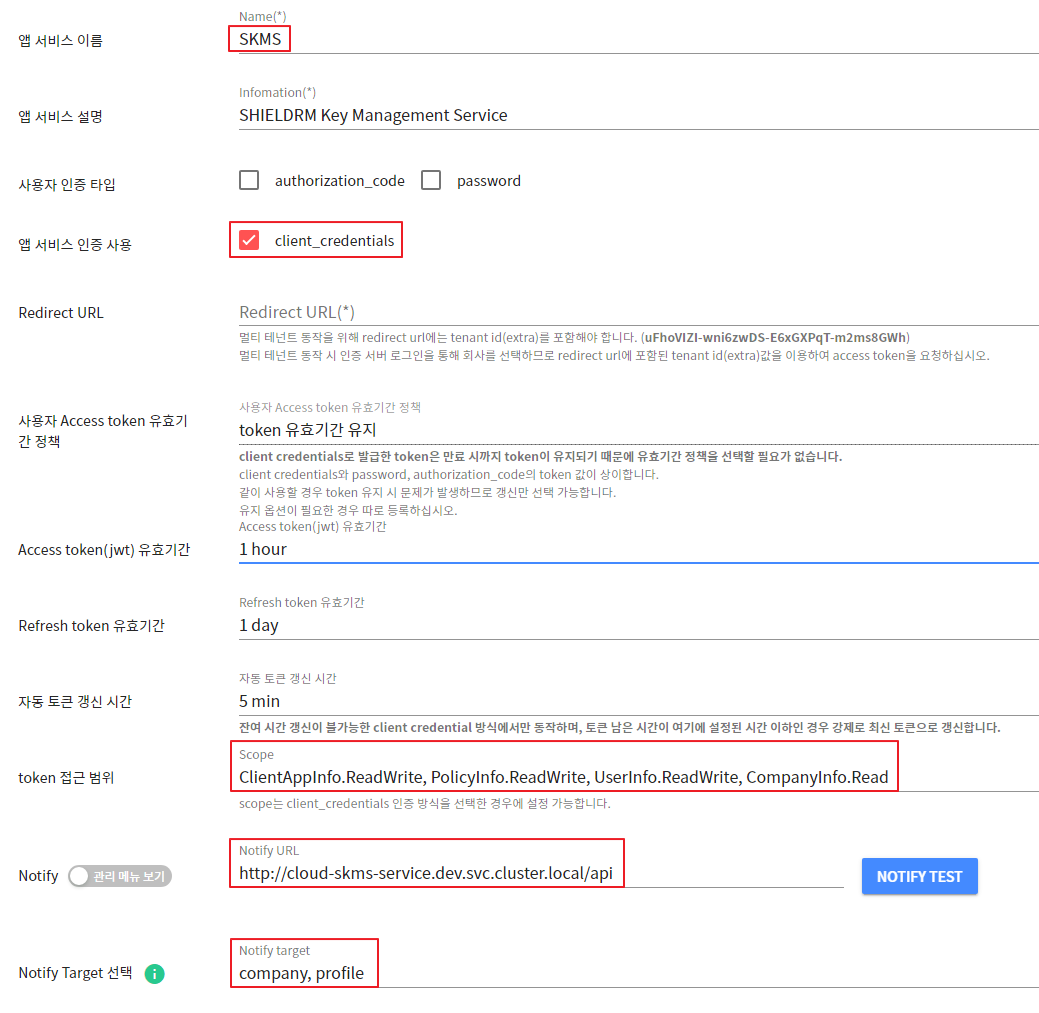
- App Service Name: SKMS
- Authentication Type: client_credentials
- Required configuration of access scope (scope) to use the authentication/authorization API.
ClientAppInfo.ReadWrite, PolicyInfo.ReadWrite, UserInfo.ReadWrite, CompanyInfo.Read- Notify settings: Used for caching the public keys of the entire company list and updating the built-in profiles of the app services registered in the master-tenant.
- Notify URL : http://cloud-skms-service.dev.svc.cluster.local/api
- Notify target : company, profile
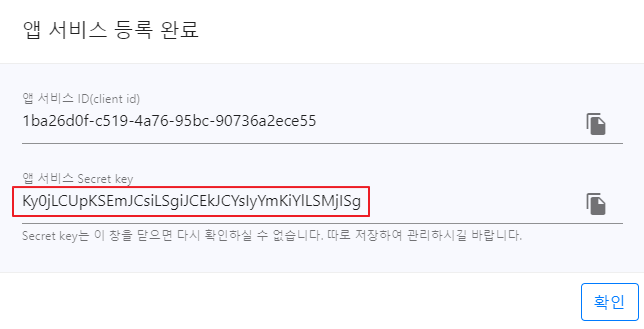
The app service ID and Secret key displayed after registration should be entered as the value of the corresponding key in the ConfigMap during SKMS Deploy.
- The app service Secret key can only be checked initially, so it needs to be stored separately (important)
[ConfigMap Input Items]
- CUSTOM_AUTH_SERVICE_EXTRA : Company ID (tenant ID) of mater-tenant
- CUSTOM_APP_TENANT_ID : Enter the app service ID (client id) value registered in the master tenant.
- CUSTOM_APP_TENANT_SECRET: Enter the Secret key value of the app service registered in master-tenant.
- AZURE_INFO : AZURE Common App ID|SECRET (pipe delimiter)
example) 7e82e70d-4386-419d-9dfd-6c8d6e6068fc|LBd8Q~.aDAmOjOhZSbcgu.sakTgSPrb_zNPxrbuM
Setting Up Policy Profiles for Master-Tenant
- Attributes registered in the master-tenant are automatically created for all companies.
- After selecting master-tenant in the BUILT-IN-PROFILE menu, enter only the Key of the profile property value. (Enter in uppercase)
- TENANT_APP_ID : Company-specific APP_ID
- TENANT_APP_SECRET : Company-specific APP_SECRET
- DS_KEY_ENCRYPTION_KEY : Used for generating encryption and decryption keys in response to security vulnerabilities.
- This policy requires a Value input (fixed value): CwI3FmhjG01Qd28JV3IreA==
- Automatically added when the SKMS service is executed.
App Registration by Company
Registering an app (service) for a newly added company
- App registration for the newly added company to use SKMS services
- Each company wishing to use SKMS needs to register an app.
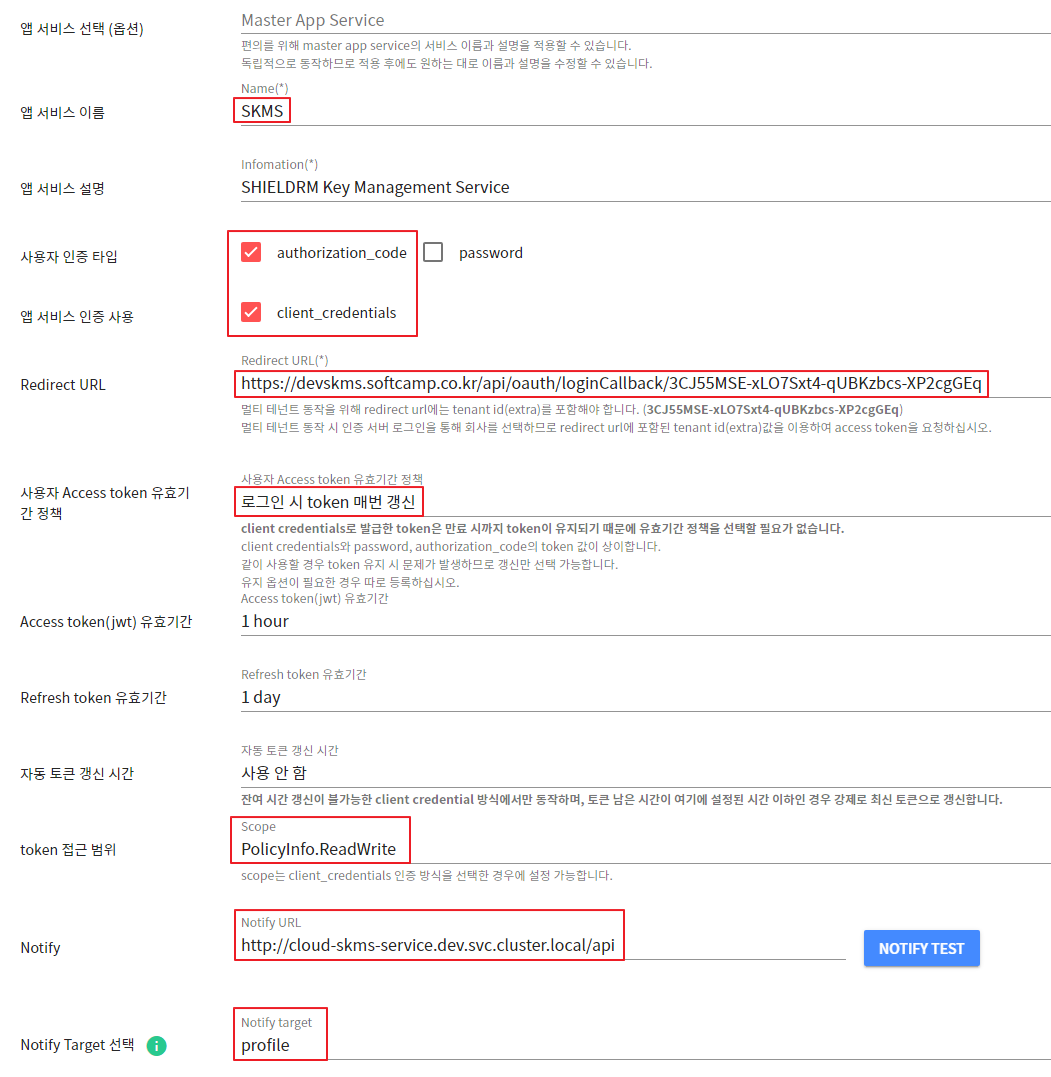
- App Service Name: SKMS
- Authentication Type: authorization_code, client_credentials
- Redirect URL : https://
{서버ip:port}/api/oauth/loginCallback/{회사 company_id(테넌트ID)}- Required configuration of access scope (scope) to use the authentication/authorization API.
PolicyInfo.ReadWrite- Notify settings: Used to update the built-in profile of the registered app service.
- Notify URL : http://cloud-skms-service.dev.svc.cluster.local/api
- Notify target : profile
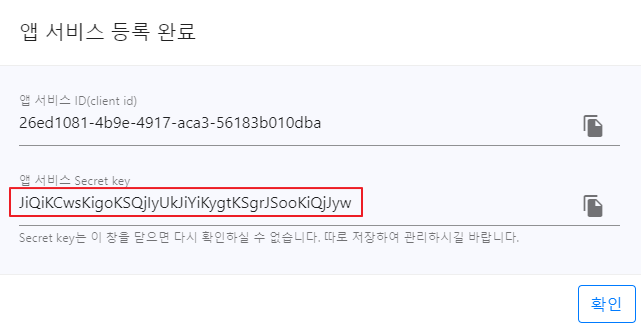
The app service ID and Secret key displayed after registration are used in the company-specific policy profile management > BUILT-IN-PROFILE tab menu.
- The App Secret generated after registration can only be confirmed initially, so it needs to be stored separately (important).
- To use the app, go to App Service Management > Select Company > Activate SKMS App Service Usage.
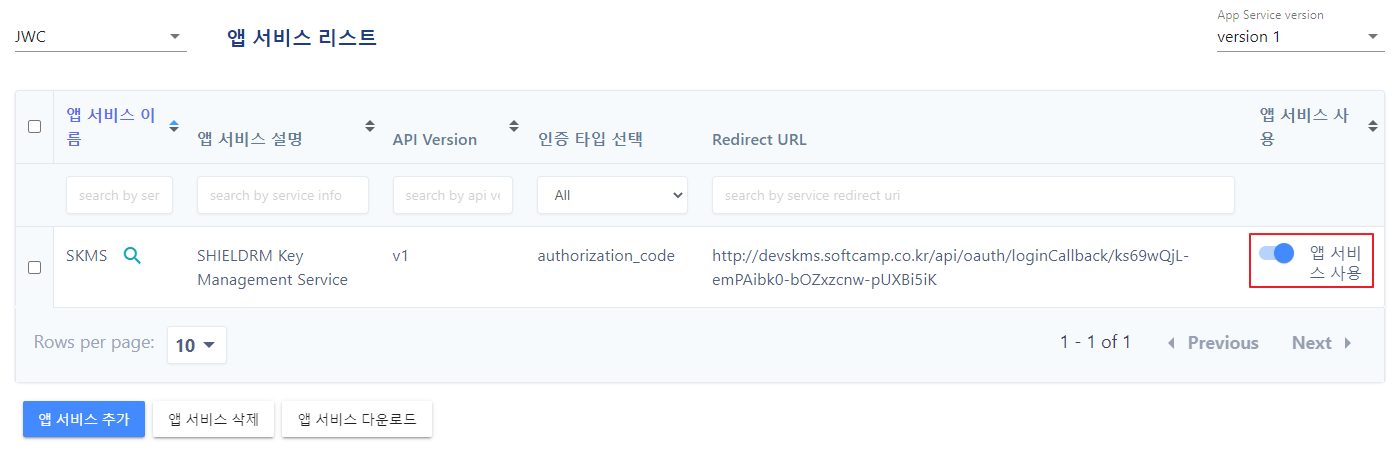
Setting Up Policy Profiles for Newly Added Companies
- In the BUILT-IN-PROFILE menu, select a new company and enter the Value of the profile attribute.
- TENANT_APP_ID : The APP_ID issued when registering the company app
- TENANT_APP_SECRET : APP_SECRET issued when registering the company app
- EDGE_KMS_URL : Enter the key vault URL information when using the EDGE server.
- Example:https://devkms.softcamp.co.kr
- EDGE_EKMS_URL : Enter EKMS URL information when using the EDGE server
- Example:https://devekms.softcamp.co.kr
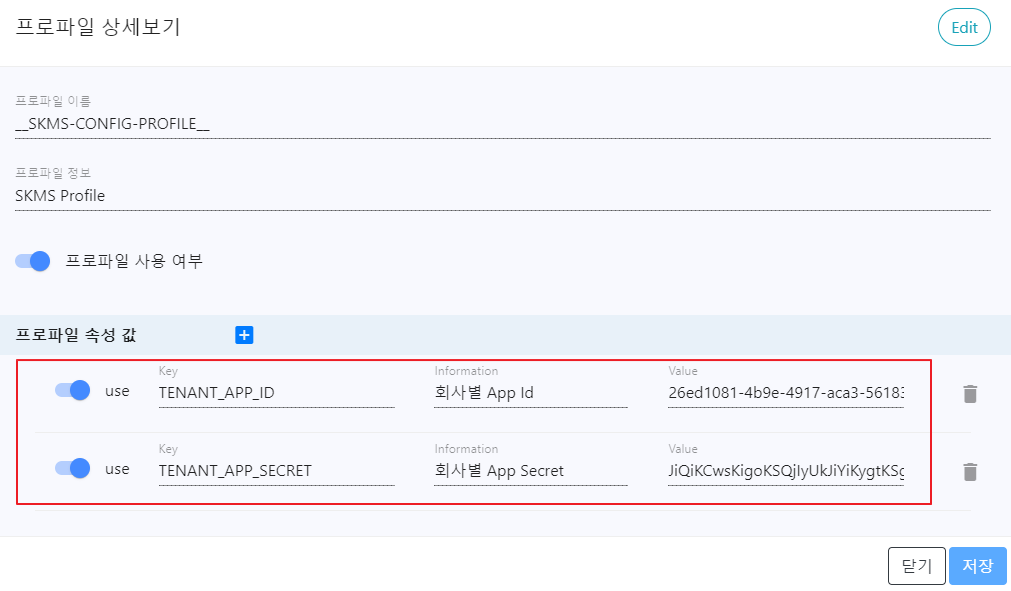
Description of the built-in profile policy for registered companies
- Key : TENANT_APP_ID
- Information
회사 별 App Id
- Value
70ce0461-264c-4506-809c-2f2088b5730e
- Key : TENANT_APP_SECRET
- Information
회사 별 App Secret
- Value
JicqKismISYkIi0mKiQtKCosJiolKSQjJyomJi0jJCs
- Key : KEY_MANAGER_INFO
- Information
암호 키 관리 페이지 설정 정보
sci_server_id : SCI 서버 아이디
sci_server_name : SCI 서버명
  - SKMS 서버 시작 시 키파일 업로드 또는 SCI 서버 연동으로 KMS 에 저장된 SCI 서버 아이디 및 서버명을 조회하여 자동으로 추가함
    (없는 경우 NoRegisteredId, NoRegisteredName)
key_type : 키매니저 키타입 (사용안함)
execute_time : 스케줄러 실행 시간(24시간 단위)
sl_uid : 키매니저 SL_UID
service_id : 	SCI 서비스 아이디
renewal_cycle : 스케줄러 실행 주기 (현재 24만 수행)
server_ip : SCI 서버 아이피
regist_ip : 등록된 서버 IP
key_count : 키볼트 데이터 저장 후 처리된 키 카운트 (총 16자리로 "|" 로 구분)
  총합계|성공합계|실패합계|중복합계|
  MAC합계|MAC성공|MAC실패|MAC중복|
  DAC합계|DAC성공|DAC실패|DAC중복|
  GRADE합계|GRADE성공|GRADE실패|GRADE중복
server_port : SCI 서버 포트
- Value
{
  "sci_server_id": "TEST-SERVER",
  "sci_server_name": "테스트 서버",
  "key_type": "0",
  "execute_time": "5",
  "sl_uid": "SL2307120000000",
  "renewal_cycle": "24",
  "service_id": "03",
  "server_ip": "10.50.10.201",
  "regist_ip": "10.20.10.91",
  "key_count": "117|0|0|117|9|0|0|9|105|0|0|105|3|0|0|3",
  "server_port": "62000"
}
- Key : KEY_UPDATE_TIME
- Information
단일 서버 정보 (멀티 서버 정보는 KEY_UPDATE_TIME_MULTI 에 저장됨)
첫번째 자리 : 키볼트에 키 정보 업데이트 시간 millisecond (UTC 기준)
두번째 자리 : 키볼트에 키 정보 저장 시 소요 시간 millisecond
- Value
1663574932538|11705
- Key : KEY_VAULT_OPTION
- Information
단일 서버 정보 (멀티 서버 정보는 KEY_UPDATE_TIME_MULTI 에 저장됨)
키파일/키볼트 사용 여부
E : RSA키파일, M : 키볼트
- Value
M
- Key : CONNECTOR_INFO
- Information
각 회사 별 연동 서비스 정보 - 마스터 테넌트의 빌트인프로파일에 저장됨
- Value
[
  "{\"ecLicense\":\"1CF4-70CE6-9D5D-72C5C\",\"systemDomain\":\"TEST\",
  \"systemNameEn\":\"TEST\",\"systemDetail\":\"\",\"connectorUseAvailable\":true,
  \"updateDate\":\"2022-11-17 07:31:05\",
  \"companyId\":\"ks69wQjL-emPAibk0-bOZxzcnw-pUXBi5iK\"}"
  ,.............
]
- Key : DS_KEY_ENCRYPTION_KEY
- Information
보안 취약점 대응으로 고객사 별 암복호화용 키 생성 시 사용됨
SCI 서버 커스텀 정책에 등록된 값과 동일하게 입력
- Value
CwI3FmhjG01Qd28JV3IreA==
- Key : EDGE_KMS_URL
- Information
EDGE 서버의 키볼트 URL 정보
- Value
https://devkms.softcamp.co.kr
- Key : EDGE_EKMS_URL
- Information
EDGE 서버의 EKMS URL 정보
- Value
https://devekms.softcamp.co.kr
- Key : KEY_MANAGER_INFO_MULTI
- Information
SCI 멀티 서버 사용 시 서버 정보
- Value
[
  {
    "sci_server_id": "TEST-SERVER",
    "sci_server_name": "테스트 서버",
    "key_type": "0",
    "execute_time": "5",
    "sl_uid": "SL2307120000000",
    "renewal_cycle": "24",
    "service_id": "03",
    "server_ip": "10.50.10.201",
    "regist_ip": "10.20.10.91",
    "key_count": "117|0|0|117|9|0|0|9|105|0|0|105|3|0|0|3",
    "server_port": "62000",
    "key_update_time": "1730174855050|35",
    "key_vault_option": "M"
  }
]
- Key : POLICY_MANAGER_INFO_MULTI
- Information
권한 정책 연동 시 서버 정보
sci_server_id : SCI 서버 아이디
execute_time : 스케줄러 실행 시간(24시간 단위)
renewal_cycle : 스케줄러 실행 주기 (현재 24만 수행)
server_ip : SCI 서버 아이피
server_port : SCI 서버 포트
policy_count : 키볼트 데이터 저장 후 처리된 정책 연동 카운트 (총 4자리로 "|" 로 구분)
  총합계|성공합계|실패합계|중복합계|
policy_update_time : 키볼트 업데이트 완료 시간(타임스탬프)|업데이트 소요 시간(밀리세컨드)
key_vault_option : SCI 연동 스케줄러 사용 여부
- Value
[
  {
    "sci_server_id": "SKMS-TEST",
    "execute_time": "18",
    "renewal_cycle": "24",
    "server_ip": "10.10.13.122",
    "server_port": "62004",
    "policy_count": "31|31|0|0",
    "policy_update_time": "1733126944465|1626",
    "key_vault_option": "M"
  }
]
- Key : MULTI_SERVER_OPTION
- Information
SCI 멀티 서버 사용 여부 (기본값 : N)
  - N : SCI 서버 아이디와 관계 없이 항상 단일 서버 사용
  - Y : SCI 서버 아이디에 따라 멀티 서버로 동작
- Value
N
- Key : EKMS_KEYFILE_SAVE_TIME
- Information
EKMS 서비스에서 키볼트에 데이터 저장 완료 후 해당 회사의 SKMS 빌트인 프로파일 업데이트
  - 키 업데이트 시간(Unix 타임스탬프)
- Value
1733126944465
- Key : AIP_ASSIGNMENT_METHOD
- Information
AIP 설정 시 AssignmentMethod 옵션
  - Privileged: 민감도 레이블을 수동으로 적용하거나 시스템이 강제로 적용할 때 사용됩니다. 자동 정책을 무시하고 직접 레이블을 지정할 수 있습니다.
  - Auto: 문서 내용을 분석하여 정책 기반으로 민감도 레이블을 자동으로 할당합니다. (예: 개인정보 포함 시 자동 1등급 설정 등)
  - Standard: 사용자가 수동으로 선택한 민감도 레이블을 그대로 유지합니다. 자동 적용이나 강제 적용 없이 사용자 선택 중심의 방식입니다.
- Value
Privileged
- Key : USE_ZTCAP_POLICY
- Information
SDF 조건부 정책 설정 메뉴 사용 여부
  - Y : 메뉴 표시됨
  - N : 메뉴 표시 안됨(기본값)
- Value
Y
- Key : AZURE_APP_ID
- Information
AZURE 앱 ID
- Value
7e82e70d-4386-419d-9dfd-6c8d6e6068fc
- Key : AZURE_APP_SECRET
- Information
AZURE 앱 SECRET
- Value
LBd8Q~.aDAmOjOhZSbcgu.sakTgSPrb_zNPxrbuM