6) Checking the status of the SDF Container
Status Check Confirmation Guide
- After the deployment to the sitecar container in the business system POD (main container) is completed, access the main container to make API calls.
- Access the main container and call the SDF Container's API using the CURL command.
- A license issued from the integration app management menu of the SHIELDRM admin page is required when making an API call.
- Available image information for API usage: Works from version security365acr.azurecr.io/shieldrm/cloud-containerlinker:20250213.1 onwards.
Check essential data related to DS and verify MIP SDK operation
Access the main container and execute the CURL command (enter license)
curl http://127.0.0.1:8181/api/healthCheck/{licenseKey}
Add query parameter (sciServerId) when using multiple SCI servers
curl http://127.0.0.1:8181/api/healthCheck/{licenseKey}?sciServerId={sciServerId}
Execution Result
| Name | Type | Description |
|---|---|---|
| code | int | Final success status (0: success) |
| healthCheck | obj | SKMS Operation Status |
| licenseCheck | obj/string | License existence |
| keyCheck | obj/string | Existence of Required Key |
| azureInfoCheck | obj/string | SKMS Environment Variable (AZURE_INFO) and OpenID Existence |
| azureInfoValidCheck | obj/string | Check if the information of azureInfoCheck is valid |
| result | string | Success/Failure Status for Each Check |
| error | string | Detailed error message on failure |
Status Check Item Description and Failure Action Plan
| Inspection Items | Description | Action Plan in Case of Failure |
|---|---|---|
| healthCheck | Check communication between SDF Container and EnDec service | - Check the SKMS_API_URL information of the SDF config map - Check communication network and DNS settings between clusters - Check if it is a valid certificate |
| licenseCheck | Check if the issued license is valid | - Check if the issued license matches the input value. - Check the usage status of the issued license in the integration app management menu. |
| keyCheck | Check Required Key Data Linked with the SCI Server | - Check if the Key Vault (KMS) service is functioning normally. - Register the custom policies DS_CUSTOM_HEADER_KEY and DS_KEY_ENCRYPTION_KEY on the SCI server and check whether they are applied to the top-level department. - After registering the custom policy, it is necessary to re-execute the key linkage. |
| azureInfoCheck | Check for the existence of required configuration values related to Azure | - Check the SHIELD ID connection information of the SDF config map (namespace, etc.) - Check if the SHIELD ID service is functioning properly. - Verify the input value of the Microsoft Azure Tenant Id for the company registered with SHIELD ID. - Check the input of AZURE_INFO in the SKMS config map. |
| azureInfoValidCheck | Check Azure Token Issuance Availability | - Failed to issue a token available from the Microsoft Azure Tenant Id of the company registered with the SHIELD ID using the AZURE_INFO information of the SKMS config map. - It is necessary to check if the required configuration values related to Azure are valid. - Confirmed SSL certificate-related issues during Azure communication (verified with root certificate) |
Sample Response Data (JSON Type)
- success
{
    "code": 0,
    "healthCheck": {
        "result": "success",
        "SKMS_API_URL": "http://127.0.0.1:8080"
    },
    "licenseCheck": {
        "result": "success",
        "companyId": "3CJ55MSE-xLO7Sxt4-qUBKzbcs-XP2cgGEq",
        "systemDomain": "test.com"
    },
    "keyCheck": {
        "result": "success",
        "customHeaderKey": "AVdos*******************",
        "dsHeaderKey": "UngyY*******************",
        "dsKeyEncryptionKey": "CwI3F*******************",
        "masterKey": "UldoZ*******************"
    },
    "azureInfoCheck": {
        "result": "success",
        "appId": "7e82e*******************************",
        "appSecret": "LBd8Q***********************************",
        "azureTenantId": "4d615*******************************"
    },
    "azureInfoValidCheck": {
        "result": "success"
    }
}
- failure
- healthCheck failed
{
    "code": -1,
    "healthCheck": {
        "result": "failed",
        "error": "I/O error on GET request for \"http://127.0.0.1:8180/api/healthCheck.do\": Connection refused: connect; nested exception is java.net.ConnectException: Connection refused: connect"
    },
    "licenseCheck": "failed",
    "keyCheck": "failed",
    "azureInfoCheck": "failed",
    "azureInfoValidCheck": "failed"
}
- licenseCheck failed
{
  "code": -1,
  "healthCheck": {
  	"result": "success",
  	"SKMS_API_URL": "http://127.0.0.1:8080"
  },
  "licenseCheck": {
  	"result": "failed",
  	"error": "{\"code\":40108,\"message\":\"Unavailable License\",\"detail\":\"[ 246D-7AAF3-E2FA-DF7B8 ] is not available.\"}"  // 미사용 라이선스
      // "error": "{\"code\":40107,\"message\":\"No matching license found\",\"detail\":\"License skms_connector_info information is empty.\"}" // 존재하지 않는 라이선스
  },
  "keyCheck": "failed",
  "azureInfoCheck": "failed",
  "azureInfoValidCheck": "failed"
}
- keyCheck failed
{
  "code": -1,
  "healthCheck": {
  	"result": "success",
  	"SKMS_API_URL": "http://127.0.0.1:8080"
  },
  "licenseCheck": {
  	"result": "success",
  	"companyId": "7FDKQsEK-QVGKyXA2-fx1LxIzy-SNIre0s9",
  	"systemDomain": "http://test.com"
  },
  "keyCheck": {
  	"result": "failed",
  	"error": "{\"code\":40110,\"message\":\"HeaderKey is Empty\",\"detail\":\"I/O error on GET request for \\\"https://devkms.softcamp.co.kr:444/drm/7FDKQsEK-QVGKyXA2-fx1LxIzy-SNIre0s9/key/DDTCODE_CHK\\\": Connect to devkms.softcamp.co.kr:444 [devkms.softcamp.co.kr/10.14.10.171] failed: Connection timed out: connect; nested exception is org.apache.http.conn.HttpHostConnectException: Connect to devkms.softcamp.co.kr:444 [devkms.softcamp.co.kr/10.14.10.171] failed: Connection timed out: connect\"}"  // 키볼트 연결 실패
      // "error": "{\"code\":40110,\"message\":\"HeaderKey is Empty\",\"detail\":\"HeaderKey is Empty\"}" // 헤더키 없음
      // "error": "{\"code\":40111,\"message\":\"EncryptionKey is Empty\",\"detail\":\"DS_KEY_ENCRYPTION_KEY is Empty\"}" // dsKeyEncryptionKey 없음
      // "error": "500 : \"{\"code\":50001,\"message\":\"An unexpected error has occurred in the internal system\",\"detail\":\"JSONArray[0] is not a JSONObject.\"}\"" // 마스터키 없음
  },
  "azureInfoCheck": "failed",
  "azureInfoValidCheck": "failed"
}
- azureInfoCheck failed
{
  "code": -1,
  "healthCheck": {
  	"result": "success",
  	"SKMS_API_URL": "http://127.0.0.1:8080"
  },
  "licenseCheck": {
  	"result": "success",
  	"companyId": "7FDKQsEK-QVGKyXA2-fx1LxIzy-SNIre0s9",
  	"systemDomain": "http://test.com"
  },
  "keyCheck": {
  	"result": "success",
  	"customHeaderKey": "AVdos*******************",
  	"dsHeaderKey": "UngyY*******************",
  	"dsKeyEncryptionKey": "CwI3F*******************",
  	"masterKey": "UldoZ*******************"
  },
  "azureInfoCheck": {
  	"result": "failed",
  	"error": "400 : \"{\"code\":40011,\"message\":\"Unable to AzureInfo\",\"detail\":\"AzureInfo is incorrect\"}\""  // AZURE_INFO 없음
      // "error": "400 : \"{\"code\":40011,\"message\":\"Unable to AzureInfo\",\"detail\":\"OpenidTenant is Empty\"}\"" // OpenidTenant 없음
      // "error": "500 : \"{\"code\":50001,\"message\":\"An unexpected error has occurred in the internal system\",\"detail\":\"I/O error on GET request for \\\"https://devlogin.softcamp.co.kr:444/SCCloudOAuthService/uFhoVIZI-wni6zwDS-E6xGXPqT-m2ms8GWh/company/getCompanyInfo\\\": Connect to devlogin.softcamp.co.kr:444 [devlogin.softcamp.co.kr/10.14.10.163] failed: Connection timed out: connect; nested exception is org.apache.http.conn.HttpHostConnectException: Connect to devlogin.softcamp.co.kr:444 [devlogin.softcamp.co.kr/10.14.10.163] failed: Connection timed out: connect\"}\""  // SHIELD ID 연결 실패
  },
  "azureInfoValidCheck": "failed"
}
- azureInfoValidCheck failed
{
   "code": -1,
   "healthCheck": {
       "result": "success",
       "SKMS_API_URL": "http://127.0.0.1:8080"
   },
   "licenseCheck": {
       "result": "success",
       "companyId": "eM6JucXm-1MNaDnZr-d51UJULP-hL8ouPxo",
      "systemDomain": "http://test.com"
   },
   "keyCheck": {
       "result": "success",
       "customHeaderKey": "AVdos*******************",
       "dsHeaderKey": "AVdos*******************",
       "dsKeyEncryptionKey": "CwI3F*******************",
       "masterKey": "UldoZ*******************"
   },
   "azureInfoCheck": {
       "result": "success",
       "appId": "7e82e*******************************",
       "appSecret": "LBd8Q***********************************",
       "azureTenantId": "4d615*******************************"
   },
   "azureInfoValidCheck": {
       "result": "failed",
       "error": "com.microsoft.informationprotection.internal.gen.Error: NoAuthTokenError: Client application failed to provide authentication token for HTTP request., CorrelationId=200476a9-aba3-4bb6-a174-5389a1a24aca, CorrelationId.Description=PolicyProfile"
   }
}
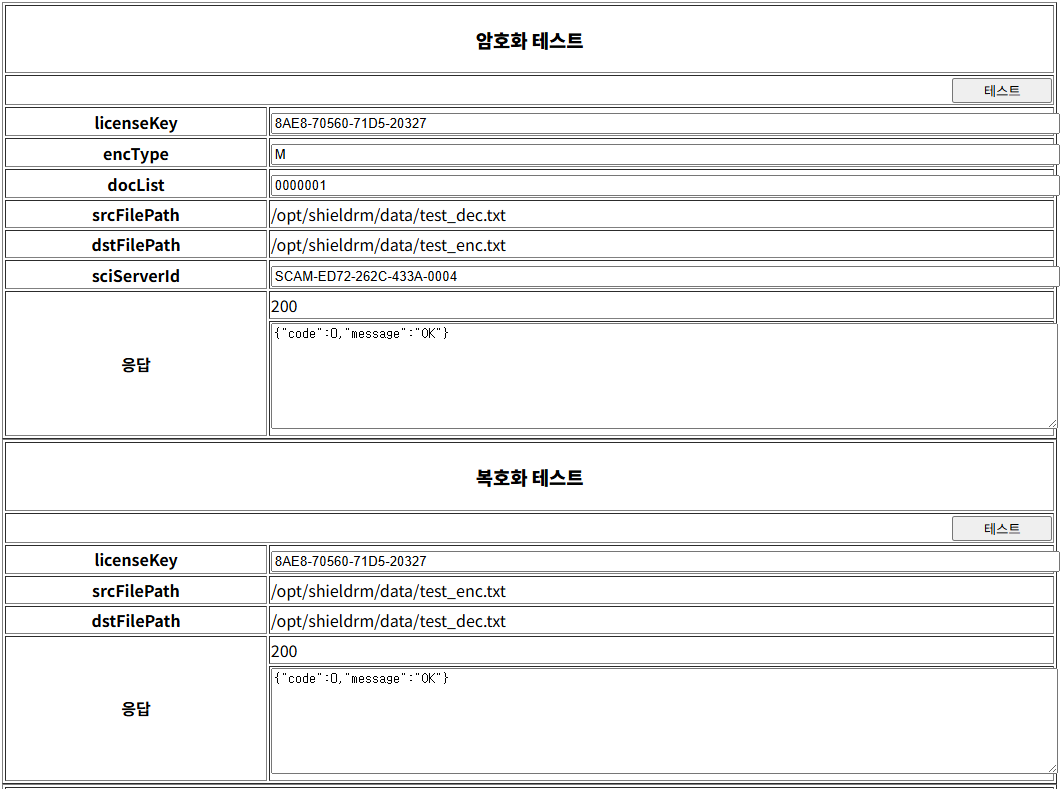
Encryption and Decryption Test Using Registered Key Data and License
Accessing the EnDec(SKMS) Encryption and Decryption Test Page
- https://[SKMS서비스URL]/endecCheck.do
- licenseKey : Enter the issued license
- encType : Enter encryption method (M / D / G)
- docList : Key ID and Permission Input
- M : 0000001
- D : SECURITYDOMAIN^111001100
- G : 0000001|SECURITYDOMAIN^111001100
- sciServerId: Enter the SCI server ID only when using multiple SCI servers.